Participant
January 11, 2020
Answered

CSS Code Help

  • January 11, 2020
  • 2 replies
  • 1157 views

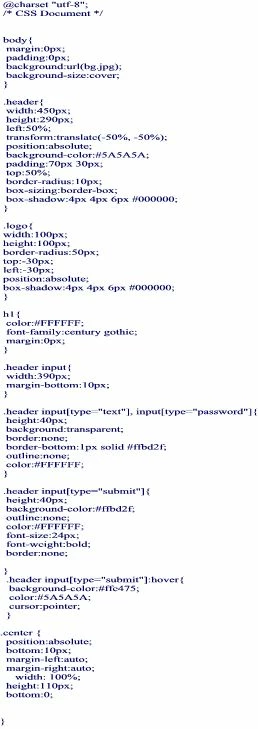
I have just started something and I cannot resolve an issue. So far I have just one page plus a css file.
The page had a full screen image as a background, this works find in 'standard' screen maode and 'full' screen mode, but if I reduce the screen with the 'reduce down' button, the top of the background image appears at the bottom of the page.

For some reason I don't seem to be able to upload the code to this post, so I;ve saved it as an image.

This topic has been closed for replies.
Correct answer Nancy OShea

Thanks for that.

I did put in a Height of 800px and that seemed to resolve it, I don't know if it worked across all browsers.

But I did try what you suggested removing the 'height' and found in 'reduce down' mode, there was a white line below the bottom of the screen.

So I kept what you suggested and added the 'height' again at 800px


As I say, it seems to be OK, it not a commercial site, just something for my family, so not hugely important, but it bugs me when I don't understand something and can't work it out.


We don't use absolute positioning for vertical centering anymore.  With CSS Grids, there's less code and none of the consequences that come from positioning elements absolutely.
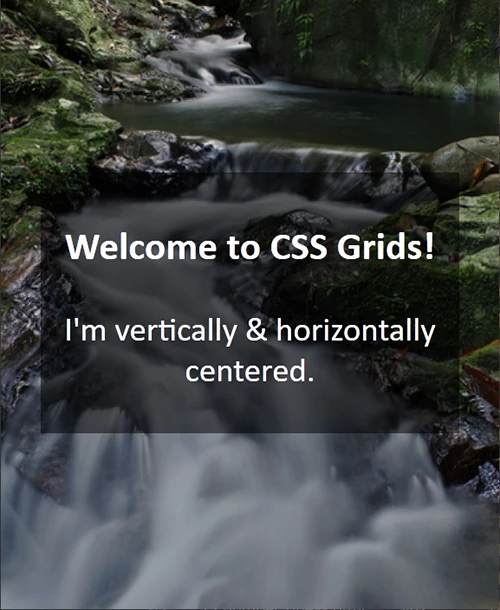


<!doctype html>
<html lang="en">
<head>
<meta charset="utf-8">
<title>CSS Grids - vertical centering</title>
<meta name="viewport" content="width=device-width, initial-scale=1">
<meta http-equiv="X-UA-Compatible" content="IE=edge">
<style>
body, html {
margin: 0;
height: 100%;
display: grid;
background: #333 url(https://placeimg.com/1200/900/nature) no-repeat center center;
background-size: cover;
}
main {
padding: 2%;
width: 80%;
text-align: center;
margin: auto;
background-color: rgba(0,0,0,0.5);
color: #FFF;
}
</style>
</head>
<body>
<main>
<h3>Welcome to CSS Grids!</h3>
<p>I'm vertically &amp; horizontally centered.</p>
</main>
</body>
</html>


Give it a try 🙂

 

2 replies

Participant
January 11, 2020

I think I've solved this, I have set a background height.

Legend
January 11, 2020

Correct way is to add to the body css:


repeat: no-repeat;

Participant
January 11, 2020

Thanks for that.

I did put in a Height of 800px and that seemed to resolve it, I don't know if it worked across all browsers.

But I did try what you suggested removing the 'height' and found in 'reduce down' mode, there was a white line below the bottom of the screen.

So I kept what you suggested and added the 'height' again at 800px


As I say, it seems to be OK, it not a commercial site, just something for my family, so not hugely important, but it bugs me when I don't understand something and can't work it out.

Participant
January 11, 2020