Inspiring
December 18, 2017
Answered

CSS Designer double-typing of numbers problem

  • December 18, 2017
  • 1 reply
  • 380 views

I can't find anywhere on the forums where this problem has been reported. I may be wrong.

I am on MacOS with DW CC 2018 - when typing values into the CSS Designer immediately after choosing the unit, e.g. "px" results in a double typing of the first character. So for example, if I want to type 100px, I choose "px" from the drop-down, then immediate start typing "100" and I get "1100". This is very frustrating. It is not only on my machine. I have been training last week on 14 iMacs and every single one of them had this problem so it's not a one-off.

My CC apps are all completely up to date as of 18th Dec 2017.

Can anyone please help?

    This topic has been closed for replies.
    Correct answer Nancy OShea

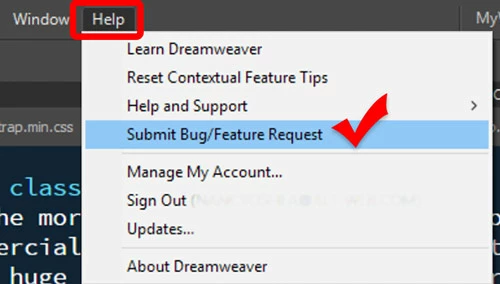
    From the DW Help Menu.  See screenshot.

    1 reply

    B i r n o u
    Legend
    December 18, 2017

    you should post a bug...

    mikemcfadAuthor
    Inspiring
    December 18, 2017

    Can you direct me to the correct place to do this?

    B i r n o u
    Legend
    December 18, 2017

    one way can be to post it there

    Adobe Dreamweaver: Bugs: Hot (706 ideas) – Adobe Dreamweaver CC: Feature Ideas

    if you need to reproduce it on a demo... indicate the step by step or use Jing Jing | TechSmith  to post a screen capture on a free screencast account Create a Screencast.com Account – TechSmith Support