



johns45317965
Known Participant
June 1, 2017
Answered

CSS Horizontal Drop Down Menu WON'T go in center - why???

  • June 1, 2017
  • 1 reply
  • 5250 views

The title describes it perfectly. Everything else I have done is going in center if I ask it to, but this is not. I developed this CSS drop-down menu through a YouTube video tutorial and everything worked fine. I went on for a day trying to put it in the center but nothing worked. I then tried to just simply highlight it and then ask Dreamweaver to move it to the center (or ever the left) through Format -> Align and it still won't move it. It just wants to stick to the left like GLUE! I did create and link a .css and like how that works...makes the files shorter and easier. Here's what the .css looks like:

@charset "utf-8";

#navMenu {
margin:0;
padding0;
text-align:center;
}

#navMenu ul {
margin:0;
padding:0;
text-align:center;
line-height:30px;
}

#navMenu li {
margin:0;
padding:0;
list-style:none;
float:left;
position:relative;
}

#navMenu ul li a {
text-align:center;
font-family:Constantia, "Lucida Bright", "DejaVu Serif", Georgia, serif;
text-decoration:none;
height:30px;
width:150px;
display:block;
color:#B8B3B4;
border:1px solid #C0A7A7;
text-shadow:1px 1px 1px #BDA4A4;
}

#navMenu ul ul {
position:absolute;
visibility:hidden;
top:32px;
}

#navMenu ul li:hover ul {
visibility:visible;
}
************************************************************

#navMenu li:hover {
background-color:#AD1D1F;
}

#navMenu ul li:hover ul li a:hover {
background:#D84749;
color:#CCE752;
}

#navMenu a:hover {
color:#87A132;
}
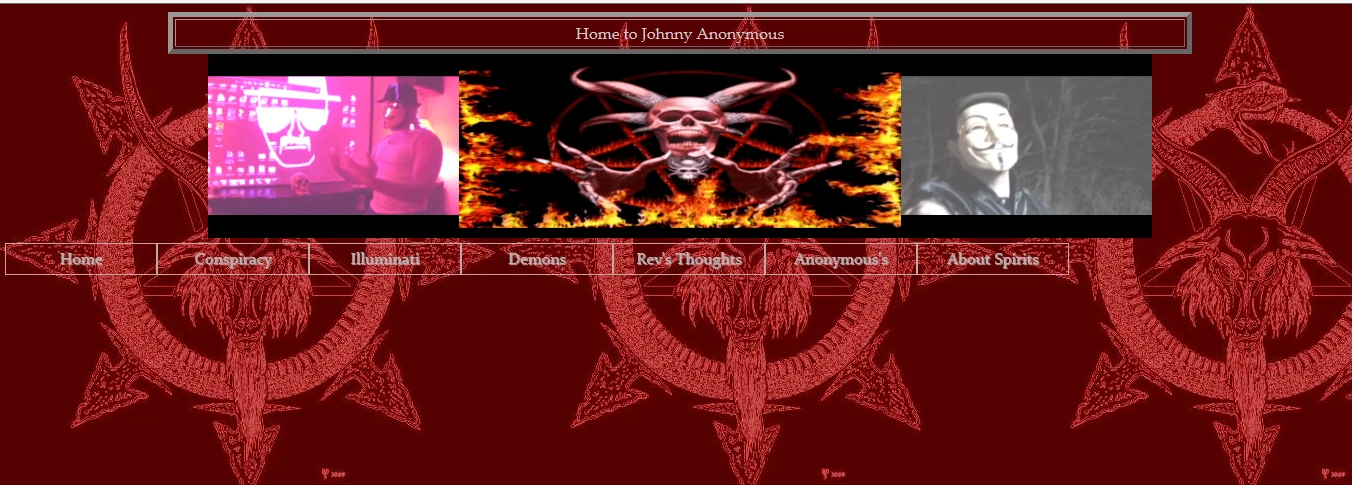
and the end result above. If anyone knows how else I can make adjustments to the CSS or HTML (or both) to move the menu to the center I'd thank you a ton!

This topic has been closed for replies.
Correct answer osgood_

Easiest way is to add display: inline-block; to your #navMenu ul css selector

#navMenu ul {

margin:0;

padding:0;

text-align:center;

line-height:30px;

display: inline-block;

}

Also noticed you have a : missing after padding in the slector below:

#navMenu {

margin:0;

padding0;

text-align:center;

}

1 reply

BenPleysier
Community Expert
Community Expert
June 1, 2017

Please make us privy to the markup (HTML) so that we can have a look where it went askew.

Wappler is the DMXzone-made Dreamweaver replacement and includes the best of their powerful extensions, as well as much more!
johns45317965
Known Participant
June 1, 2017

I'm not too sure how to make a person "privy"...Do I do that here or from my host or from my Dreamweaver?

If you'd like you can just go and see the entire HTML script at www.false-prophet.website/Table.html then and simply F12ing it; then click "Debugger" (if using Internet Explorer).  When you see the <link href="css/header.css" rel="stylesheet" type="text/css"> around line #28, that's the link to the css file/script I printed out above for the drop down menu - located above in original post.

BenPleysier
Community Expert
Community Expert
June 1, 2017

The structure of an HTML document should read similar to

<!doctype html>

<html>

<head>

<meta charset="utf-8">

<meta name="google-site-verification" content="_A7zKP0rGslfUUqBmXVRKBuNzCG6pJe_bVnWUdFXoI8" />

<title>Home of The False Prophet - Conspiracy!</title>

<link href="images/favicon.ico" rel="shortcut icon" type="image/x-icon" />

<link href="http://www.false-prophet.website/css/header.css" rel="stylesheet">

<style>

html {

  -webkit-box-sizing: border-box;

  -moz-box-sizing: border-box;

  box-sizing: border-box;

}

*, *:before, *:after {

  -webkit-box-sizing: inherit;

  -moz-box-sizing: inherit;

  box-sizing: inherit;

  }

  .clrflt {

  clear: left;

  }

  body {

  color: #CDCDCD;

  margin: auto;

  max-width: 1050px;

  background-image: url(images/Satan_Symbol.jpg);

  font-family: Baskerville, "Palatino Linotype", Palatino, "Century Schoolbook L", "Times New Roman", serif;

  }

  header.main {

  border: outset 5px;

  line-height: 2.5em;

  text-align: center;

  }

  div.jumbotron img {

  width: 25%;

  display: block;

  float: left;

  margin-top: 10px;

  }

  div.jumbotron img:nth-child(2) {

  width: 50%;

  margin-top: 0;

  }

</style>

</head>

<body>

<header class="main">Home to Johnny Anonymous</header>

<div class="jumbotron">

  <img src="http://i304.photobucket.com/albums/nn168/JohnnyAnonymous75/lecturing_front_of_projector_zpsxdbxphte.gif" alt=" photo lecturing_front_of_projector_zpsxdbxphte.gif"/>

  <img src="http://i304.photobucket.com/albums/nn168/JohnnyAnonymous75/Satan_flying_and_and_stays_put%20-%20ezgif.com%20better%20480%20X%20200%20-%20good_zpstgxfo0kv.gif" alt=" photo Satan_flying_and_and_stays_put - ezgif.com better 480 X 200 - good_zpstgxfo0kv.gif"/>

  <img src="http://i304.photobucket.com/albums/nn168/JohnnyAnonymous75/ripping_on_conspiracy_outdoors_zpssbongrb7.gif" alt=" photo ripping_on_conspiracy_outdoors_zpssbongrb7.gif "/>

</div>

<div id="navMenu" class="clrflt">

<ul>

  <li><a href="#">Home</a></li>

  <li><a href="#">Conspiracy</a>

  <ul>

  <li><a href="#">Bin Laden Alive?</a></li>

  <li><a href="#">Chemtrails</a></li>

  </ul>

  </li>

  <li><a href="#">Illuminati</a></li>

  <li><a href="#">Demons</a>

  <ul>

  <li><a href="#">Sonny Cardona</a></li>

  <li><a href="#">Robert Dear</a></li>

  </ul> <!-- end inner UL -->

  </li> <!-- end main LI -->

  <li><a href="#">Rev's Thoughts</a></li>

  <li><a href="#">Anonymous's</a>

  <ul>

  <li><a href="#">Johnny</a></li>

  <li><a href="#">Payne</a></li>

  <li><a href="#">Kyle</a></li>

  <li><a href="#">Conspiracy Clown</a></li>

  </ul> <!-- end inner UL -->

  </li> <!-- end main LI -->

  <li><a href="#">About Spirits</a></li>

</div> <!-- end navMenu -->

</body>

</html>

Copy and paste into a new document.

Wappler is the DMXzone-made Dreamweaver replacement and includes the best of their powerful extensions, as well as much more!