


Participant
November 14, 2025
Question

CSS Validation

  • November 14, 2025
  • 1 reply
  • 63 views

I am using 21.6 Build 15711 and want to start using var() but when i add:

:root {
--aa-blue: #0078D2;
--aa-digital-blue: #E1F0FA;
--aa-light-blue: #4DB4FA;
--aa-dark-blue: #00467F;
 
--lite-blue: #BDDEF4;
 
--aa-gray: #9DA6AB;
--aa-digital-gray: #EEEEEE;
--aa-light-gray: #D0DAE0;
--aa-dark-gray: #36495A;
 
--aa-white: #FFFFFF;
--aa-black: #131313;
--aa-red: #C30019;
--dark-brown: #3D2B1F;
--red: #FF0000;
--30-percent-aa-blue: rgba(0, 120, 210, .3);
}
I get all sorts of validation errors.
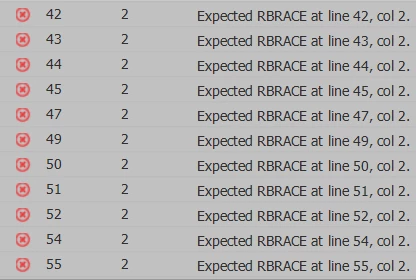
 

AI said to update my CSS Validator but am not finding a way to do that.

Mike

    1 reply

    Nancy OShea
    Community Expert
    Community Expert
    November 14, 2025

    Try the online validation service below.

    https://jigsaw.w3.org/css-validator/


    This snippet validates fine. 

    :root {
    --aa-blue: #0078D2;
    --aa-digital-blue: #E1F0FA;
    --aa-light-blue: #4DB4FA;
    --aa-dark-blue: #00467F;

    }


    For more on custom variable properties, see the MDN article below.

    https://developer.mozilla.org/en-US/docs/Web/CSS/Guides/Cascading_variables/Using_custom_properties


    Hope that helps.


    Nancy O'Shea— Product User & Community Expert
    Participant
    November 14, 2025

    Thanks for the references, two great sources I use often.

    Jon Fritz
    Community Expert
    Community Expert
    November 17, 2025

    DW simply doesn't understand CSS Variables. I haven't tested them in the most recent version of the program, but everything before it will throw errors when it comes across the "--" of CSS Variables.

    This has been an issue for many years.

    The online validator is necessary if you use CSS Variables and want to make sure you have clean code.