mathy_m-83
Known Participant
March 17, 2017
Answered

css with row or column

  • March 17, 2017
  • 3 replies
  • 544 views

hi everyone

I would like to create a css with 3 columns.

1st column with pictures. 2ed column with a description of the pictures. 3rd column a small form.

I do this css but it only works on the 1st line.

@charset "UTF-8";

.colonne-un {

    width:25%;

    float:left; 

    padding-top: 15px;

    padding-left: 5px;

}

.colonne-deux {

    width:51%;

    float:left;

    padding-top: 15px;

    padding-left: 20px;

    padding-right: 40px;

    text-decoration: none;

    color:#2F322A;

    text-align: left;

    font-size: 12px;

}

.colonne-trois {

    width:23%;

    float:left;

    padding-top: 15px;

    padding-left: 5px;

    background-color: #E0E6F7;

    border:1px solid #ccc;

}

.image {

    padding-top: 30px;

}

I would like make something like that

Rooms – Paradise Hotel

do you know if i can fine some exemples

Best regards

    This topic has been closed for replies.
    Correct answer BenPleysier

    Copy and paste the following into a new document

    <!DOCTYPE html>

    <html lang="en">

    <head>

      <title>Bootstrap Example</title>

      <meta charset="utf-8">

      <meta name="viewport" content="width=device-width, initial-scale=1">

      <link rel="stylesheet" href="https://maxcdn.bootstrapcdn.com/bootstrap/3.3.7/css/bootstrap.min.css">

      <script src="https://ajax.googleapis.com/ajax/libs/jquery/3.1.1/jquery.min.js"></script>

      <script src="https://maxcdn.bootstrapcdn.com/bootstrap/3.3.7/js/bootstrap.min.js"></script>

    </head>

    <body>

      <div class="container">

      <h1>Hello World!</h1>

      <p>Resize the browser window to see the effect.</p>

      <div class="row">

      <div class="col-sm-8">

      <div class="row">

      <div class="col-sm-6"><img src="http://4arudp1mdn1e1owocm1o7kdf.wpengine.netdna-cdn.com/paradise/wp-content/uploads/sites/7/2013/05/room_3_room_page_2_big.jpg" class="img-responsive" alt="">

      </div>

      <div class="col-sm-6">

      <h5><a href="#">Chambre Supérieure 1 personnes</a><span> La mer, la plage à prix doux</span></h5>

      <h4>Les chambres simples supérieures sont entièrement rénovées.</h4>

      </div>

      </div>

      <hr>

      <div class="row">

      <div class="col-sm-6"><img src="http://4arudp1mdn1e1owocm1o7kdf.wpengine.netdna-cdn.com/paradise/wp-content/uploads/sites/7/2013/05/room_3_room_page_2_big.jpg" class="img-responsive" alt="">

      </div>

      <div class="col-sm-6">

      <h5><a href="#">Chambre Supérieure 1 personnes</a><span> La mer, la plage à prix doux</span></h5>

      <h4>Les chambres simples supérieures sont entièrement rénovées.</h4>

      </div>

      </div>

      </div>

      <div class="col-sm-4">

      <h3>LOGIN FORM</h3>

      <form>

      <div class="form-group">

      <label for="email">Email address:</label>

      <input type="email" class="form-control" id="email">

      </div>

      <div class="form-group">

      <label for="pwd">Password:</label>

      <input type="password" class="form-control" id="pwd">

      </div>

      <div class="checkbox">

      <label><input type="checkbox"> Remember me</label>

      </div>

      <button type="submit" class="btn btn-primary">Submit</button>

      </form>

      </div>

      </div>

      </div>

    </body>

    </html>

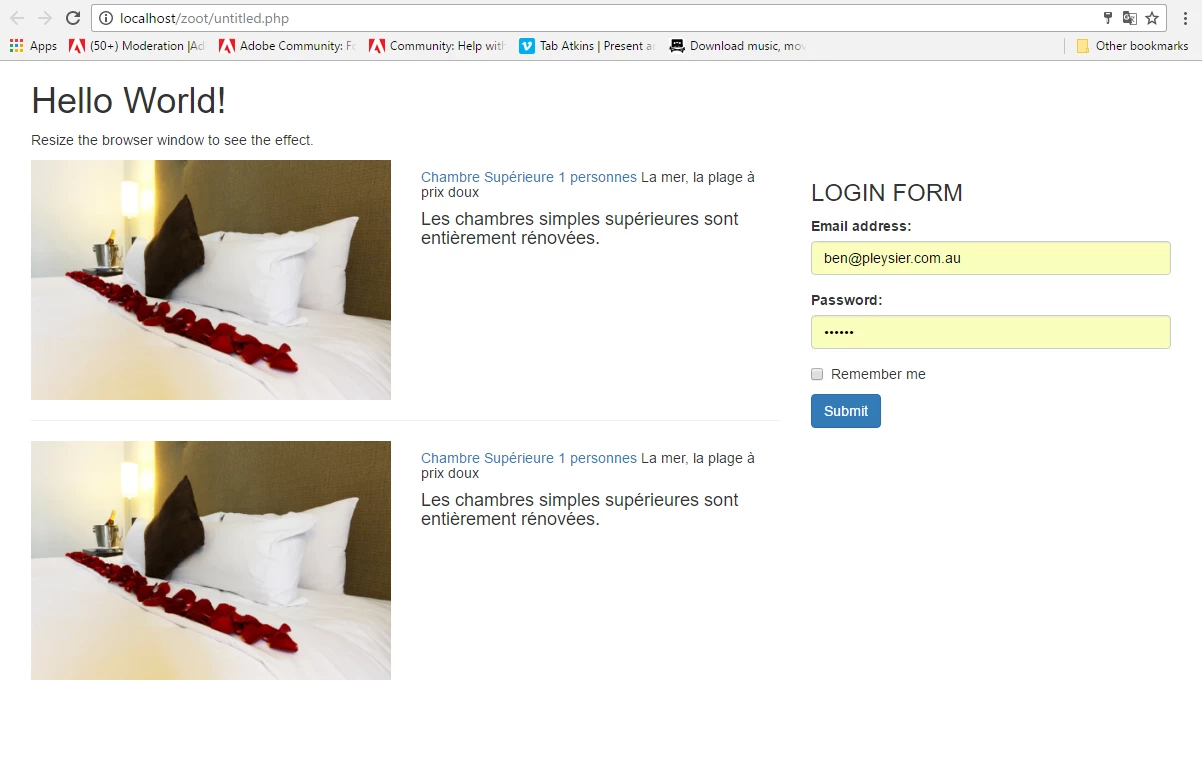
    The result will be similar to

    3 replies

    mathy_m-83
    Known Participant
    March 18, 2017

    I think this is not the solution of my problem.

    I do not get the result I want

    The descriptions are not in front of the pictures.

    <!DOCTYPE html>

    <html lang="en">

    <head>

       <title>Bootstrap Example</title>

       <meta charset="utf-8">

       <meta name="viewport" content="width=device-width, initial-scale=1">

       <link rel="stylesheet" href="bootstrap.min.css">

       <script src="jquery.min.js"></script>

       <script src="bootstrap.min.js"></script>

    </head>


    <body>


    <div class="container-fluid">

       <h1>Hello World!</h1>

       <p>Resize the browser window to see the effect.</p>


    <div class="row">

      <div class="col-sm-8" style="background-color:lavender;">.col-sm-8

      <div class="row">

    <div class="col-sm-6" style="background-color:lightcyan; min-height: 380px;">

      <p>.col-sm-6 - images</p>

       <p><a href="#"><img src="../../img-chambres/Chambre-bleue-clair-500x260.jpg" alt="image" width="227" height="141" class=""></a></p>

       <hr>

       <p><a href="#"><img src="../../img-chambres/Chambre-grise-500x260.jpg" alt="image" width="227" height="141" class=""></a></p>

    <hr>

       </div>

       <!-- fin col-sm-6 images -->


    <!-- col-sm-6 description -->

      <div class="col-sm-6" style="background-color:lightgray; min-height: 380px">.col-sm-6 - descriptions

       <h5><a href="#">Chambre Supérieure 1 personnes</a><span> La mer, la plage à prix doux</span></h5>

       <h4>Les chambres simples supérieures sont entièrement rénovées.</h4>

       <hr>

       <h5><a href="#">Chambre Supérieure 2 personnes</a><span> La mer, la plage à prix doux</span></h5>

       <h4>Les chambres doubles supérieures sont entièrement...</h4>

      </div><!-- fin col-sm-6 description -->

      
    </div><!-- fin row -->


    </div><!-- fin col-sm-8 -->


    <div class="col-sm-4" style="background-color:lavenderblush; min-height: 400px">.col-sm-4 - form

      <h1>Form</h1>


    </div><!-- fin col-sm-4-->


    </div><!-- row -->


    </div><!-- fin ontainer-fluid -->


    </body>

    </html>

    BenPleysier
    Community Expert
    BenPleysierCommunity ExpertCorrect answer
    Community Expert
    March 19, 2017

    Copy and paste the following into a new document

    <!DOCTYPE html>

    <html lang="en">

    <head>

      <title>Bootstrap Example</title>

      <meta charset="utf-8">

      <meta name="viewport" content="width=device-width, initial-scale=1">

      <link rel="stylesheet" href="https://maxcdn.bootstrapcdn.com/bootstrap/3.3.7/css/bootstrap.min.css">

      <script src="https://ajax.googleapis.com/ajax/libs/jquery/3.1.1/jquery.min.js"></script>

      <script src="https://maxcdn.bootstrapcdn.com/bootstrap/3.3.7/js/bootstrap.min.js"></script>

    </head>

    <body>

      <div class="container">

      <h1>Hello World!</h1>

      <p>Resize the browser window to see the effect.</p>

      <div class="row">

      <div class="col-sm-8">

      <div class="row">

      <div class="col-sm-6"><img src="http://4arudp1mdn1e1owocm1o7kdf.wpengine.netdna-cdn.com/paradise/wp-content/uploads/sites/7/2013/05/room_3_room_page_2_big.jpg" class="img-responsive" alt="">

      </div>

      <div class="col-sm-6">

      <h5><a href="#">Chambre Supérieure 1 personnes</a><span> La mer, la plage à prix doux</span></h5>

      <h4>Les chambres simples supérieures sont entièrement rénovées.</h4>

      </div>

      </div>

      <hr>

      <div class="row">

      <div class="col-sm-6"><img src="http://4arudp1mdn1e1owocm1o7kdf.wpengine.netdna-cdn.com/paradise/wp-content/uploads/sites/7/2013/05/room_3_room_page_2_big.jpg" class="img-responsive" alt="">

      </div>

      <div class="col-sm-6">

      <h5><a href="#">Chambre Supérieure 1 personnes</a><span> La mer, la plage à prix doux</span></h5>

      <h4>Les chambres simples supérieures sont entièrement rénovées.</h4>

      </div>

      </div>

      </div>

      <div class="col-sm-4">

      <h3>LOGIN FORM</h3>

      <form>

      <div class="form-group">

      <label for="email">Email address:</label>

      <input type="email" class="form-control" id="email">

      </div>

      <div class="form-group">

      <label for="pwd">Password:</label>

      <input type="password" class="form-control" id="pwd">

      </div>

      <div class="checkbox">

      <label><input type="checkbox"> Remember me</label>

      </div>

      <button type="submit" class="btn btn-primary">Submit</button>

      </form>

      </div>

      </div>

      </div>

    </body>

    </html>

    The result will be similar to

    Wappler is the DMXzone-made Dreamweaver replacement and includes the best of their powerful extensions, as well as much more!
    Legend
    March 18, 2017

    Consider using Flexbox. Apart from the browser vendor prefixes (listed below) it's a far easier approach. You can always include the prefixes at the end of the project - have some kind of autoprefixer write them for you or you can convert your css online at Autoprefixer CSS online – make your vendor prefixes is actual. .

    display: -webkit-box;

    display: -ms-flexbox;

    -webkit-box-pack: justify;

    -ms-flex-pack: justify;

    -ms-flex-wrap: wrap;

    Example code below: (I've marked in Red the only Flexbox css you would need to use while in production. Browser prefixes for Flexbox have been marked in Green - the browser prefixes can be added at a later stage.).

    <!DOCTYPE html>

    <html>

    <head>

    <meta charset="UTF-8"/>

    <title>Hotel Rooms</title>

    <style>

    .hotel_rooms {

    display: -webkit-box;

    display: -ms-flexbox;

    display: flex;

    -ms-flex-wrap: wrap;

    flex-wrap: wrap;

    -webkit-box-pack: justify;

    -ms-flex-pack: justify;

    justify-content: space-between;

    width:78%;

    margin: 0 auto;

    }

    @media screen and (max-width: 768px) {

    .hotel_rooms {

    -webkit-box-orient: vertical;

    -webkit-box-direction: normal;

    -ms-flex-direction: column;

    flex-direction: column;

    width:68%;

    }

    }

    .hotel_image {

    margin: 0;

    padding: 0;

    width: 26%;

    background-color: #f1f1f1;

    }

    .hotel_room_description {

    width: 39%;

    background-color: #f1f1f1;

    }

    .reservation_form {

    width: 30%;

    background-color: #f1f1f1;

    }

    @media screen and (max-width: 768px) {

    .hotel_image, .hotel_room_description, .reservation_form {

    width: 100%;

    margin: 0 0 15px 0;

    }

    }

    </style>

    </head>

    <body>

    <div class="hotel_rooms">

    <figure class="hotel_image">

    <p>Image goes here</p>

    </figure>

    <!-- end hotel_image -->

    <main class="hotel_room_description">

    <p>Description goes here</p>

    </main>

    <!-- end hotel room description -->

    <aside class="reservation_form">

    <p>Form goes here</p>

    </aside>

    <!-- end reservation_form -->

    </div>

    <!-- end hotel_rooms -->

    </body>

    </html>

    BenPleysier
    Community Expert
    Community Expert
    March 18, 2017

    Have a look at using Bootstrap as in

    <!DOCTYPE html>

    <html lang="en">

    <head>

      <title>Bootstrap Example</title>

      <meta charset="utf-8">

      <meta name="viewport" content="width=device-width, initial-scale=1">

      <link rel="stylesheet" href="https://maxcdn.bootstrapcdn.com/bootstrap/3.3.7/css/bootstrap.min.css">

      <script src="https://ajax.googleapis.com/ajax/libs/jquery/3.1.1/jquery.min.js"></script>

      <script src="https://maxcdn.bootstrapcdn.com/bootstrap/3.3.7/js/bootstrap.min.js"></script>

    </head>

    <body>

    <div class="container-fluid">

      <h1>Hello World!</h1>

      <p>Resize the browser window to see the effect.</p>

      <div class="row">

        <div class="col-sm-8" style="background-color:lavender;">.col-sm-8

          <div class="row">

            <div class="col-sm-6" style="background-color:lightcyan; min-height: 380px;">.col-sm-6</div>

            <div class="col-sm-6" style="background-color:lightgray; min-height: 380px">.col-sm-6</div>

          </div>

        </div>

        <div class="col-sm-4" style="background-color:lavenderblush; min-height: 400px">.col-sm-4</div>

      </div>

    </div>


    </body>

    </html>

    Bootstrap is included in the later versions of Dreamweaver using the Insert Panel as shown

    Wappler is the DMXzone-made Dreamweaver replacement and includes the best of their powerful extensions, as well as much more!