
Inspiring
November 30, 2020
Answered

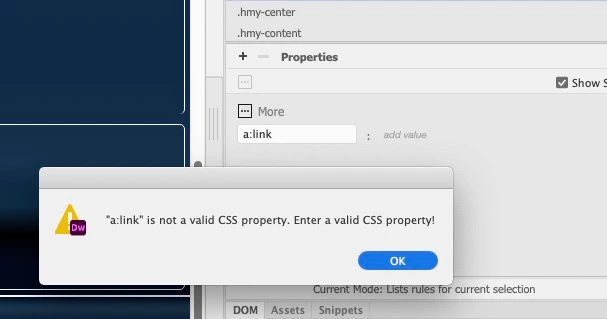
CSS won't let me add a:link... says css is invalid?

  • November 30, 2020
  • 2 replies
  • 324 views

I've created a new class for the footer and want to change the link colors but when I try, it says my a:link etc are invalid CSS.  What am I missing?  Is this a bug?  It seems to me that adding, editing css is not as easy as it was. 

I have selected hyperlinked text in the footer area to try and modify the colors. 
    This topic has been closed for replies.
    Correct answer Jon Fritz

    You would create the a:link under Selectors, not Properties.

    If you only want to select links in your footer, the Selector would be something like...

    .yourfooterclass a:link

    ...you would then add Properties like color, margin, text-decoration, etc after creating the Selector.

    2 replies

    Nancy OShea
    Community Expert
    Community Expert
    November 30, 2020

    Maybe because a:link is a CSS pseudo -class that will effect ALL anchors on your page regardless of where they appear.  If you want to style just the footer links, try footer a instead.  Or do what I do and manually edit code in your stylesheet thus avoiding panel hassles entirely.


    Nancy O'Shea— Product User & Community Expert
    jefferisAuthor
    Inspiring
    November 30, 2020

    Thanks all. I ended up doing it manually, but there is a big change from DW CS 6 to 2021 in how the panels work. 


    I see the selector does what I want though. 

    Jon Fritz
    Community Expert
    Jon FritzCommunity ExpertCorrect answer
    Community Expert
    November 30, 2020

    You would create the a:link under Selectors, not Properties.

    If you only want to select links in your footer, the Selector would be something like...

    .yourfooterclass a:link

    ...you would then add Properties like color, margin, text-decoration, etc after creating the Selector.