


Participant
November 16, 2017
Question

Custom Bootstrap Setup Error

  • November 16, 2017
  • 1 reply
  • 349 views

I'm having problems setting up a new custom bootstrap document: if I try to enter my own screen sizes, I get this error.
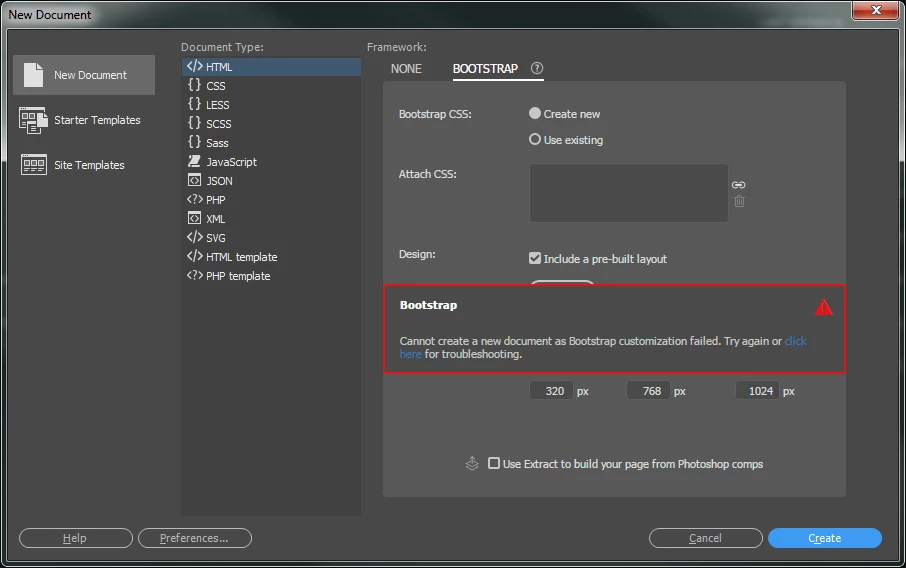
To make this worse, when I try to go to the troubleshooting, the link throws up another error saying "Unable to display help. Connect to the internet and try again." I am connected to the internet!

Any help would be appreciated.

Thanks

David

This topic has been closed for replies.

1 reply

Community Manager
November 16, 2017

Hi,

Thanks for reporting. We couldn't see this issue at our end.

What is the OS you are using. Please Logout from Dreamweaver and Login again to see if the issue is resolved.

Thanks

OB1UKAuthor
Participant
November 17, 2017

Hi Kratika,

I'm using a PC running Windows 7 (SP1) and it is the latest version of Dreamweaver CC.

There was an issue when DW updated a couple of weeks ago: once the updates were installed, the program wouldn't start so I had to contact Adobe support who suggested that I rename the Dreamweaver CC 2018 folder. I did this which did help a little but also made it that several items in the menu (like New) were greyed out. Anyway, long story short, the problem was eventually sorted but now I have this issue: I seem to think that the two are related?

Thanks,

David

Community Manager
November 20, 2017

Hi,

Did you try uninstalling Dreamweaver with removing all preferences, logout from creative cloud.

Login to creative cloud , install Dreamweaver, relaunch Dreamweaver.

If it doesn't resolve your problem could you please try steps mentioned in below link and see of it helps:

Use the Creative Cloud Cleaner Tool to solve installation problems

Thanks