


Inspiring
Jun 13, 2021 1:43 PM UTC
Answered

Custom code themes in Dreamweaver 2019

Hi everyone,


I’m trying to create a custom code theme (version CC2019), but not having any luck.


Per the instructions found on this page ( https://helpx.adobe.com/dreamweaver/using/customize-code-coloring.html#Token-inspector ), I created a new code theme based on an existing theme and renamed it. custom-light.


Instructions

Now that you know the selectors that you need to edit, make the changes to the main.less file.

Go to the end of the file until you see the following comment:

/* Custom code colors or overrides should start after this line */


Type in the selectors for the code elements whose colors you want to edit. Use syntax similar to the following example:

.cm-tag {color: #00D0D0; }


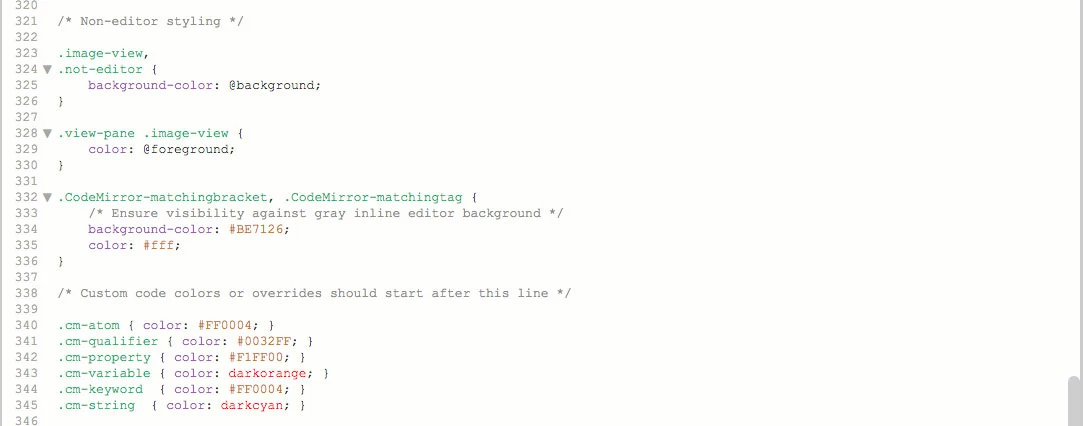
I’ve done just this, but the colors will not change.


I’ve included a pic. with the hope that helps.


Any help would be appreciated.


Thanks.


Mark
This topic is closed to new replies. Start a new post to keep the conversation going.
Nancy OShea
Nancy OSheaCorrect answer
Community Expert
Jun 13, 2021 7:41 PM UTC

Save & close the less CSS file.

Go back to Preferences and select the newly edited code color theme and hit the blue Apply button.

On some systems, you may need to restart DW, too.


Nancy O'Shea— Product User & Community Expert

2 replies

Nancy OShea
Community Expert
Nancy OSheaCommunity ExpertCorrect answer
Community Expert
Jun 13, 2021 7:41 PM UTC

Save & close the less CSS file.

Go back to Preferences and select the newly edited code color theme and hit the blue Apply button.

On some systems, you may need to restart DW, too.


Translate
Nancy O'Shea— Product User & Community Expert
Inspiring
Jun 18, 2021 12:46 PM UTC

Hi Nancy,


Sorry for the delay in responding.


Hitting the Apply button solved the problem, and you only have to do it once. Now, whenever I change the colors and save the file, the changes are reflected immediately.


Thanks so much for your help.


Mark

Translate
