

Brandon Menneke
Inspiring
March 19, 2021
Answered

Custom Workspace Windows - Live | HTML | CSS

  • March 19, 2021
  • 2 replies
  • 378 views

This may be a feature request, so far I've been able to kinda get Dreamweaver to do this but not fully.


I would like to be able to customize my workspace across multiple displays. Would like to have live view up full on one screen and be able to see the html and css in seperate pannels all at the same time so I don't have to toggle between views.


Suprided this isn't a feature as far as I'm aware of as they have this capability within Premiere and After Effects.
This topic has been closed for replies.
Correct answer Nancy OShea

Unfortunately, that's not how DW works.  Also DW has nothing in common with video or graphics apps. 


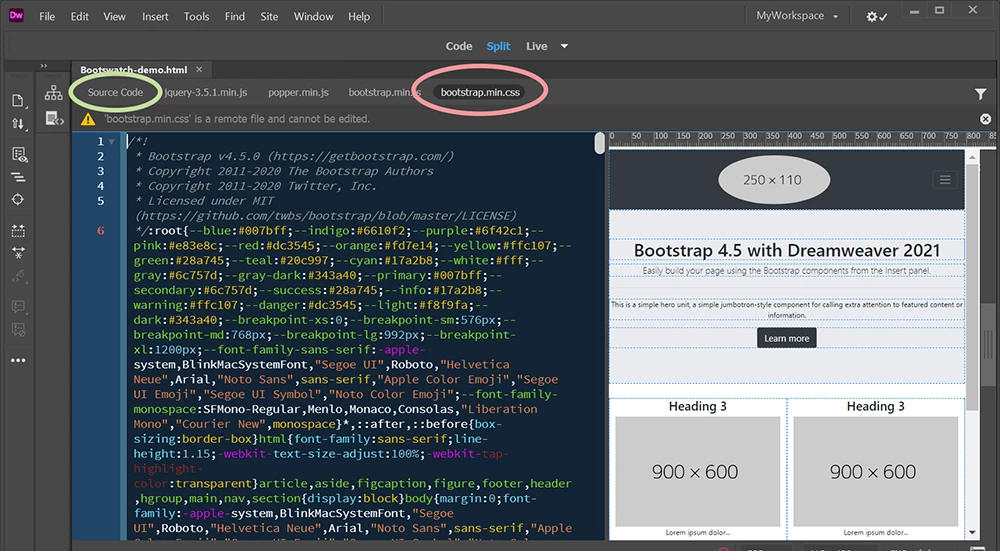
Live view is connected to Source Code (the HTML file) on your Related Files tabs.  In order to see the CSS, you must click away from Source Code to the CSS tab.  It's impossible to display both codes simultaneously from this panel.


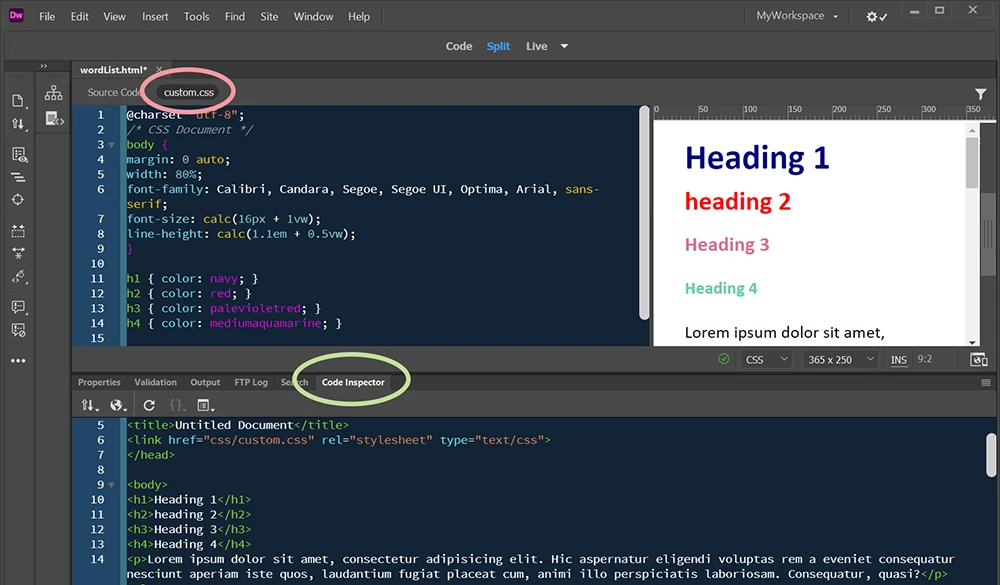
In this 2nd example, I have opened the Code Inspector panel and dropped it into my Properties group. Tada!  CSS code, Live view on top, HTML code on the bottom.   Your mileage may vary depending on your workspace.


Hope that helps.


2 replies

Nancy OShea
Community Expert
Nancy OSheaCommunity ExpertCorrect answer
Community Expert
March 19, 2021

Unfortunately, that's not how DW works.  Also DW has nothing in common with video or graphics apps. 


Live view is connected to Source Code (the HTML file) on your Related Files tabs.  In order to see the CSS, you must click away from Source Code to the CSS tab.  It's impossible to display both codes simultaneously from this panel.


In this 2nd example, I have opened the Code Inspector panel and dropped it into my Properties group. Tada!  CSS code, Live view on top, HTML code on the bottom.   Your mileage may vary depending on your workspace.


Hope that helps.


Nancy O'Shea— Product User & Community Expert
Brandon Menneke
Inspiring
March 19, 2021

I have 3 displays so I'm looking to take advantage of the screen real estate.

So I think you already answerd my question; but using what @Paul-M  stateted above I was able to get the layout I was wanting to do completely in Dreamweaver. This was breaking out the code inspector panel and then using a browser for live. My main concern there was having to constantly refresh but it looks like it does that for me once edits are completed.


Trying to achieve the same thing all in Dreamweaver this was the best I could get but had the problem of toggling views.


So if those are my only two options I'll end up using the first method that I posted above.

Legend
March 19, 2021

You can drag panels to a another display, I have never used liveview so I don't know if or how that would work, but you can have live visual display by having a browser window open in a separate display.

Paul-M - Community Expert