


Participant
March 27, 2023
Answered

Delete file from local drive that is not on server

  • March 27, 2023
  • 1 reply
  • 504 views

Two of us are making updates to the same website. Problem: One of us deletes a page and syncs. When the other of us syncs, it finds the page in our local copy and wants to put it back on the live site.


Is there a "Delete local files not on remote server" option? Basically the inverse of the standard "Delete remote files not on local drive" checkbox.
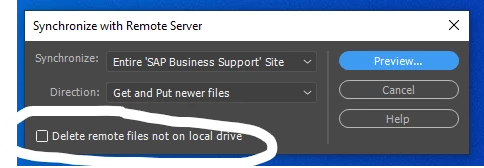

    This topic has been closed for replies.
    Correct answer Nancy OShea

    Probably not. You'll each need to manually delete the file from your local & remote site folders to get back on a level playing field.  Do not sync files until you've both done that.


    File check-in/out will prevent you from overwriting work performed by another.


    1 reply

    Nancy OShea
    Community Expert
    Community Expert
    March 27, 2023

    Don't use File Sync if you work independently.  I never use it because I have files on remote site that must NEVER be in local site and vice versa.  You do not need file sync to transfer files.  Use the UP or DOWN arrow keys to transfer files.


    If you collaborate, use file check-in/out feature to check files in & out of the remote server.

    https://helpx.adobe.com/dreamweaver/using/checking-checking-out-files.html

    When one person is working on a file, the other person can't access it until it's checked back-in.


    Hope that helps.


    Nancy O'Shea— Product User & Community Expert
    Participant
    March 27, 2023

    Will the check in/out feature fix the problem I am having? Collaborator 1 deletes an item from the live site that is no longer needed and then syncs, and then when collaborator 2 syncs, DW finds the missing file in collaborator 2's local drive and puts it back?

    Nancy OShea
    Community Expert
    Nancy OSheaCommunity ExpertCorrect answer
    Community Expert
    March 27, 2023

    Probably not. You'll each need to manually delete the file from your local & remote site folders to get back on a level playing field.  Do not sync files until you've both done that.


    File check-in/out will prevent you from overwriting work performed by another.


    Nancy O'Shea— Product User & Community Expert