Infracraft
Participant
April 18, 2018
Answered

Delete Remote Files not on Local Drive

  • April 18, 2018
  • 2 replies
  • 1353 views

When I try to syncronize files with my remote and testing servers Dreamweaver asks if I want to delete files not on the local instance.

However when I check this and then press preview rather than marking the files as delete it marks them as get.

Is there a way to fix this?

thanks.

    This topic has been closed for replies.
    Correct answer BenPleysier

    I'm not sure how you managed to achieve this but this is exactly the functionality I want.

    I spent over an hour on the online chat with Adobe this morning and the person I was speaking to remoted in and watched my transfers and witnessed the issue.

    This was under Case No: ADB-1824795-P0H8

    I was eventually told that this was not a bug and that this functionality was expected in versions of dreamweaver CC she suggested rolling back to CS6 which I did still with no luck.

    I have no idea what is going on but this functionality is extremely important for our web development work.

    Sorry I posted the above from the wrong account.


    I tried both versions 'Entire Site' and 'Selected Folders' and both worked identically.
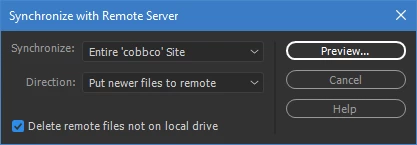
    My Dreamweaver is 10155 Build ver 18.1 on a Windows system.

    You could try Unusual behavior in Dreamweaver? Try restoring preferences.

    2 replies

    Infracraft
    Participant
    April 19, 2018

    The Reason this wasn't working is because we had marked the transaction as get and put newer files.

    As a result the site was trying to Get the file from the server.

    Using just a put newer files operation results in the expected behavior.

    B i r n o u
    Legend
    April 18, 2018

    can you please describe step by step what is happening... I never encounter any trouble with this feature ?

    Infracraft
    Participant
    April 18, 2018

    Step 1 - Create new Site

    Step 2 - use get function to pull all files from Server to Local

    Step 3 - Delete Index.php (Or Any other File on Local)

    Step 4 - Use Sync (Check Delete files on remote, not on local)

    Step 5 - Press Preview

    Index.php is now marked as get... Not as delete.

    Nancy OShea
    Community Expert
    Community Expert
    April 18, 2018

    The whole purpose of file synchronization is so you have the same files locally and on remote. 

    I frequently have local files that are not on the remote server and vice versa.  That's how I want it.  So I NEVER use file sync. 

    Nancy O'Shea— Product User & Community Expert

