Inspiring
February 6, 2019
Answered

Deleting published folders

  • February 6, 2019
  • 2 replies
  • 525 views

How do I delete a folder that I originally published?

Sand Patch

[Moderator edited for clarity.]

    This topic has been closed for replies.
    Correct answer Nancy OShea

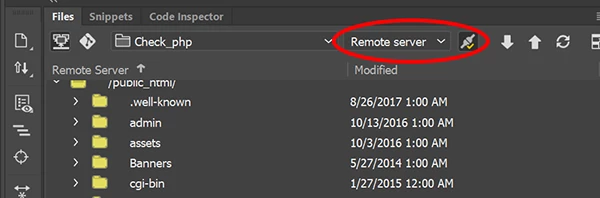
    Are you asking how to delete a folder from your remote server?

    1. Use your Files Panel (F8)
    2. Select Remote Server and hit the Connect button. See screenshots.
    3. Select folder.
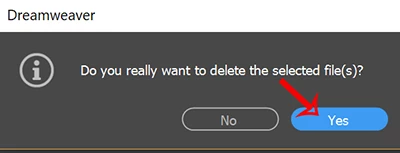
    4. Hit the Delete key on you keyboard.
    5. When prompted to confirm, hit Yes.

    2 replies

    Nancy OShea
    Community Expert
    Nancy OSheaCommunity ExpertCorrect answer
    Community Expert
    February 6, 2019

    Are you asking how to delete a folder from your remote server?

    1. Use your Files Panel (F8)
    2. Select Remote Server and hit the Connect button. See screenshots.
    3. Select folder.
    4. Hit the Delete key on you keyboard.
    5. When prompted to confirm, hit Yes.
    Nancy O'Shea— Product User & Community Expert
    Inspiring
    February 7, 2019

    Thank you so much!

    Sand Patch

    BenPleysier
    Community Expert
    Community Expert
    February 6, 2019

    I am sorry, but I do not understand the question. Could you please elaborate?

    Wappler is the DMXzone-made Dreamweaver replacement and includes the best of their powerful extensions, as well as much more!