

Sara_Reese
Inspiring
August 13, 2014
Answered

Deprecated: mysql_pconnect(): The mysql extension is deprecated and will be removed in the future: use mysqli or PDO instead

  • August 13, 2014
  • 1 reply
  • 16789 views

Hello I am doing a website for my work and trying to connect a database to dreamweaver (Via WAMP) - I have done this successfully before when doing a "test" site, but now when I do the same thing as I did last time (after DW and WAMP updates) I now get an error message when I F12 (preview in browser) my results.php page. (please see image below):
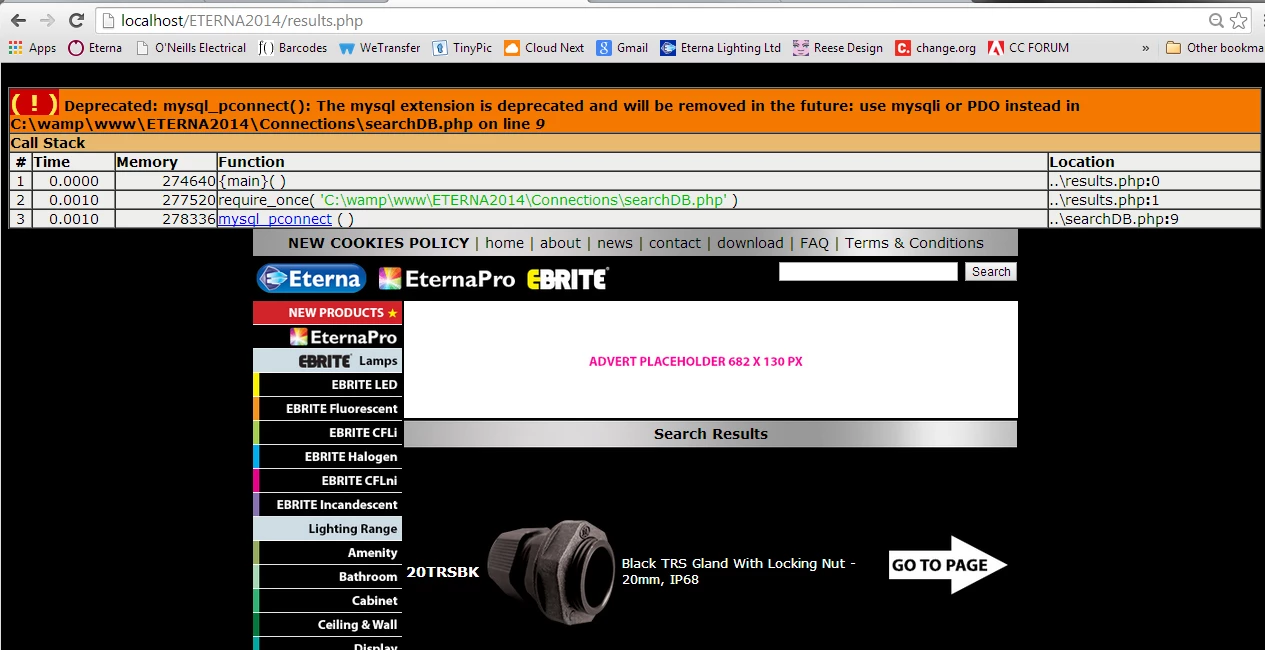
I have tried to find a fix on google, but have found none that help me if I am using WAMP with Dreamweaver. I can see maybe I need to change the code in the config.inc.php file, or paste the below code somewhere, but for the life of me I cannot work out which file I am meant to copy this code in to and where? I have tried to copy it in the top of the config.inc.php file but the error still remains.

<?php

error_reporting(E_ALL ^ E_DEPRECATED);


Does anyone know how to make the error go away please?

thanks

Sara

This topic has been closed for replies.
Correct answer osgood_

Sara.Reese wrote:

ok thanks. Dont supose you know how to make the error go away in the mean time though do you? I would love to not see it! Esp when showing the boss when I preview it

Try:


<?php
error_reporting
(0); // Turn off all error reporting
?>

1 reply

Legend
August 13, 2014

Its just a warning nothing more. The mysql extension is no longer supported in php 5.5....so what it is saying is be WARNED that if you use it and your host used php 5.5 or your host updates to 5.5 your code will not be compatible. That will probably be a few years away yet. Most hosts are still using php5.3 or 5.4 and I suspect itwould be really silly of them to NOT issue you a warning way before they decide to update to 5.5.

Sara_Reese
Inspiring
August 13, 2014

ok thanks. Dont supose you know how to make the error go away in the mean time though do you? I would love to not see it! Esp when showing the boss when I preview it

Is there anywhere in Wamp or DW or changing one of the script logs to hide this message maybe?

thanks for your reply.

Sara

osgood_Correct answer
Legend
August 13, 2014

Sara.Reese wrote:

ok thanks. Dont supose you know how to make the error go away in the mean time though do you? I would love to not see it! Esp when showing the boss when I preview it

Try:


<?php
error_reporting
(0); // Turn off all error reporting
?>