


Known Participant
January 4, 2024
Answered

desgn view looks good, extreme distorton in live view

  • January 4, 2024
  • 3 replies
  • 2415 views

I have DW 21.3 on a refurbished 2018 Macbook pro. I am a stained glass artist who made a fairly cool website ( www.brooksideglasworks.com) starting with golive and then dreamweaver which i first put up in 2002 or so. But my older version of DW stopped working on newer OS and I have not worked on my site for years.
I was never going to be a webmaster and barely get code, which is why the whole wysiwyg thing seemed to be a way to do it. Anyway I started a subscription to DW as a part time teacher, and downloaded my site. 
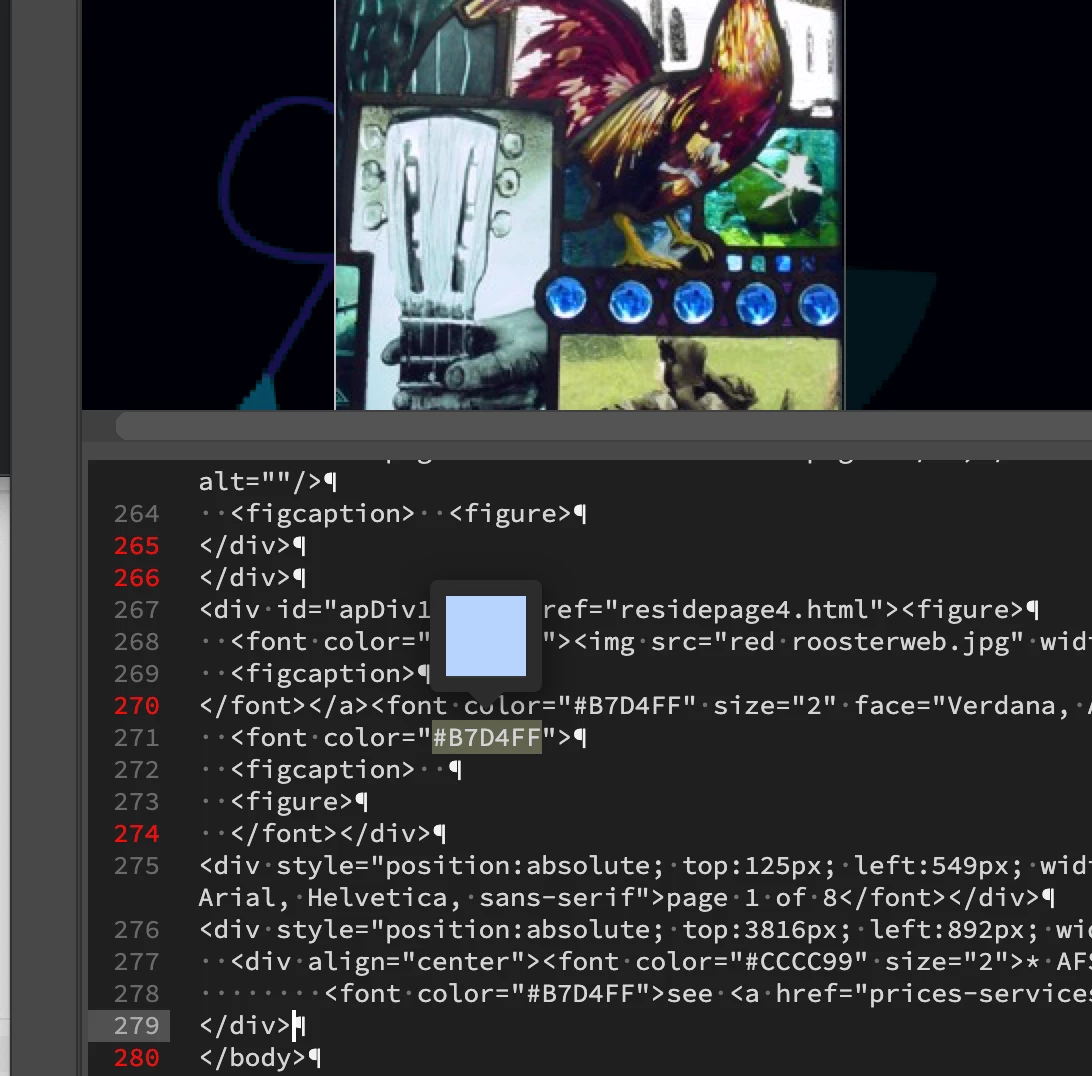
I was a little disappointed that the images do not load and i had to manually move them into place but I made the changes I wanted  to the index page, doing a lot of looking at the good code to fix the bad and and it looked great in the Live view when I finished.  My  index and page one of an overview of my work are the most complex , but I had that 2nd page looking good even thought there was still some red code I want to fix. But when I looked at the site in the live view ( or browser) it is completely distorted and off the edge and overlaps and things moved. Apparently what you see is no guarantee of what you get. How the location info from absolute positioning fails is hard to understand. Kind of semi-absolute

SO HERE ARE MY QUESTIONS:( sorry for the long introduction but it might help ) 
1) Is there some way to force a redoing of the code based on the visual layout on the design view screen? This code actually works online so it seems like it should be salvageable. Too much to ask for, right?  ( Should I send photos of before and after from design to live, 
2) the 2nd page is done in these numbered apDiv boxes to hold text or images or both and each has an absolute position( i use this because I'm not a grid person (and I pay for it). There is no red lines in this area but quite a few in the code text below that. I really can't understand the feedbackmessages I get when I move cursor over the reded lines of code. I just wonder if I startd a new version of the page and just put this apDiv code in first and then added text and images in the pre-sized and pre located boxes if that would generate better code and I could watch it as I go and so keep it clean. 
I would watch tutorials, and I may have to, but they tend to go too fast and I don't know the terms that well. If you know some infotutorials for genuine novices  or can point me in the right direction on this issue I'd be grateful. 

<#apDiv10 {
position: absolute;
width: 416px;
height: 223px;
z-index: 7;
left: 85px;
top: 200px;
}
#apDiv11 {
position:absolute;
width:302px;
height:355px;
z-index:8;
left: 281px;
top: 846px;>
Below is some of the problem stuff
 S


    This topic has been closed for replies.
    Correct answer Ben M

    Yes, I talked with one other community (PineGrow) a week ago, considering their product and I posed questions about absolute positioning  and I could see a big split on the issue,  several saying move away from it, others use it.   Ben has sent code that avoids completely absolute positioning and I think I will start there and see were I can take it. Your thoughts on cost have merit and I am kind of surprised how weak the support for DW is here on this adobe sponsored site but hey, you guys obviously know a thing or 2.  I was kind of feeling about DW that there is too much promotion and expense and not enough fulfillment of promise. I suppose people are used to it and getting it up to date now is a major deal with many downsides.  Naturally I thought their product would be the most seemless to make needed adjustments to a site that was made with it. I have a fairly inexpensive host, like 34 bucks a year, so am planning to stay there. 


    Unfortunately it has been this way in a few Adobe communities. As you could probably imagine in its prime, this forum was very active and admittedly I, like many others, used DW moreso than I do today. As far as editors go, I have Nova (formerly Coda) on my Mac for when I need to do quick edits. But that has to do more with my workflows which are more closely related to other Adobe products like Marketo. But to the point of communities that have gone quieter lately, XD is another that has been quieter in minimal maintenance since Adobe's proposed merger with Figma which is no longer happening.


    With those solutions I mention you would have to leave that host as these solutions include hosting on their platform. This way they can help control the code if there are updates affecting everyone. Using Wix as an example their entry plans which should be more than enough for you range from $16-27/mo which is the editor + hosting, or Squarespace is $16-23/mo for the similar service.


    At the end of the day, unlike Photoshop or Illustrator with more proprietary file formats, HTML can be edited in a simple text editor and unlike Microsoft's Frontpage that had a shorter life, the use of proprietary code from editors on the web has since gone away as at its core it is simply just plain text code. Some of the more visual users went to hosted solutions, and others went into more of the dev world with git and other testing lifecycles as the web branched out into apps and more than just a simple website.

    3 replies

    Community Expert
    January 4, 2024

    Personally speaking after viewing your site and hearing what you are looking to do visually, I don't think DW is the best solution for you. Given the cost of DW, the status of it, and your desire for a visual editor, I would probably recommend migrating the site to a template with a hosted solution like a Wix/Squarespace/Webflow. 

    jonabarkAuthor
    Known Participant
    January 4, 2024

    You may be right but I'm committed to Adobe for at least a year. I will keep this recommendation in my notes for future reference though. 

    Community Expert
    January 5, 2024

    Something to consider is that Dreamweaver is not your only cost here as you are also paying your web host as well as the domain, some of which would be overlap into those hosted solutions I mention.  In addition, what I am suggesting will still take time and depending on the total amount of content this could be a month or so to move content over into their templates that you would want to work on concurrently with the existing maintenance of your site. This is something you will want to consider is that moving will not be as easy as flipping a switch, but in the long run it should simplify ongoing maintenance of the site.


    To answer your questions further, there is no way to force a redoing of the code based on your layout. Dreamweaver never got that advanced. You could try an AI GPT function to see if it would do that for you, but that is probably a stretch and not a guarantee.


    And in addition on what has been said about why not to use an ap div, the ap div (short for absolute positioning), you are working in 3 dimensions. In absolute positioning, you have x/y/z coordinates. The order in which you place the code here doesn't matter, but this is also one of the issues with non-responsive grid design as this is. Absolute positioning puts all of your elements on a grid. For instance from your apDiv11 above, left (X) is 281px, top (Y) is 846px, and (Z) is 8. So you are actually much more of a grid person than you think if you choose to work with this type of layout as unlike responsive websites that adapt to a user's screen whether it's a 1920x1080 PC laptop, a 3456x2234 Mac laptop, a 2340x1080 Samsung Galaxy Phone, or a 2048x2732 iPad Pro, the styling adapts to the resolution. In your grid, that may look ok on the PC laptop, but that box would be super small on a Mac laptop and as a result, your current layout is mostly on the left side with an unbalanced empty space on the right. Regardless of whether you start a new page, the apDivs will result in the same issue present today and the code generated by DW is as mentioned, not intelligent, so you would end up with the same result as you have today.

    Jon Fritz
    Community Expert
    Community Expert
    January 4, 2024

    You have a large number of HTML errors, including structural issues.

    Some of the errors come from using outdated methods and can stay without much fanfare, but the structural problems need to be repaired. Not all browsers are equal when it comes to guessing what was meant when they run into HTML errors.

    Visit https://validator.w3.org/nu/ to get a listing of your issues. Fixing them may be all that's necessary to bring your page back to what you expect from the current code.

    Keep in mind though, your site only really functions on desktop computers and more than half of all internet users are on something else. It may be time to start over with a responsive template, if you'd like to reach the majority of people online.

    jonabarkAuthor
    Known Participant
    January 4, 2024

    Thanks for looking at my questions and problem. Your response is the most helpful . I don't think my actual site, the code of which was made using an older version of dreamweaver when the wysiwyg aspect was a bigger selling point, is quite so bad on other devices. I and others have used it with iphones and  ipad and it works fine though it uploads slow on iphone. But I would like to fix the html problems and get to clean code at least and if I could use my current site as a visual template i'm very open to rebuild  the pages to be more responsive. I like how my site looks, not like a madison avenue ad. I want to keep that look. I want my image containers to float on the page background without being in an obvious grid. Were you able to look at the site and...Can you recommend an approach(I really don't know CSS from Javascript, but willing to learn and focus on one that will work for me) that resolves the reponsiveness and keeps the structure and image background I now have. The only really complicated page I have is reside page 1 ( the one I showed) from the index page-the residential and autonomous windows button.  One thing I achieved back at the start of the millenia was visually rich and complex pages that load very fast at a time when people were putting in very large image files and slowing response times to a crawl. Not so bad for a code dummy( which i really am), who is a practical and pretty decent artist of a medieval art form.  Anyway thanks again  and I look forward to hearing from you.

    Jon Fritz
    Community Expert
    Community Expert
    January 4, 2024

    I'm not sure what devices you're testing on, but the site is unreadably small, and the right side gets cut off completely, on an iPhone 14.

    Swiping side to side to try to see the parts that are cut off, then pinching to zoom in to read are things the general public hates (no, hate is too light a word) despises with every fiber of their being, when they go online with their phones. The old 4:3 design aspect ratio for desktop monitors doesn't work on mobile, refrigerators, 4k+ ultra resolution TVs, etc...

    Starting with a responsive template would be the bare minimum in my opinion. Keep your old site where it is and create a new Site Definiton in DW, then use a responsive template and bring the info over from the old...

    1. Go to Site > New Site
    2. Give your site a Name and create a new Local Site Folder (don't use the old folder it will confuse DW)
    3. If you like, you can enter your FTP info under Servers now, or do it when everything is done, it won't matter to the program
    4. With your new site selectedfrom the dropdown menu in your in your Files panel, go to File > New 
    5. Click Starter Templates in the leftmost side bar
    6. Choose a layout you like from Basic Layouts, Bootstrap Templates or Responsive Starters and save it as index.html

    BenPleysier
    Community Expert
    Community Expert
    January 4, 2024

    My system refuses to load the website, hence I cannot comment on the whole site. The comments below refer to the code that you have shown.


    1. There should be no need to use Absolute Position as demonstrated here.

    2. The font element is depricated as demonstrated here.

    3. The proper use of <figure> and <figcaption> is demonstrated here.

    4. Line 266 seems to carry a </div> tag without a corresponding <div> tag.


    There may be other anomolies that I cannot see at this stage. Suffice to say that the website is a complete mess.


    If you are not a coder, have a look at this playlist that I have created using a low code editor:


    Wappler is the DMXzone-made Dreamweaver replacement and includes the best of their powerful extensions, as well as much more!
    jonabarkAuthor
    Known Participant
    January 4, 2024

    I'm sorry your computer cannot see the site, but it is hard  to know what I want to do without seeing it. I like my site and want to make it more flexible and resposive and remove problems while keeping the visual structure,  but I will never be a code expert.  I can learn new stuff but my main activity is painting, drawing and making stained glas windows so I need to minimize and focus my website time . The  whole sales job from Dreamweaver is that you can design things visually and DW will do the bulk of code work. You seem to want to sell your own product as the only real aternative to DW , but calling my website( it actually is not my website but my dowloaded version I am trying to fix in DW) a mess, without seeing the actual site, and doing so on a DW community forum is not really the best sales approach, at least to me. Nevertheless I do appreciate the information on alternatives to absolute positioning  and the depricated font elements. You are obviously a master at reading code and and know the terrain on the  deepest level, but I never wil be anywhere near that levell unless the heavenly codemaster dowloads mastery into my aging medieval brain. I don't think that is going to happen. Best wishes for your business.

    Nancy OShea
    Community Expert
    Community Expert
    January 4, 2024

    1.  This is a user-to-user forum, not a direct pipeline to Adobe.


    2. As web developers and long time product users, we can only comment on what we see and assist users with specific product questions.  Not to be disparaging, we can't teach you how to be a web developer.  That's a talent you must learn on your own or subcontract out to an experienced professional.


    3. The correct URL to your site is this:  https://brooksideglassworks.com/

    As seen from my desktop device (1680px wide):


    From a handheld mobile device (412px wide), tiny text:


    18 Code validation errors:

    https://validator.w3.org/check?verbose=1&uri=https%3A%2F%2Fwww.brooksideglassworks.com%2F


    4. First impressions matter.  You never get a second chance at a first impression. Your site is not mobile-friendly and it's not accessible for vision impaired users.  This may not seem important but it is.  In 2024, penalizing people for their device or disability won't bring you customers, it will push them away.


    5. Software doesn't make great websites, people do.  Dreamweaver is merely a tool and it's not the only tool we use.  It's in minimal maintenance status which means it's no longer receiving new features.  See below for more details on what that means.

    https://community.adobe.com/t5/dreamweaver-discussions/bootstrap-5/m-p/14046967#M225831


    6. Understand your medium.  If you're not able to learn coding fundamentals, hire a professional to build you a website that you can maintain without coding skills. WordPress, Squarespace or Webflow are suitable platforms to consider.  


    Best of luck.


    Nancy O'Shea— Product User & Community Expert