Participant
November 18, 2022
Answered

Difference in appearance between http and https?

  • November 18, 2022
  • 4 replies
  • 1842 views

My husband recently passed away and I created a tribute page for him. However, the style page is attaching to the http://dulemba.com/Stan.html page, but not to the https://dulemba.com/Stan.html page. That "s" (security) seems to be canceling out my coding somehow (the code is the same); and yet, that's the address I sent to everyone. Any thoughts as to how to fix this? Thanks, e 

    This topic has been closed for replies.
    Correct answer Nancy OShea
    quote

    Remind me - If the file is, for example, http://dulemba.com/Stan/whatever.html - would the relative path be: /Stan/whatever.html - or would it be something else? Thanks!


    By @elizabethd17156409

    =========

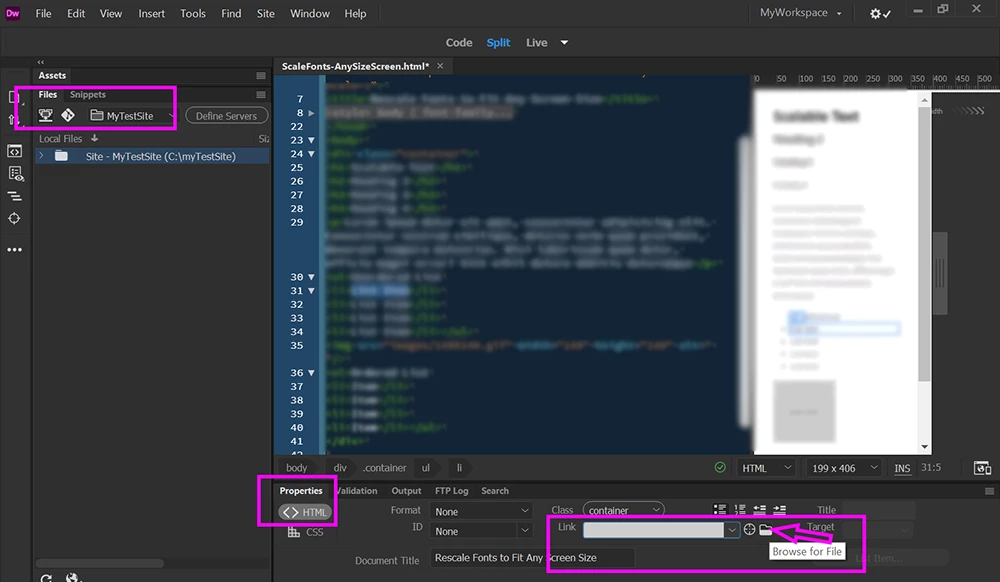
    When your site folder is properly defined, you don't need to remember file paths.  Dreamweaver manages links to site assets and pages for you.


    Open Properties panel (Ctrl + F3)

    Click on HTML.

    Click the Link Field, Folder Icon to browse for file.  See screenshot.

    Save file (Ctrl + S).

    Dreamweaver will automatically resolve paths for you.


    4 replies

    Participant
    November 26, 2022
    FB_IMG_1669488514351.jpg
    Participant
    October 18, 2023

    Is redirection from http to https code 302?

    BenPleysier
    Community Expert
    Community Expert
    October 18, 2023

    Short answer: No.


    The matter involves a lot more than a simple redirect. Please use Bing to search the subject as this is not a Dreamwever related subject.

    Wappler is the DMXzone-made Dreamweaver replacement and includes the best of their powerful extensions, as well as much more!
    Nancy OShea
    Community Expert
    Community Expert
    November 18, 2022

    @elizabethd17156409,

    My condolences on your husband's passing.


    See Why No Padlock report below:

    https://www.whynopadlock.com/results/0dc428d5-2588-4f9a-9c0f-36bb9363fc68


    Your server is not automatically redirecting incoming HTTP traffic to HTTPS as it should.   In addition, it's resolving to BOTH www and non-www domains.  Google penalizes sites for duplicate content.  Choose one preferred domain address and resolve all incoming traffic to that address.  

    ## YOUR PREFERRED DOMAIN NAME ##
    https://dulemba.com/ 


    On Linux servers with an admin panel like WHM or c-Panel, you can do this yourself by editing your server's .htaccess file. 


    ## REMOVE WWW FROM URLS ##
    RewriteEngine on
    RewriteCond %{HTTP_HOST} ^www\.
    RewriteRule ^(.*)$ http://example.com/$1 [R=301,L]
    
    ## REWRITING HTTP TO SECURE HTTPS ##
    RewriteEngine On
    RewriteCond %{HTTPS} off
    RewriteRule ^(.*)$ https://%{HTTP_HOST}%{REQUEST_URI} [L,R=301]


    If you're not able do this yourself, ask your web developer or hosting provider for assistance.


    Hope that helps.  Good luck. 🙂


    Nancy O'Shea— Product User & Community Expert
    Participant
    November 26, 2022

    Thank you so much for your help. Is this code that I could add to a style sheet - would that work? (I work in Dreamweaver with HTML and a little bit of CSS knowledge.) Cheers, e

    Nancy OShea
    Community Expert
    Community Expert
    November 26, 2022

    No.  Sever configuration is not effected by stylesheets.   Contact your hosting provider for assistance.


    Nancy O'Shea— Product User & Community Expert
    Community Expert
    November 18, 2022

    Since HTML and CSS both point to the same server, why bother with the domain in the URL... can't you use the relative paths instead ?


    @1552174 url("imported.css");
    Participant
    November 18, 2022

    Good point. I had gotten in the habit of putting in the whole URL, but I can see now how that would be problematic. Remind me - If the file is, for example, http://dulemba.com/Stan/whatever.html - would the relative path be: /Stan/whatever.html - or would it be something else? Thanks!

    Legend
    November 18, 2022

    It would just be 'whatever.html' as that file is in the 'Stan' folder - https://dulemba.com/Stan/index.html or you could just supply the link as https://dulemba.com/Stan - the browser will look for an index.html file in the 'Stan' folder and use that as a starting point of the files.


    You probably have an 'index.html' in the 'Stan' folder as a starting point for the browser to find?


    Once the browser is in the 'Stan' folder the files become relative so a file located directly within the 'Stan' folder named 'whatever.html' only needs to be linked/referenced as 'whatever.html'


    Sorry the hear of your husbands recent passing, stay strong.

    BenPleysier
    Community Expert
    Community Expert
    November 18, 2022

    Sorry for your loss.


    Change 

    http://dulemba.com/style.css

    to 

    https://dulemba.com/style.css

    Wappler is the DMXzone-made Dreamweaver replacement and includes the best of their powerful extensions, as well as much more!
    Participant
    November 18, 2022

    Thank you, Ben. That seems to have worked. But I wonder - the style sheet sits in Dreamweaver as style.html - there is no http or https designator attached to it. So, I changed the code in the actual document to: 

    <style type="text/css">
    @1552174 url(https://dulemba.com/style.css);
    </style>

    But, does this mean I update ALL my files to this new code? (Adding the "s" to http.)

    For this file, I just added this code in addition to the style code with http - I mean, I want the style to apply to either and many sites link to the http version. So I now have code for both http and https - will that be a problem? 

    Clear as mud?

    Thanks again. e