


Participant
July 10, 2017
Answered

Disable image preview in Dreamviewer CC 2017

  • July 10, 2017
  • 2 replies
  • 728 views

Hi,

I'am running the latest version of Dreamviewer CC and experiencing what i would call a dangerous bug/problem.

When working in code view and hovering over a URL inside a file_get_contents function, Dreamviewer is loading this URL and displaying a "image not found" message on top.

I create API's in PHP and when Dreamviewer load this URL, it actually runs the live API, which is not okay at all.

I have Goolged and found many people having the same problem and with no option to disable this annoying thing.

Also, there is no logic in Dreamviewer trying to fetch and preview a image from URLs like https://domain.com/api/api.php?secret=XXXX

HOW TO DISABLE IMAGE PREVIEW?
This topic has been closed for replies.
Correct answer mrmagnecom

I got a reply from Adobe. Here is how to solve this:

  • Go to :

Win: %appdata%\Adobe\Dreamweaver CC 2017\<locale>\Configuration\Brackets\Mac: ~/Library/Application Support/Adobe/Dreamweaver CC 2017/<locale>/Configuration/Brackets/

  • Open brackets.json file.
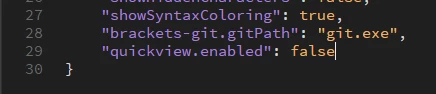
  • Add the following code "quickview.enabled": false.
  • Save the file and re-launch Dreamweaver

I can confirm that this solution is working and will disable the image preview on hover.

2 replies

mrmagnecomAuthorCorrect answer
Participant
July 21, 2017

I got a reply from Adobe. Here is how to solve this:

  • Go to :

Win: %appdata%\Adobe\Dreamweaver CC 2017\<locale>\Configuration\Brackets\Mac: ~/Library/Application Support/Adobe/Dreamweaver CC 2017/<locale>/Configuration/Brackets/

  • Open brackets.json file.
  • Add the following code "quickview.enabled": false.
  • Save the file and re-launch Dreamweaver

I can confirm that this solution is working and will disable the image preview on hover.

Participant
July 10, 2017

Also, please vote for the idea of adding a "disable image preview" option in the software