Participant
July 12, 2018
Answered

Disabling automatic closing of brackets and parenthesis in DW CC 2018?

  • July 12, 2018
  • 2 replies
  • 2167 views

Is there a way to disable the automatic insertion of closing brackets in DW 2018? I appreciate the HTML and PHP code completion but the closing of brackets drives me crazy.

Thanks in advance for your help!

    Correct answer Jon Fritz

    This post is 7 years and several versions out of date.

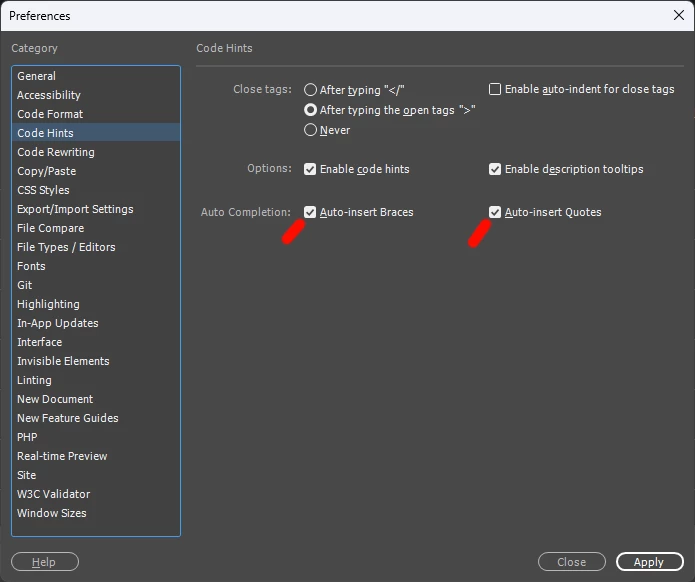
    In the intervening years, Adobe has added simple checkbox preferences to toggle the auto-completion of braces and quotes. It's in the same location I gave originally (Preferences > Code Hints). Now unchecking them will turn off the functions, making a modification to the same file as the manual instructions I gave previously...


    2 replies

    Participant
    December 4, 2020

    Incredibly useful - only thing I'll add here is that typically when updating Dreamweaver CC is that it leaves the older folder in place (i.e. I upgraded from 2020 to 2021 but both folders are still in the directory). I found to get it working properly using this method I needed up update both version's JSON files (not sure why) but it seemed to fix it so I'm happy.

    Jon Fritz
    Community Expert
    Jon FritzCommunity ExpertCorrect answer
    Community Expert
    April 11, 2025

    This post is 7 years and several versions out of date.

    In the intervening years, Adobe has added simple checkbox preferences to toggle the auto-completion of braces and quotes. It's in the same location I gave originally (Preferences > Code Hints). Now unchecking them will turn off the functions, making a modification to the same file as the manual instructions I gave previously...


    Jon Fritz
    Community Expert
    Community Expert
    July 12, 2018

    Go to Edit > Preferences > Code Hints and select the Never option for Close Tags...

    Participant
    July 12, 2018

    I'm sorry, I meant characters like: { }, " ", ( )

    As soon as I type the opening one, DW inserts the closing one.

    I'm fine with the closing HTML tags.

    Jon Fritz
    Community Expert
    Community Expert
    July 12, 2018

    Ah, that one you have to squish in the brackets.json file...

    1. On a PC, go to C: > Users > your user name >  AppData (make sure hidden files are turned on if you don't see this folder) > Roaming > Adobe > Dreamweaver CC 2018 > your language > Configuration > Brackets > brackets.json

    1a. On a Mac, this "should" be... (I don't have a Mac)

      a. do a search for  ~/Library/Application Support (make sure the ~ is there)

      b. hit Go

      c. next, go to Adobe > Dreamweaver CC 2017 > your language > Configuration > Brackets > brackets.json

    2. (make a back-up first so you can go back if you goof) Open the file in something other than DW

    3. If the option for closeBrackets doesn't already exist, add a comma to the last item on the list, then add the following to the end of the file, before the closing } ...

    "closeBrackets": false,

    (make sure the "b" in Brackets is capitalized)

    3. Save and open DW and that "should" stop the auto closing for you.