Participant
September 28, 2019
Answered

Disabling usage information transmission

  • September 28, 2019
  • 3 replies
  • 261 views

Hi,


During the Dreamweaver installer it stated that usage information would be transmitted, but this can be disabled.

I have yet to find an option to actually disable it, which is putting me off even using the product. Can anyone enlighten me as to it's location?


Thanks.

    This topic has been closed for replies.
    Correct answer Nancy OShea

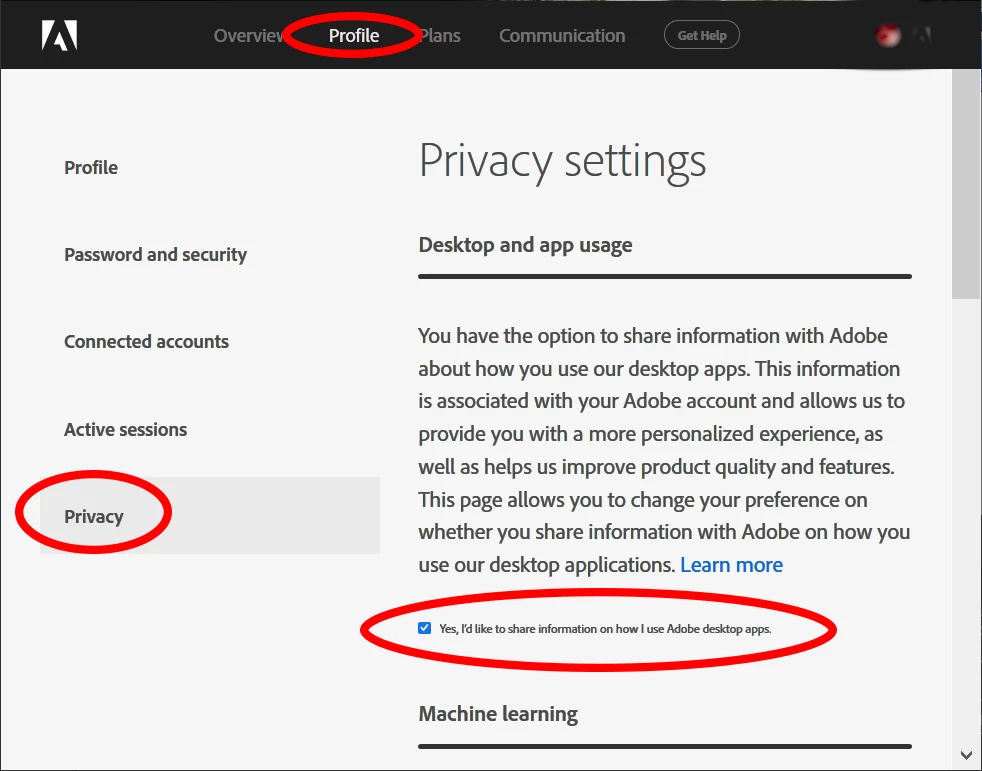
    The option to share user information is attached to your Adobe User ID and not individual applications.


    1. Log-in to your Adobe Account and select Privacy settings. 
      https://account.adobe.com/privacy

    2. See screenshot.  Check or uncheck all boxes as required.


    3 replies

    Nancy OShea
    Community Expert
    Nancy OSheaCommunity ExpertCorrect answer
    Community Expert
    September 28, 2019

    The option to share user information is attached to your Adobe User ID and not individual applications.


    1. Log-in to your Adobe Account and select Privacy settings. 
      https://account.adobe.com/privacy

    2. See screenshot.  Check or uncheck all boxes as required.


    Nancy O'Shea— Product User & Community Expert
    Nancy OShea
    Community Expert
    Community Expert
    September 28, 2019

    Go offline. 


    Nancy O'Shea— Product User & Community Expert
    BenPleysier
    Community Expert
    Community Expert
    September 28, 2019

    I do not think that this can be disabled, mainly because Adobe needs to know that the product that you are using is a legitimately aquired product.

    Wappler is the DMXzone-made Dreamweaver replacement and includes the best of their powerful extensions, as well as much more!