Participant
August 23, 2017
Answered

Div error

  • August 23, 2017
  • 4 replies
  • 529 views

Followed online Tutorial -

Define page structure with HTML\

Attempt to insert <div class="artwork-piece"></div>

which then generate code error on line.

Dreamweaver Tech Support USELESS - USELESS - USELESS

After porting into my computer and wasting an enormous amount of time - they state they are not trained to provide this type of support.

Adobe you must be joking. I have to go online to the Forum and beg for help.

This topic has been closed for replies.
Correct answer Nancy OShea

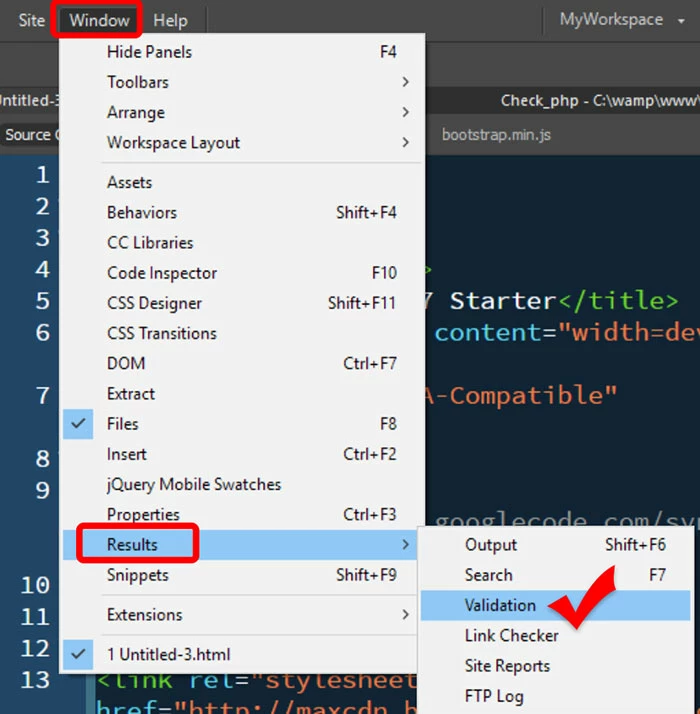
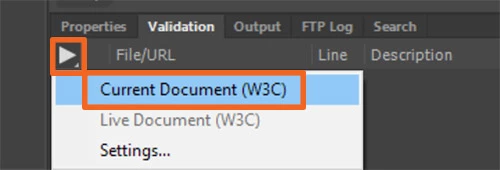
Most likely your document contains other code errors above that insertion point.   Resolve those errors and you should be fine.  To validate code in DW -- see screenshots.

Nancy

4 replies

Nancy OShea
Community Expert
Nancy OSheaCommunity ExpertCorrect answer
Community Expert
August 23, 2017

Most likely your document contains other code errors above that insertion point.   Resolve those errors and you should be fine.  To validate code in DW -- see screenshots.

Nancy

Nancy O'Shea— Product User & Community Expert
Ussnorway7605025
Legend
August 23, 2017

Bob@ShibumiOz  wrote

Followed online Tutorial -

which one?

Jon Fritz
Community Expert
Community Expert
August 23, 2017

If you are adding the <div> code you've posted into any element other than the <body> or one of its descendants that also allows a <div> to be nested within it, DW would give you a validation/linting error as expected under the html standard.

If you're not specifically talking about a validation error, or linting error (a red or orange line number in the Code View), we will need more information to point you in the right direction.

Posting a link to your work in progress here in the forum is best, but if you can't upload to your server, a distant second would be to copy/paste the entire code into a forum reply. Don't reply via email, html code doesn't come through in email replies.

BenPleysier
Community Expert
Community Expert
August 23, 2017

Sorry, it must be my age because I fail to see any question hidden within your rant.

Please explain what page structure you are defining and what is the error message. May we also assume that you are on a Windows machine and using the latest version of Dreamweaver (v 2017.5)?

Adobe staff are taught to deal with issues in current versions of Dreamweaver, not how it is used and what is used. This user to user forum will gladly be of assistance (if possible).

Wappler is the DMXzone-made Dreamweaver replacement and includes the best of their powerful extensions, as well as much more!