nigelh70638339
Inspiring
May 31, 2017
Answered

div floating left with image and some text

  • May 31, 2017
  • 2 replies
  • 837 views

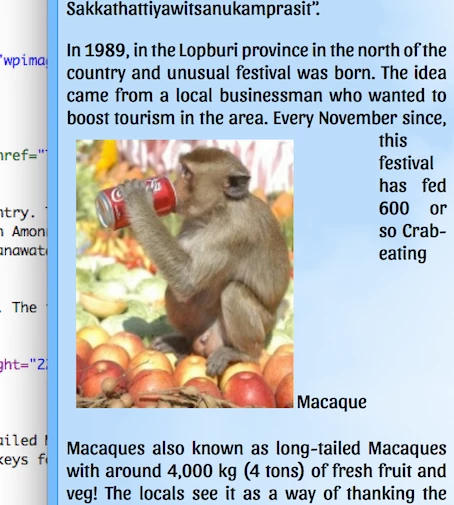
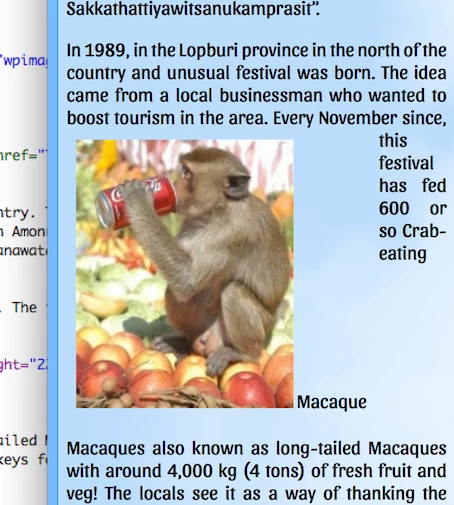
I am having some issues with trying to get an image which is floating to the left and beneath that I ant to add some text. This image and text has text wrapped around it in a paragraph.

Below is the paragraph in question:

<p>In 1989, in the Lopburi province in the north of the country and unusual festival was born. The idea came from a local businessman who wanted to boost tourism in the area. <img src="wpimages/monkey.jpg" alt="Crab-eating Macaque" width="183" height="226" class="fltlft">Every November since, this festival has fed 600 or so Crab-eating Macaques also known as long-tailed Macaques with around 4,000 kg (4 tons) of fresh fruit and veg! The locals see it as a way of thanking the monkeys for attracting the large number of tourists to the region just to see the spectacle.</p>

The additional text I want to add needs to be below the image. The way I have got around it so far is to create a css rule for the image and  then put 25px of padding on the bottom and then create an AP Div and then enter the text. The issue I have found with this is that in Design view the div is all mixed up in the text of the paragraph.

I hope I have made it clear!

Thanks in advance!
    This topic has been closed for replies.
    Correct answer osgood_

    osgood  I did do something wrong and after correcting and doing again this the result in Safari, Opera, Firefox and Google Chrome.


    nigelh70638339  wrote

    osgood  I did do something wrong and after correcting and doing again this the result in Safari, Opera, Firefox and Google Chrome.

    Well the image isn't wide enough to fill the width of the <span></span> tag so you need to set it to the width of the image:

    .fltlft {

    float: left;

    width: 200px; /* SET TO WIDTH OF IMAGE */

    margin: 15px 15px 15px 0;

    padding: 0;

    display: block;

    }

    Once you do that the word 'Macaque' can only go to the next available space, under the image.

    See what the results are after you have done that.

    2 replies

    BenPleysier
    Community Expert
    Community Expert
    May 31, 2017

    Try

    <!doctype html>

    <html>

    <head>

    <meta charset="utf-8">

    <title>Untitled Document</title>

    <style>

      div.media {

      float: left;

      margin-right: 15px;

      }

      div.media p {

      font-size: 0.85em;

      font-style: italic;

      }

    </style>

    </head>

    <body>

    <div class="media">

      <img src="https://dummyimage.com/183x226/dbb8db/fff" alt="Crab-eating Macaque" width="183" height="226" class="fltlft">

      <div class="text">

      <p>Extra text goes here.</p>

      </div>

    </div>

    <p>In 1989, in the Lopburi province in the north of the country and unusual festival was born. The idea came from a local businessman who wanted to boost tourism in the area. Every November since, this festival has fed 600 or so Crab-eating Macaques also known as long-tailed Macaques with around 4,000 kg (4 tons) of fresh fruit and veg! The locals see it as a way of thanking the monkeys for attracting the large number of tourists to the region just to see the spectacle.</p>

    <p>In 1989, in the Lopburi province in the north of the country and unusual festival was born. The idea came from a local businessman who wanted to boost tourism in the area. Every November since, this festival has fed 600 or so Crab-eating Macaques also known as long-tailed Macaques with around 4,000 kg (4 tons) of fresh fruit and veg! The locals see it as a way of thanking the monkeys for attracting the large number of tourists to the region just to see the spectacle.</p>

    <p>In 1989, in the Lopburi province in the north of the country and unusual festival was born. The idea came from a local businessman who wanted to boost tourism in the area. Every November since, this festival has fed 600 or so Crab-eating Macaques also known as long-tailed Macaques with around 4,000 kg (4 tons) of fresh fruit and veg! The locals see it as a way of thanking the monkeys for attracting the large number of tourists to the region just to see the spectacle.</p>

    </body>

    </html>

    Wappler is the DMXzone-made Dreamweaver replacement and includes the best of their powerful extensions, as well as much more!
    Legend
    May 31, 2017

    Wrap the image/text in a <span></span> tag (example below):

    <!DOCTYPE html>

    <html>

    <head>

    <meta http-equiv="charset=UTF-8">

    <title>Untitled Document</title>

    <style>

    img {

    max-width: 100%;

    height: auto;

    }

    .fltlft {

    float: left;

    width: 200px;

    margin: 15px 15px 15px 0;

    padding: 0;

    display: block;

    }

    </style>

    </head>

    <body>

    <p>

    In 1989, in the Lopburi province in the north of the country and unusual festival was born. The idea came from a local businessman who wanted to boost tourism in the area.

    <span class="fltlft"><img src="http://images.all-free-download.com/images/graphicthumb/butterfly_on_flower_196982.jpg" alt="Crab-eating Macaque">

    Your image text here

    </span>

    Every November since, this festival has fed 600 or so Crab-eating Macaques also known as long-tailed Macaques with around 4,000 kg (4 tons) of fresh fruit and veg! The locals see it as a way of thanking the monkeysfor attracting the large number of tourists to the region just to see the spectacle.

    </p>

    </body>

    </html>

    nigelh70638339
    Inspiring
    May 31, 2017

    osgood thanks for reply but the image is pushed to the right and the text went inside the paragraph text.

    BenP this created a div for the text but it was placed at the top of the image and to the right.

    Thanks for the replies!

    Legend
    May 31, 2017

    nigelh70638339  wrote

    osgood thanks for reply but the image is pushed to the right and the text went inside the paragraph text.

    Works OK here in Firefox, Chrome and Safari, check to see if you have it set up exactly as the solution I posted.