Inspiring
July 15, 2026
Answered

DMX Zone Extension Manager problem with newest Dreamweaver

  • July 15, 2026
  • 10 replies
  • 115 views

Since Dreamweaver 21.8 (on a Mac running 26.5.2) some on my old Project VII extensions have disappeared. Not all of them, but more than half. I had installed them using DMX Zone Extension Manager 1.3.0 (newest) years ago. The missing extensions still show as active in DMX. Now, with Dreamweaver 21.8, If I try to uninstall an extension (to then re-install it) I get an error saying that my menu.xml file is corrupt. There seems to be multiple files named that associated with Dreamweaver!

Any thoughts?
    Correct answer Nancy OShea

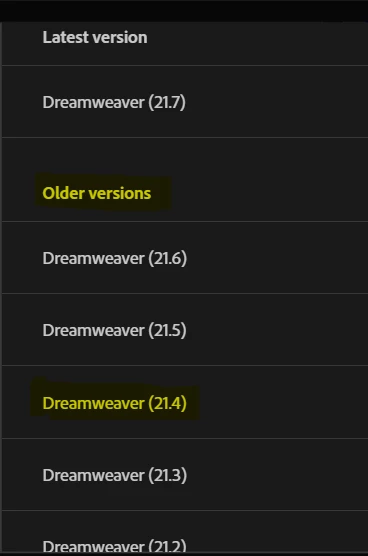
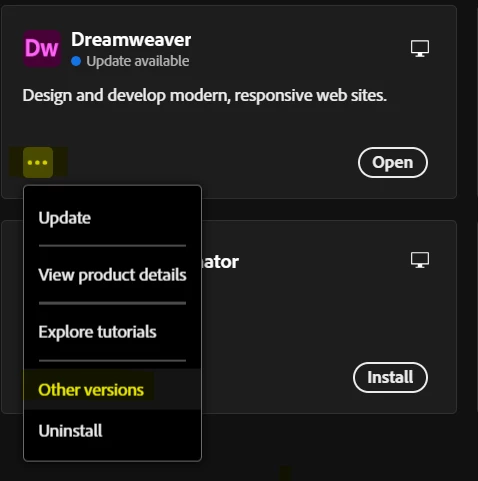
    If you rely much on extensions, you should revert to previous versions of DW that can still support them.  I’m not sure the latest releases can. 


    For what it’s worth, I stopped using DW extensions. I found that scripted solutions provided better results with fewer hassles.


    Screenshot from Creative Cloud Desktop App.


    Hope that helps.


    10 replies

    Participant
    August 15, 2026

    The ONLY reason I am trying the new Dreamweaver  is because i thought i could use my project vii extensions.


    Nancy OShea
    Community Expert
    Community Expert
    August 15, 2026

    DMX Zone Extension Manager for installing 3rd party extensions.

    https://www.dmxzone.com/go/22670/dmxzone-extension-manager-for-dreamweaver/

    DW Tools => Commands => DMX Zone Extension Manager


    DISCLAIMER: DMX Zone’s ExMan is a legacy app built for DW 8+ on Win7 and OSX. I don’t know about its compatibility with Win11, or macOS Tahoe (26).


    I stopped using DW extensions & replaced them with Bootstrap components or plain vanilla JS which works in ALL code editors. 

    https://getbootstrap.com/docs/5.3/components/accordion/


    Nancy O'Shea— Product User & Community Expert
    Community Manager
    August 5, 2026

    Hi ​@TomF2468  we have resolved the issue with the latest Dw 21.8.1 release. Please try updating to the latest version and let us know if you are still observing the reported issue with the extensions.


    Have a pleasant day!


    Regards,

    Nayan

    Adobe Dreamweaver Team 

    TomF2468Author
    Inspiring
    August 7, 2026

    Yahoo… It works! I did have to re-install the plugins (with DMZ Zone), but everything is now working on the latest release 21.8.1

    Inspiring
    July 25, 2026

    OK thanks anyway

    TomF2468Author
    Inspiring
    July 17, 2026

    Going back to 21.6 solved this for me. I had to do it without saved preferences and had to trace down a few support files before all was working again. That means I had to reinstall all of my extensions and custom workspace. I know that seems backwards (holding onto the old extensions) but it is easier than rebuilding existing sites without those extensions!

    Inspiring
    July 24, 2026

    Same for me Tom - shame they dont care about our purchased extensions from many years.

    Nancy OShea
    Community Expert
    Nancy OSheaCommunity ExpertCorrect answer
    Community Expert
    July 15, 2026

    If you rely much on extensions, you should revert to previous versions of DW that can still support them.  I’m not sure the latest releases can. 


    For what it’s worth, I stopped using DW extensions. I found that scripted solutions provided better results with fewer hassles.


    Screenshot from Creative Cloud Desktop App.


    Hope that helps.


    Nancy O'Shea— Product User & Community Expert
    Inspiring
    July 24, 2026

    Hi Nancy is it not possible to ask the powers that be at DW why they cant update to cover all of our purchased extensions for DW ? I am sure there will be many like us out there who love extensions. 

    Nancy OShea
    Community Expert
    Community Expert
    July 24, 2026

    No, not possible. Upper-level decision makers don’t lurk in these user-to-user forums. 


    Nancy O'Shea— Product User & Community Expert