


Known Participant
March 22, 2017
Answered

Do a search for only blank table cells

  • March 22, 2017
  • 2 replies
  • 999 views

My day job has me auditing the data entry of other people in batches of html documents. One of the things we need to search for is empty cells in tables (and often nested tables). Given we need to crank through 150+ per week, visually hunting down all the possible empty cells can be a bit of a repetitive chore. I would love to use the "find/replace" tool to just search all the documents in a batch so I can just work my way down the list. Even better would be to search for all <td> tags that have a non-breaking space character ( ) and assign an attribute that gives is a starkly obvious highlight color so I don't have to keep the search results open.

Here's the problem: Doing a search for a specific tag containing   doesn't find anything. Putting a space in the "containing" field in the search box just lists all the table cells that have blocks of text but not the empty cells.

Additional complication: The person who put together the "templates" that the build team is using was using some other application (I suspect Microsoft Word) that left all sorts of cruft and crud scattered throughout the tags, so simply doing a search for "<td> </td>" in the source code will completely skip most (if not all) empty cells, because that search string will bypass all cells that have any additional attributes, or even just a random space in the code.

Yet Another Additional complication: The person who put this template together didn't know how to use <div> tags, so they used a bunch of empty <p> tags to create white-space at the bottom of the document. I've already been told that I'm not allowed to add <div> tags or remove the empty <p> tags, so just doing a source code search for "&nbsp" will show me all the empty <p> tags with the <td> tags buried in the search results.

Does anyone know how to use the "Specific tag" part of the search tool to find the non-breaking space characters? Or is there a better way to do this that I'm unaware of?

This topic has been closed for replies.
Correct answer Nancy OShea

I noticed they stripped it out when my comment got approved. They contain the   character.


I came up with some jQuery code that may help you. 

Consider this document.  NOTE: I'm using spaces between & n b s p ; to preserve the code in this forum. For this to work, remove the spaces.

<!doctype html>

<html lang="en">

<head>

<meta charset="utf-8">

<title>Untitled Document</title>

</head>

<body>

<table width="600" border="4" cellpadding="5" cellspacing="1">

<tr>

<td></td>

<td>& n b s p ;</td>

<td></td>

<td>content</td>

</tr>

<tr>

<td>& n b s p ;</td>

<td></td>

<td>content</td>

</tr>

<tr>

<td>& n b s p ;</td>

<td>content</td>

<td></td>

</tr>

<tr>

<td>& n b s p ;</td>

<td>content</td>

<td></td>

</tr>

</table>

<!--jQuery library-->

<script src="https://cdnjs.cloudflare.com/ajax/libs/jquery/1.11.3/jquery.min.js"></script>

<script>

//strip non-breaking spaces from cells

$("td").each(function() {

    var $this = $(this);

    $this.html($this.html().replace(/ /g, ''));

});

//check for empty cells i.e. <td></td>

$( "td:empty" )

  .text( "Was empty!" )

        //highlight empty cells

  .css( "background", "rgb(255,220,200)" );

</script>

</body>

</html>

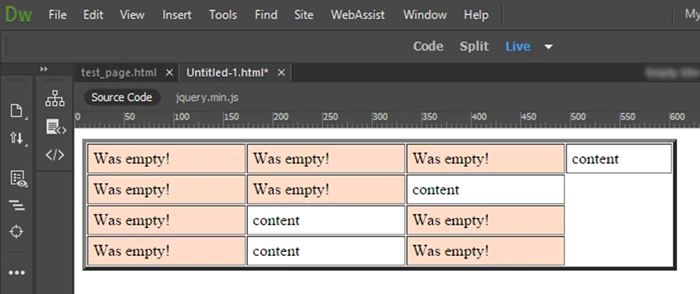
In Live View, it looks like this.

Hope this helps.

Nancy

2 replies

Nancy OShea
Community Expert
Community Expert
March 22, 2017

I agree with Rob that working with static HTML is a bit primitive.  My tables are populated from a database with server-side code.   For this example, I had to create a static HTML page with empty table cells.

Using the latest version of DW CC 2017, Find:

<td> </td>

Current Site

Find ALL

Nancy

Nancy O'Shea— Product User & Community Expert
Rob Hecker2
Legend
March 22, 2017

If this is data entry, where is the data going? Does it go into a database?

Or is a bunch of static html pages being created?

It sounds like you have to deal with the fact that everything has been done wrong and they want to keep doing it wrong, but lets start by figuring out just how wrong it is.

Are the data entries being done over the web or within an intranet?

Known Participant
March 22, 2017

Rob Hecker2

If this is data entry, where is the data going? Does it go into a database?

Or is a bunch of static html pages being created?

It sounds like you have to deal with the fact that everything has been done wrong and they want to keep doing it wrong, but lets start by figuring out just how wrong it is.

Are the data entries being done over the web or within an intranet?

Nancy OShea

I agree with Rob that working with static HTML is a bit primitive.  My tables are populated from a database with server-side code.

Oh, god, you have no idea!

Get ready to cringe: They have a whole team of people that harvests the data from Excel files and then creates a bunch of static HTML pages. Whenever I get any deeper than basic HTML/CSS or mention any way of doing this task more advanced than mid-90's level site building, my supervisor's eyes glaze over. (Were it up to me, we'd have built a LAMP stack on a virtual server, set up a web-form for data collection from the various parts of the company, skipped the Excel files and data entry team entirely, and served the information out as you guys immediately thought it should be) Worst part is I was hired through a staffing agency after they'd been doing this for a year, so they've already mentally committed to doing it the way things are now, so getting them to go with a massively better solution would be a Sisyphian task. (At least I know I'll have a job for the next year or two)

Nancy OShea

Using the latest version of DW CC 2017, Find:

  1. <td> </td> 

Current Site

Find ALL

I'm attempting something very similar in CC 2015 (can't post a screenshot from this computer thanks to IT policies) but the problem is this:

<td> </td>

Does not equal this:

<td > </td>

There's so very MANY of the latter example and others of it's type that just doing the search as you suggest just doesn't work to find all the empty cells. (Spaces in the code, attributes where none should be, <span> tags wrapping around anchors and   characters, etc.)

Ideally, I can use the "Search for a specific tag" option, specify <td>, and tell it to (somehow) only return results with the non-breaking space character.

There may be no good way to do this, if that's the case, then I get to do this the hard way. :/

Nancy OShea
Community Expert
Community Expert
March 22, 2017

Sadly, this forum strips out the & n b s p ; code.

But that's what I used inside the <td> cells.

Are your cells completely empty or do they contain a non-breaking space?

Nancy

Nancy O'Shea— Product User & Community Expert