brucec80997378
Participant
April 29, 2017
Answered

doctype error?

  • April 29, 2017
  • 1 reply
  • 956 views

So I build the page in photoshop, import it over to dream weaver, immediately get an error code for no doctype, I check the page in live view looks perfect, I then add the doctype like so <!DOCTYPE html> at the top of the page, check again in live view and have all kinds of display issues. I am running PS CC and DW CC. Any clues on this? I have tried lower case on the doctype also and still didn't work.

This topic has been closed for replies.
Correct answer Nancy OShea

Photoshop is a terrific graphics app but it's woefully inept at generating good HTML and CSS code.  You cannot use PS generated code on a live web site.  PS is fine for making comps to show the client before you undertake the real work of building your design with HTML & CSS code.   Use PS for images only. 

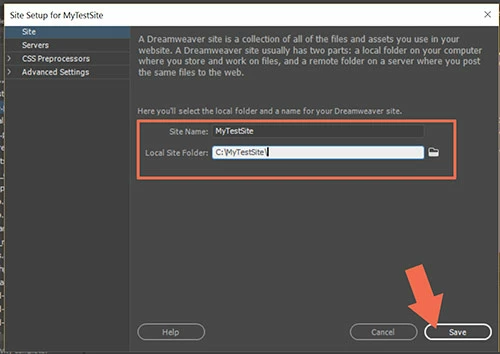
  1. Define your local site folder in DW by going to Site > New Site.  The site folder is where you keep your images and other site assets on our hard drive.   Example:  C:\MyTestSite\
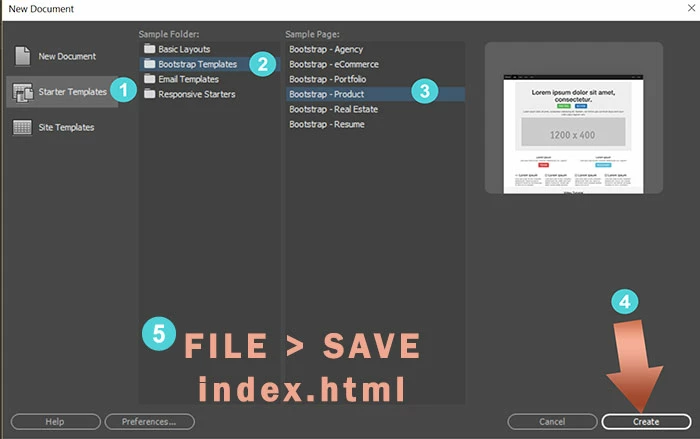
  2. Create a new HTML document.  Or use a Starter Template.  Go to  File > New > see screenshot.

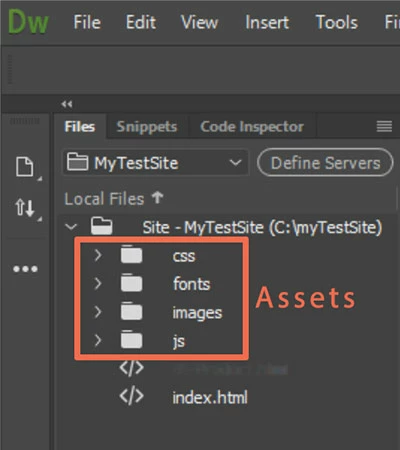
Once your file is saved to your local site folder, DW creates assets folders for you.

You should have an error free document to work with.  You can insert your JPG or PNG images that you made in PS.

Nancy

1 reply

Nancy OShea
Community Expert
Nancy OSheaCommunity ExpertCorrect answer
Community Expert
April 29, 2017

Photoshop is a terrific graphics app but it's woefully inept at generating good HTML and CSS code.  You cannot use PS generated code on a live web site.  PS is fine for making comps to show the client before you undertake the real work of building your design with HTML & CSS code.   Use PS for images only. 

  1. Define your local site folder in DW by going to Site > New Site.  The site folder is where you keep your images and other site assets on our hard drive.   Example:  C:\MyTestSite\
  2. Create a new HTML document.  Or use a Starter Template.  Go to  File > New > see screenshot.

Once your file is saved to your local site folder, DW creates assets folders for you.

You should have an error free document to work with.  You can insert your JPG or PNG images that you made in PS.

Nancy

Nancy O'Shea— Product User & Community Expert
brucec80997378
Participant
April 30, 2017

Thanks for your help!!