Inspiring
September 9, 2017
Answered

Dreamwaever 2017.5 is not running

  • September 9, 2017
  • 3 replies
  • 550 views

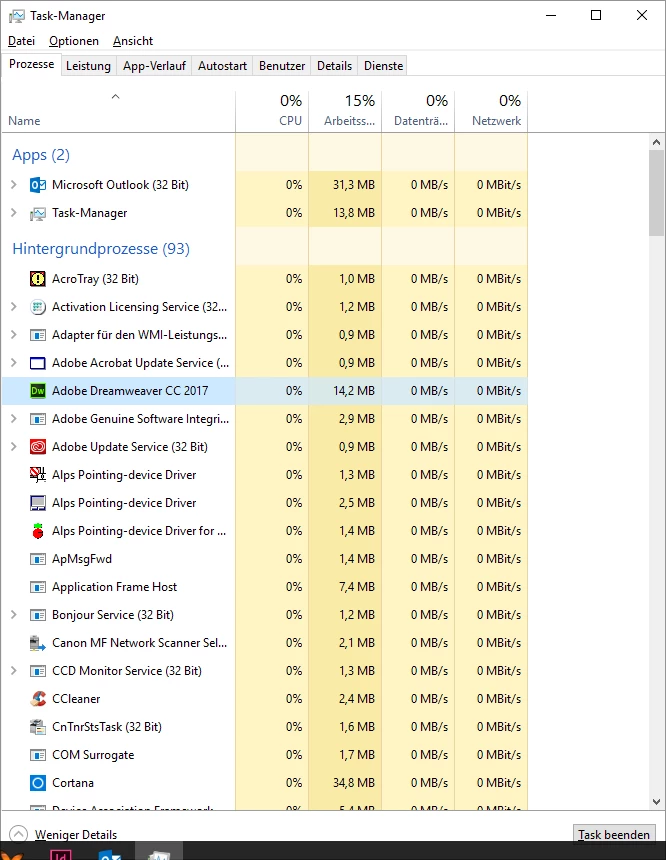
Hi there, I still have a Problem with Dreamweaver CC 2017.5. When ever I'll try starting the Programm it is running as a backgrund process under Windows 10 home Edition.

All Software updates are made. There is no anti Virus Software running on my PC. What's happend?

Please help - it urgent!

    This topic has been closed for replies.
    Correct answer Nancy OShea

    Hi Nancy, I've used CCleaner.exe and after that I've made some reboots. Running Dreamweaver in Admin mode is also failed.


    What you should run is the Adobe Creative Cloud Cleaner tool to remove DW.  Then reinstall.

    http://helpx.adobe.com/creative-suite/kb/cs5-cleaner-tool-installation-problems.html

    Before reinstalling, ensure you have all the latest updates for your operating system.

    3 replies

    ALsp
    Legend
    September 9, 2017

    Rather than pulling your hair out, why don't you revert to a prior Dreamweaver version? CS6 is available through the cloud and it's a much better program than CC.

    hrauerAuthor
    Inspiring
    September 9, 2017

    Hi Ben, thank's for the first etempt but is wasn't helpfull. After resolving all Lavasoft .dlls the Problem is still available. Dreamweaver dosn't works in any way. It allways Comes up as an Background process.

    BenPleysier
    Community Expert
    Community Expert
    September 9, 2017

    The problem may be caused by Lavasoft This may help you find out Dreamweaver CC 2017 Issue

    Wappler is the DMXzone-made Dreamweaver replacement and includes the best of their powerful extensions, as well as much more!
    hrauerAuthor
    Inspiring
    September 9, 2017

    Hi Ben, thank's for the first etempt but is wasn't helpfull. After resolving all Lavasoft .dlls the Problem is still available. Dreamweaver dosn't works in any way. It allways Comes up as an Background process.

    Nancy OShea
    Community Expert
    Community Expert
    September 9, 2017

    After removing LavaSoft and all related DLL files, did you restart your computer?

    Also try launching DW by right-clicking and select Run as Administrator.

    Nancy O'Shea— Product User & Community Expert