


Participant
October 15, 2020
Answered

Dreamweaver 20.2 won't connect to GoDaddy any longer

  • October 15, 2020
  • 7 replies
  • 3394 views

I've been in chat with GoDaddy for 2 hours and they seem to think the issue is with Dreamweaver. I try to connect to my remote site and get an FTP error (that the passwords and account do not match) and cannot connect. I tried all the things I could find, verifying the password and account, toggling on and off settings. I even deleted the site in the site manager and made a new one. Still not connecting. Nothing in the FTP log either. GoDaddy did just migrate the site to new servers. Anyone else having the problem?

This topic has been closed for replies.
Correct answer Nancy OShea

@Infodiva808 

Try Connect using: SFTP instead of FTP. 

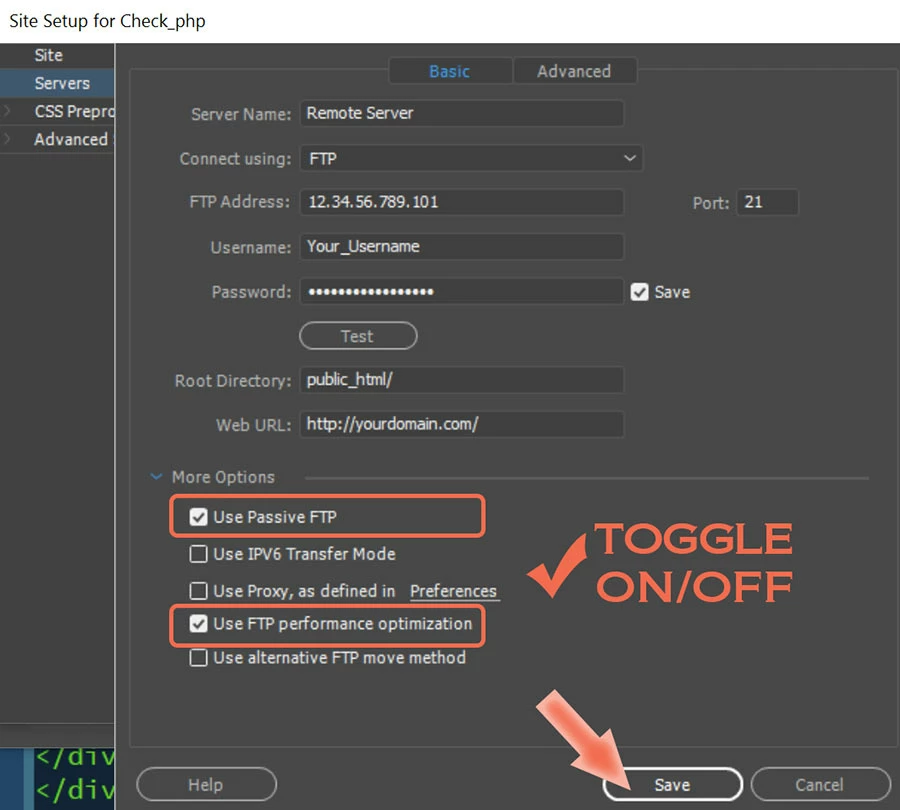
Also try toggling the settings under More Options.  See screenshot.


7 replies

FSProductions
Participant
May 8, 2023

I had to do a couple of things, not sure if it was one change or all of them. I reset my cPanel password, then I had to change my FTP Address from my domain name as I had previously been able to use and instead place my IP address in this field. And finally, I had to place public_html in the Root Directory field. After all of that, my issue was resolved.

Participant
February 26, 2021

I'm currently enduring this exact issue. Has there been a solve for it?

Nancy OShea
Community Expert
Community Expert
February 26, 2021

Hi @kenalmquist,

If you can't connect to GoDaddy, contact them.  Either the server is not set up correctly at their end or you don't have the correct S/FTP log-in credentials at your end.  Site > Manage Sites... > Server


ServerName: [Any designation you wish]

Connect using:  SFTP or FTP, Etc...

S/FTP Address:

Username:

Password:

Root Directory:


Nancy O'Shea— Product User & Community Expert
Nancy OShea
Community Expert
Nancy OSheaCommunity ExpertCorrect answer
Community Expert
October 15, 2020

@Infodiva808 

Try Connect using: SFTP instead of FTP. 

Also try toggling the settings under More Options.  See screenshot.


Nancy O'Shea— Product User & Community Expert
Participating Frequently
October 15, 2020

I also had to add public_html to Dreamweaver's root directory in the server settings...

Participating Frequently
October 15, 2020

I had the similar issues with Dreamweaver.....When they switched my site to C-Panel, some items did not get changed...I had to go into Dreamweaver>site>manage site>server.......I had to put the new username, password, and ip address that Go Daddy changed when moving the site...

Community Expert
October 15, 2020

Unfortunately your screenshot does not help at all.  Can you open DW, click on Site-->Advanced-->FTP Log and try to make the connection again.  And then let us know the FTP error number you are receiving as that will tell us what is going on.

Participant
October 15, 2020

I just wanted to add that I was able to connect with Filezilla but shouldn't the connection work in Dreamweaver?

Participating Frequently
May 10, 2023

@Infodiva808 sftp is big problem for server and client ftp connections.

Nancy OShea
Community Expert
Community Expert
May 10, 2023

This is an old topic from 3 years ago. 😕😕


Nancy O'Shea— Product User & Community Expert