So I tested your answer.
I made added some changes to Bkg color and font style in the css sheet and saw that the file did did have the asterisk in the top of the document window, I still was not able to "save all related files', however when I went 'Save All' the asterisk disappeared.
So I am still concerned that even when I had something to save it still did not give me that option to 'save all the related files', actually i am confused.
It sounds to me as if you were working from the CSS file directly, and not through the Related Files bar at the top of the main document. Save All would be the correct option if you are opening the files and modifying them directly.
Try this...
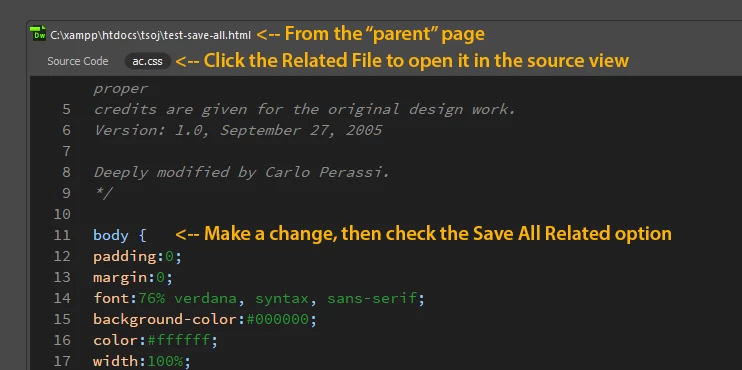
1. Open the "parent" page first.
2. Click on the .css file in the Related Files bar of that page
3. Make a change to the css (without hitting Ctrl + S) check the Save All Related option
See image below...





 AdChoices