karsteng79712692
Participating Frequently
November 3, 2016
Answered

Dreamweaver 2017 code coloring broken

  • November 3, 2016
  • 10 replies
  • 9297 views

Hi

Unfortunately I just updated Dreamweaver to 2017 and now it's close to impossible to work in this program.

I always use code view and the code coloring was perfect in 2016.

In 2017 however the page cannot use code coloring for pages that contains mixed languages.

That makes it too hard to identify the different code blocks as they are color mixed.

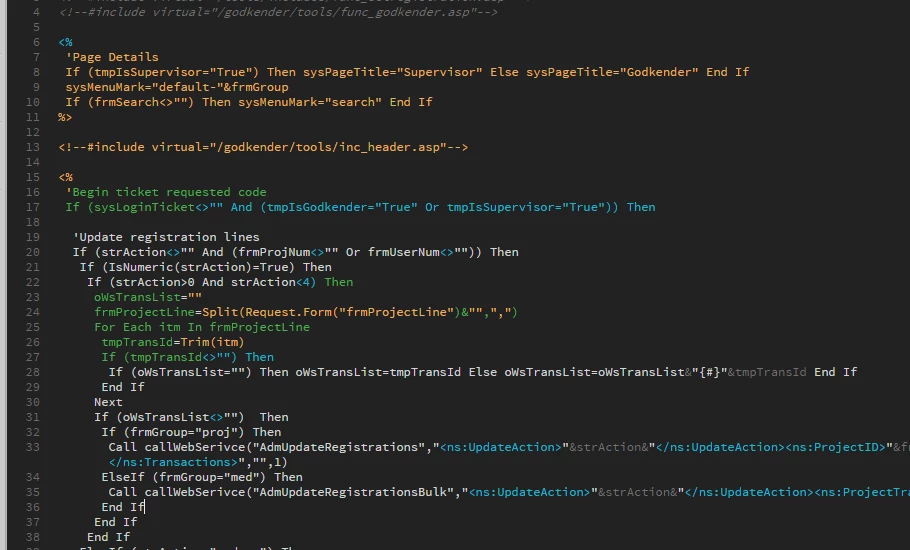
See image:

ASP starts with blue color. Then goes all orange and ends with orange tag.

Next ASP block starts with orange then goes green and starts mixing randomly with write and blue.

This goes on when the code switches to HTML and later JavaScript.
Please tell me this can be fixed. Currently Dreamweaver is useless for me

This topic has been closed for replies.
Correct answer ariez4669845

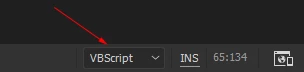
I found a solution to the comment problem. Look at the bottom-right corner of your DreamWeaver screen. There's a language selector which is set to HTML by default when you open .asp files. Choose VBScript and voila - the comment colors problem is gone.

10 replies

Participating Frequently
June 28, 2020

Hi All,


We have started working on “Code Color Customization” improvements by adding support for customization of generic and language specific colors.


We have further stabilized the code coloring feature in our latest Prerelease build 15333.


You can refer to below thread for more details on code coloring customization improvements.
https://forums.adobeprerelease.com/dwalpha/discussion/467/dreamweaver-build-15333-is-now-available#l...


Please join Dreamweaver beta program from below link and try out the feature.

https://www.adobeprerelease.com/beta/9EB451B5-D2E8-46E5-AFA2-78C85442FFA2/participate/CD0C95AA-6274-...


Please go ahead and try out the build and let inflow your thoughts/suggestions. Looking forward to your valuable feedback.


Thanks


Dreamweaver Team

ariez4669845Correct answer
Participant
December 28, 2016

I found a solution to the comment problem. Look at the bottom-right corner of your DreamWeaver screen. There's a language selector which is set to HTML by default when you open .asp files. Choose VBScript and voila - the comment colors problem is gone.

Participant
December 28, 2016

This is much better! but still not what it was in 2015. 2015 at lease diferentiated between mixed HTML/ASP/CSS code.

Looking for a new alternative now.

Thanks though, this is MUCH BETTER,.

Participant
December 2, 2016

I'm an ASP/VBScript developer as well, and this is completely frustrating.  It can't be that hard to keep code coloring and code hinting for one more language that they already have definitions for.  I'm considering ditching Adobe and going back to the Microsoft tools. I hear they have improved a lot over the years.

yazzbe
Participant
November 11, 2016

please bring back code coloring for ASP/vbScript. I have many (old) ASP sites that need to be maintained. I don't want to switch to another program for those.

minor issues:

  • you cannot ctrl+f when no file is open. eg. when you want to search a folder map, Dreamweaver forces you to open a file first, totally unnecessary
  • when selecting and uploading a file, the file is not selected any more in the file tree

The broken code coloring and a few other minor issues made me revert back to 2015 CC today.

Participating Frequently
November 3, 2016

There is a Brackets theme solution for people on Windows, scroll down to Per Berntsen Nov 3, 2016 8:15 AM (in response to NVGLeo):

Re: Code colouring in dreamweaver 2017

But, where are main.less and package.json Brackets style files on the MacOS Sierra operating system?

Thanks,

Dean

Jon Fritz
Community Expert
Community Expert
November 3, 2016

Have you looked under the same path, replacing "C:\Program Files" with "Macintosh HD\Applications"?

All the older versions of DW put things under the same paths, with that slight change, hopefully this one is the same.

Participating Frequently
November 3, 2016

Yes, the Mac is version paths are different than the Windows one. And after searching the entire install folder, did not find those files. Thanks.

Participant
November 3, 2016

I work with classic ASP and ASP.NET. Also found the new version terrible as I just use code view and it is just broken with these files. Cannot find any code color option and my "old hacks" (editing color.xml and themes folder XMLs) that worked up until version 2015 do not work anymore...

Rolling back until there's a way to get my old Dreamweaver code view colors back. Or at least there's any code coloring working - even with "new" colors.

Thanks.

Nancy OShea
Community Expert
Community Expert
November 3, 2016

With the new code editor based on Brackets, you have to edit the LESS and JSON files now.  XML doesn't work.  See Reply #9 in this disucssion

Re: Code colouring in dreamweaver 2017

Nancy O.

Nancy O'Shea— Product User & Community Expert
Participating Frequently
November 3, 2016

Hello, this is a BIG deal. Need a way to get the old code coloring back. Very hard to learn the new code coloring. In the middle of big project. Adobe, please respond!

Participating Frequently
November 3, 2016
Blue Bear
Participating Frequently
November 3, 2016

I just rolled back as well - the code coloring and lack of being able to sort/view the file list by date are usability deal-breakers for me.

I hope Adobe is listening to its users....  I don't get why anyone would remove user-customizable features.  It makes zero sense.

Jon Fritz
Community Expert
Community Expert
November 3, 2016

You can sort by date.

Right click the bar next to "Local Files" in your Files window and place a check by "Modified". That will add a clickable header to the files window allowing you to sort by modification date.

Personally, I'm also waiting on CC2017 due to the code coloring, and a few other cosmetic issues. Hopefully the next patch takes care of my issues with the program.

Blue Bear
Participating Frequently
November 3, 2016

I've tried that, and could not get any additional headers to display in order to check them (simply nothing showed up no matter where I right-clicked!)

Bruce -- Sent from my iPhone

BenPleysier
Community Expert
Community Expert
November 3, 2016

I thought that I would do a little test and got the following

Wappler is the DMXzone-made Dreamweaver replacement and includes the best of their powerful extensions, as well as much more!
karsteng79712692
Participating Frequently
November 3, 2016

And if you place some HTML right after the include file?

I tried several documents but always with the same broken result.

Now I rolled back to DW 2015.1 where there are no problems at all.

Per Berntsen
Community Expert
Community Expert
November 3, 2016

See post 9 in this thread

Re: Code colouring in dreamweaver 2017

NVGLeo
Participating Frequently
November 3, 2016

I cannot code anything either. The program is useless to me as well. At least they didnt make everything BLACK and WHITE. I will cancel my subscription if they don't come with a solution in 24 hours.