mabodev
Participating Frequently
November 8, 2016
Answered

Dreamweaver 2017 double click select

  • November 8, 2016
  • 9 replies
  • 4694 views

Hello

i recently updated to DW 2017

my main problem is when i double click to select an element including the php $ symbol, the past version only selects the "name" of the variable, leaving aside the $ symbol, this new version includes the symbol in the select, how can i only select the name?

regards

This topic has been closed for replies.
Correct answer BenPleysier

As well as making your view known in this user-to-user forum, please make it known where it counts by going to

9 replies

mabodev
mabodevAuthor
Participating Frequently
July 18, 2017

DW 2017.5 released.....

what a mess!

now you fixed the double click on variables and the $ sign, but... if i select shift + ctrl + back arrow it includes the dollar sign.

the autoclose quotes is a nightmare

when you are typing, after saving into remote server sometimes it selects the text and if you are not aware you delete you code

the find dialog  is separate from the find and replace

the place for refresh button on the files window is now sync with the remote server

i wonder why you take a very decent software and turned into this, i have lost several hours trying to find the problem in code just to find out that the problem is DW changing code.

i hate you, from the deep of my heart

Jon Fritz
Community Expert
Community Expert
July 18, 2017

As a paid subscriber, there's no reason for you to force yourself to use the latest version.

Under a single subscription, you can have 5 CC versions installed on the same machine(s), at the same time, they just won't run concurrently.

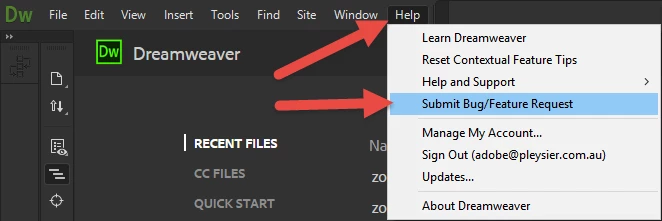
Simply drop back to an older, functional-in-your-workflow version, while reporting issues and making feature requests under the Help menu. Adobe has backtracked on several deprecated or massively changed features when it comes to DW at the (sometimes incredibly loud) urging of its users.

To get the older version back...

1. Open the Creative Cloud Desktop App

2. Click the Apps tab
3. Scroll down to the "Find Additional Apps" bar
4. Click the blue link on the right side of the "Find Additional Apps" bar
5. Choose the bottom most link, "View Previous Versions" in the pop up menu
6. Under the "Find Additional Apps" bar, scroll down to and click the Dreamweaver icon
7. Choose the version you want from the list and install.

The only real limitation to installing older versions is that various dot releases of the same version will overwrite each other. So, you wouldn't be able to have CC 2017.2 and CC2017.5 at the same time. However, you could have CS6, CC, CC2014, CC2015 and CC2017.x all installed at once if you felt the desire to do that.

mabodev
mabodevAuthor
Participating Frequently
July 18, 2017

Thanks... but changing things it not "my workflow", yeah nobody is forcing me to update but, i am paying so  would I get a rebate for not using the latest version?

so am i stucked with a version with no support for the latest code hints?

this is not photoshop , this is a typing program, when everything is almost mechanical. if you are going to chance critical things, at least include in the config an option to activate this.

mabodev
mabodevAuthor
Participating Frequently
May 20, 2017

when DW 17.5 is going to be released?

BenPleysier
Community Expert
Community Expert
May 21, 2017

Those in the know are covered by a non-disclosure agreement.

Wappler is the DMXzone-made Dreamweaver replacement and includes the best of their powerful extensions, as well as much more!
Nancy OShea
Community Expert
Community Expert
May 21, 2017

I'm guessing it will be a while....

2017.1 only recently rolled out.

Nancy

Nancy O'Shea— Product User & Community Expert
Niharika Jha
Adobe Employee
Adobe Employee
May 15, 2017

Hi All,

Please wait on for Dreamweaver 17.5 for this fix.

Regards,

Niharika Gupta

Adobe Dreamweaver

Known Participant
May 15, 2017

Is the reply itself takes so many months ......

Rob Hecker2
Legend
January 16, 2017

As I said in your other post on this issue, the current behavior seems logical to me, even if it isn't what you want.

Known Participant
January 16, 2017

Well maybe for your flow, it works well. But for my flow, it doesn't.

So, how to cater to both our types? Just put it as part of setting, easy right?

That's what I'm talking about.

As for making sense, here's an example:

$myvar=$get['myvar'];

Now, I wanna copy paste yourvar and replace the myvar on top.

Try double-clicking and achieving that for both cases. In this browser, you can, rightfully, and it makes sense.

In DW, it works fine for the second one, for the first one, you have to add the $ manually after pasting, or not use double-click-select at all.

Hope u understand my point.

Known Participant
January 16, 2017

Submitted long ago and waiting. The cows have already come home, but not their reply!

EDGEMarketing
Participant
January 11, 2017

I submitted mine!

Participant
December 4, 2016

This new dreamweaver function is a mess! It takes a lot of time to remove all the dollar sign.

As a programmer it is a waste of time.

I do not understand why this has been done in this version.

Please give us an option to select or deselect this behaviour. Before if you had a variable like for example $variable with a double click only the word variable  was highlighted, not it selects also the dollar sign $variable.

Please do it.

BenPleysier
Community Expert
BenPleysierCommunity ExpertCorrect answer
Community Expert
December 4, 2016

As well as making your view known in this user-to-user forum, please make it known where it counts by going to

Wappler is the DMXzone-made Dreamweaver replacement and includes the best of their powerful extensions, as well as much more!
BenPleysier
Community Expert
Community Expert
December 4, 2016

As an extra note, the issue has not attracted the attention of the Dreamweaver Team at this point in time. Submit your request and get as many people to vote for it as you can.

Wappler is the DMXzone-made Dreamweaver replacement and includes the best of their powerful extensions, as well as much more!
Known Participant
November 22, 2016

I have the same problem. Double click is including the $. When will the question be answered? It's like almost a month already.

Gary_Criteria
Participant
November 11, 2016

I've been using Dreamweaver since the Macromedia days. It's VERY difficult to get used to some of changes now such as double clicking a variable only for the $ to be included in that selection. I've spent most of the morning putting the dollar sign back in where I've been using it as I normally would, memory muscle built up over years can be hard to change.