


richardn8625382
Participant
May 14, 2017
Answered

Dreamweaver (2017) Has Stopped Working

  • May 14, 2017
  • 1 reply
  • 290 views

Dreamweaver 17.0.0 ; 17.0.1 ; 17.0.2

Computer is a Dell XPS435/9000

OS: Windows Creators v 1703

Intel Core I7 920 @ 2.67 GHz

24 GB Ram

1.5TB HD with 1TB Free

After what seemed as a normal install, Dreamweaver consistently shows this graphic after the program seems to open normally. Once open this graphic appears instantly and Dreamweaver has to be closed.
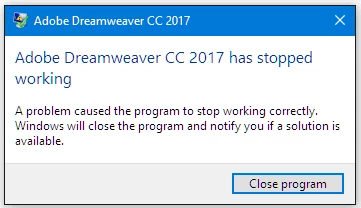
This also happened while using Windows v 1607. While installing in both windows versions, my Antivirus and Malware programs were shut down. Additional, prior versions CS6 and 2015 were deleted prior to the install.

All other Adobe products appear to be operating.

I have spent countless hours following various How-Tos and nothing works.

Any further suggestions?

This topic has been closed for replies.
Correct answer Nancy OShea

Open your Windows Event Viewer.  What is the faulting module?

If the faulting module is "LavasoftTcpService64.dll" (or something similar) then Lavasoft is the culprit.

Lavasoft extension is a known conflict with Dreamweaver & Photoshop.  Uninstalling Lavasoft and removing its related DLL files fixes the problem.  See link below for details.

Photoshop crashes with Lavasoft Chrome extension installed

Nancy

1 reply

Nancy OShea
Community Expert
Nancy OSheaCommunity ExpertCorrect answer
Community Expert
May 14, 2017

Open your Windows Event Viewer.  What is the faulting module?

If the faulting module is "LavasoftTcpService64.dll" (or something similar) then Lavasoft is the culprit.

Lavasoft extension is a known conflict with Dreamweaver & Photoshop.  Uninstalling Lavasoft and removing its related DLL files fixes the problem.  See link below for details.

Photoshop crashes with Lavasoft Chrome extension installed

Nancy

Nancy O'Shea— Product User & Community Expert
richardn8625382
Participant
May 14, 2017

Thank you a million time over Nancy!

After searching the Event Viewer for a while I finally came across a Dreamweaver listing  with the listing of "LavasoftTcpService64.dll" (or something similar). For whatever reason I had the Lavasoft Web Companion (which I never used) and sure enough deleted it from my system and wouldn't you know Dreamweaver 2017 opened and was ready for action!

Again, thank you so much! Now back to work!

Nancy OShea
Community Expert
Community Expert
May 14, 2017

Glad to be of help .

Nancy O'Shea— Product User & Community Expert