Participant
November 30, 2016
Answered

Dreamweaver 2017 - How to refresh local files

  • November 30, 2016
  • 3 replies
  • 4076 views

I just updated to the new Dreamweaver 2017, and now the refresh button pops up this box:
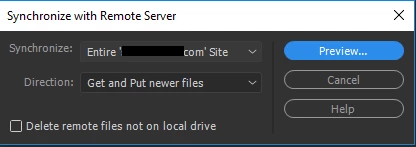
All I'm trying to do is refresh the local files...

    This topic has been closed for replies.
    Correct answer BenPleysier

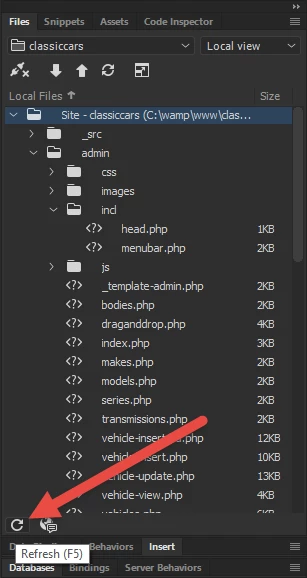
    You pressed the Synchronise button. To refresh local files

    3 replies

    Participant
    May 1, 2018

    Thank you!!! This was driving me nuts for months. I think it's finally time to review the new features as suggested above. I do wish, however, that Dreamweaver could automatically refresh as soon as a new file is added to the local folder. Is there a way to edit the refresh rate?

    Nancy OShea
    Community Expert
    Community Expert
    May 1, 2018

    I simply hit F5.

    Nancy O'Shea— Product User & Community Expert
    Participant
    April 26, 2018

    OMG, thank you! This has been frustrating me for months!

    BenPleysier
    Community Expert
    BenPleysierCommunity ExpertCorrect answer
    Community Expert
    November 30, 2016

    You pressed the Synchronise button. To refresh local files

    Wappler is the DMXzone-made Dreamweaver replacement and includes the best of their powerful extensions, as well as much more!
    GarrzillaAuthor
    Participant
    November 30, 2016

    Hmm thank you. thats an odd place to put that button

    Mugstomer
    Participant
    February 13, 2017

    Especially when it's been at the top for over a decade... one of the many changes made without any consideration of exiting users.