Operacional23
Known Participant
April 7, 2018
Answered

Dreamweaver 2018 - Adding the Databases, Bindings, Server Behaviors Panels

  • April 7, 2018
  • 1 reply
  • 2775 views

Hello,

How to leave Adobe Dreamweaver CC 2018 18.1.10155 this way:
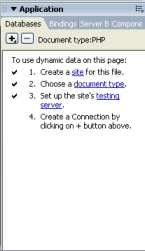

(Old Adobe Dreamweaver CC image)

???

Thank you!

    This topic has been closed for replies.
    Correct answer Nancy OShea

    Can not really put these panels on?


    I have the deprecated DB panels because one of my extensions from WebAssit piggy backs on top of it.  However, I do not use the old panels to generate code as it is sorely out of date.

    I kept DW CC 2017.0 so I could continue using the panels extension.

    I obtained the extension from DMX Zone.

    https://www.dmxzone.com/go/21842/enable-server-behaviors-and-data-bindings-panel-support-for-dreamweaver-cc/

    And I used the Extension Manager from DMX Zone to install it.

    https://www.dmxzone.com/go/22670/dmxzone-extension-manager-for-dreamweaver/

    1 reply

    BenPleysier
    Community Expert
    Community Expert
    April 7, 2018

    Dreamweaver CC2015 was the last version where the panels worked. You can install previous versions of Dreamweaver along with the latest.

    Wappler is the DMXzone-made Dreamweaver replacement and includes the best of their powerful extensions, as well as much more!
    Operacional23
    Known Participant
    April 7, 2018

    How to join two versions?

    BenPleysier
    Community Expert
    Community Expert
    April 8, 2018

    The two versions cannot be joined, you can install both, they will live alongside each other, but cannot run at the same time.

    Wappler is the DMXzone-made Dreamweaver replacement and includes the best of their powerful extensions, as well as much more!
