Answered
Dreamweaver 2019 Starter Templates
I have the Adobe Dreamweaver CC 2019 through graduate school Stevenson University and I can not find the Dreamweaver templates that are already created by Dreamweaver.

I have the Adobe Dreamweaver CC 2019 through graduate school Stevenson University and I can not find the Dreamweaver templates that are already created by Dreamweaver.
I have branched this to a new discussion called Dreamweaver 2019 Starter Templates.
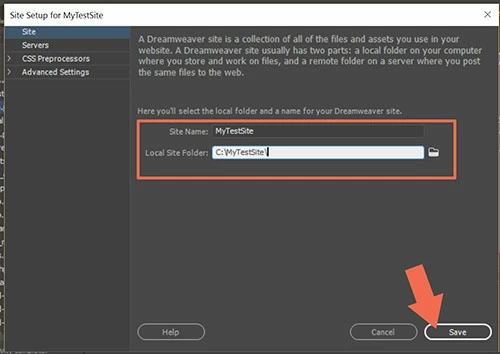
If you haven't already, first define your local site folder by going to Site > New site and telling DW where you want to keep your project files. For example my local site is C:\MyTestSite\
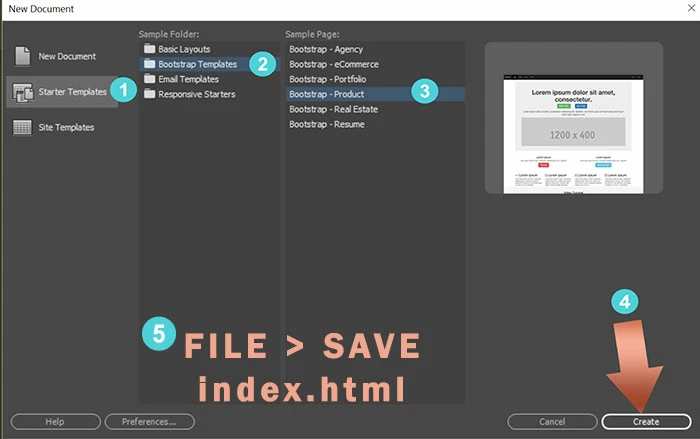
Next, go to File > New > Starter Templates. See screenshot.
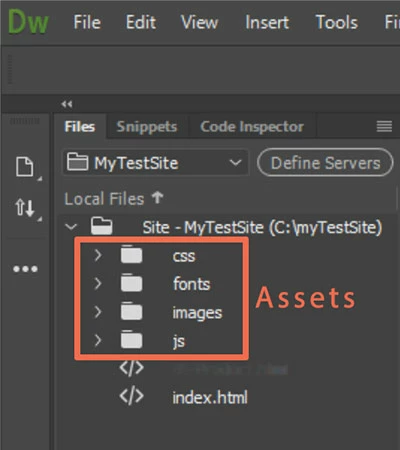
Depending on which starter template you select, DW will create assets for you when you save the file. See Files Panel.
Already have an account? Login
Enter your E-mail address. We'll send you an e-mail with instructions to reset your password.


 AdChoices