


Participant
Mar 10, 2022 7:14 PM UTC
Answered

Dreamweaver 2021 interface drop down menus highlight, but will not drop down

The menu name will only highlight, but will not not drop down - second try and holding the cursor on the name causes it to drop down - but there is no way to select across to the secondary menu item, i.e., "insert". Just started, maddening and useless at this point. I reinstalled Dreamweaver form CC, but useless.

This topic is closed to new replies. Start a new post to keep the conversation going.
Nancy OShea
Nancy OSheaCorrect answer
Community Expert
Mar 10, 2022 9:22 PM UTC

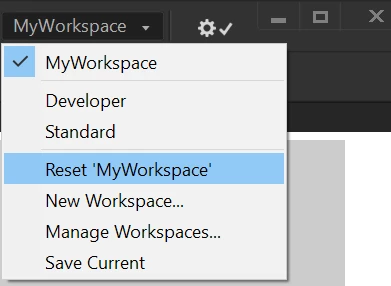
Try switching to another Workspace.


Nancy O'Shea— Product User & Community Expert

5 replies

Nancy OShea
Community Expert
Community Expert
Mar 10, 2022 8:38 PM UTC

Assuming your computer meets the minimum CPU & GPU requirements below, try restoring preferences.

https://helpx.adobe.com/creative-cloud/system-requirements.html
https://helpx.adobe.com/dreamweaver/system-requirements.html

Restore DW Preferences:

https://helpx.adobe.com/dreamweaver/kb/restore-preferences-dreamweaver.html


Translate
Nancy O'Shea— Product User & Community Expert
Participant
Mar 10, 2022 8:47 PM UTC

Thank you for your quick reply. Already reset all perferences - using a 2020 M1 mac laptop. Just doesn't work.

Translate
Nancy OShea
Community Expert
Nancy OSheaCommunity ExpertCorrect answer
Community Expert
Mar 10, 2022 9:22 PM UTC

Try switching to another Workspace.


Translate
Nancy O'Shea— Product User & Community Expert