HWurst
Participating Frequently
October 31, 2022
Answered

Dreamweaver 2021 SPACE BAR not working

  • October 31, 2022
  • 6 replies
  • 1970 views

BUG - Dreamweaver 2021 - Mac OS 12.6.1 - using space bar while typing forces HTML page to CLOSE. Unable to use 'space' bar while typing in Code view and Design view.

This topic has been closed for replies.
Correct answer Nancy OShea

Thanks for troubleshooting, @HWurst .

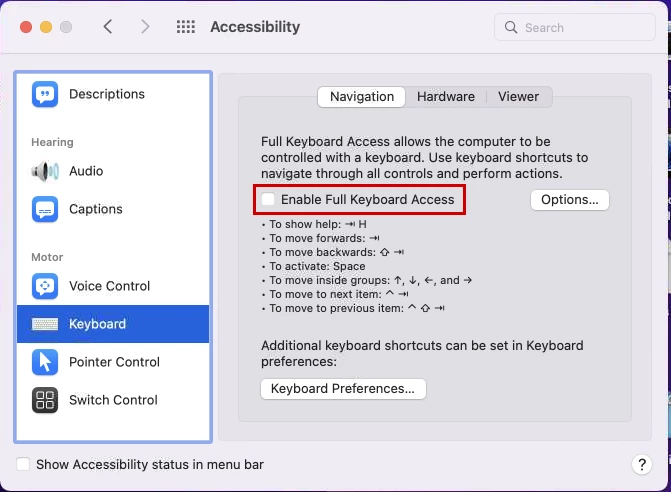
This is known Monterey problem.  Disable Full Keyboard Access in Monterey's Accessibility settings.

https://kb.parallels.com/en/129013

https://discussions.apple.com/thread/253331341


I'm loath to suggest upgrading to Ventura (or any new OS) until we know what the bugs & security issues are.  Historically, Apple has been quick to release new stuff but slower than a snail about delivering patches. 😕😕


Hope that helps.


6 replies

Nancy OShea
Community Expert
Nancy OSheaCommunity ExpertCorrect answer
Community Expert
November 1, 2022

Thanks for troubleshooting, @HWurst .

This is known Monterey problem.  Disable Full Keyboard Access in Monterey's Accessibility settings.

https://kb.parallels.com/en/129013

https://discussions.apple.com/thread/253331341


I'm loath to suggest upgrading to Ventura (or any new OS) until we know what the bugs & security issues are.  Historically, Apple has been quick to release new stuff but slower than a snail about delivering patches. 😕😕


Hope that helps.


Nancy O'Shea— Product User & Community Expert
HWurst
HWurstAuthor
Participating Frequently
November 1, 2022

Thank you, Nancy! 

That fixed the problem, and I do appreciate your time, expertise, and excellent help.

Heidi

Nancy OShea
Community Expert
Community Expert
November 1, 2022

You're welcome, Heidi.  Glad it worked for you. 🙂


Nancy O'Shea— Product User & Community Expert
Nancy OShea
Community Expert
Community Expert
October 31, 2022

@Daniel Kramer,

Please DO NOT TELL people to delete files. 


Nancy O'Shea— Product User & Community Expert
Community Expert
October 31, 2022

ok

Nancy OShea
Community Expert
Community Expert
October 31, 2022

WAIT!  Before you delete anything:

  • Did you restart your computer?
  • Does space bar work in other apps? 
  • Does space bar work in Design View or other DW files and sites?
  • Are you working with valid code denoted by a green checkmark? 

To restore Preferences on a Mac.

  • Hold down Cmd + Option + Shift while launching Dreamweaver.
  • In the Reset Preferences dialog box, click Yes.


Nancy O'Shea— Product User & Community Expert
HWurst
HWurstAuthor
Participating Frequently
October 31, 2022

Hi Nancy -


First of all THANK YOU,  for your concern and help... but the plot thickens after answering your pertinent questions.

• Restarted computer (twice, last night as well)

• Space bar works in Apple Mail, text edit, and Apple Pages... BUT NOT in any text editor set to HTML, including BBEdit and a new download of Brackets (Mac v 2.1.2... or any other current Adobe app.

• Space bar does NOT work in any Dreamweaver view (Code, Design or Live) for any existing HTML files; checked multiple HTML pages on more than one of my sites.

• Yes, HTML is the code (in Dreamweaver, BBEdit, Brackets

• Yes, I did try to reset preferences (thanks for How to do that!)


No problems with space bar before very recent updrade to Mac OS 12.6.1 and because this is happening in OTHER Adobe 2023 apps (PSD and AI) and was not a problem before now, I am beginning to think this might be a Apple MacOS Monterey 12.6.1 problem. 


I also check W3C validator for the new HTML files I was strugging with yesterday and there are no code errors, and the pages do perform as /usual/expected on the web after I created code in text edit and pasted into Dreamweaver. 


Do you think this problem would 'go away' if I upgraded to the new Mac OS Ventura 13.0? I hesitate to do so until some of the bugs are worked out, as it just became available? Instead, I opted to update to the current Mac OS 12.6.1.

Thanks,

Heidi


Here are screenshots of problem in Photoship 2023 and Illustrator showing the alert box when pressing the space bar:

Community Expert
October 31, 2022

you can drag those to the trash, then restart Dreamweaver 

HWurst
HWurstAuthor
Participating Frequently
October 31, 2022

Thank you, Daniel.

Been so long since I've deleted a corrupted preference file I've forgotton how to do that. Do I just drag the file from Library to the desktop and then restart my Mac, which will rebuild that preference file? And which file (see circled items in screenshot below):


Community Expert
October 31, 2022

I just gave it a try and I didn't have any issues. Maybe one of the prefrence files is corrupt and needs to be deleted.