April 1, 2021
Answered

Dreamweaver 21.1 crashes on Mac shortly after launch

  • April 1, 2021
  • 1 reply
  • 833 views

Steps to reproduce:

  1. Launch Dreamweaver 21.1 on Mac v11.2.3
  2. Create a new file (I chose a simple HTML)
  3. Start editing your file (I added a simple <div> and started to apply styling to it)


What happens:

  1. Fans immediately turn on when app launches
  2. Checking the Activity Monitor app, it lists node as using up to 300% of CPU Usage with Dreamweaver only using about 4%.
  3. App crashes after a few seconds of editing/typing


What I've tried:

  1. Resetting the preferences by holding the CMD+SHIFT+CTRL when opening Dreamweaver
  2. Downgrading to an older version of Dreamweaver


This, obviously, makes Dreamweaver unusable as it crashes the second you start trying to do something.
    This topic has been closed for replies.
    Correct answer Nancy OShea

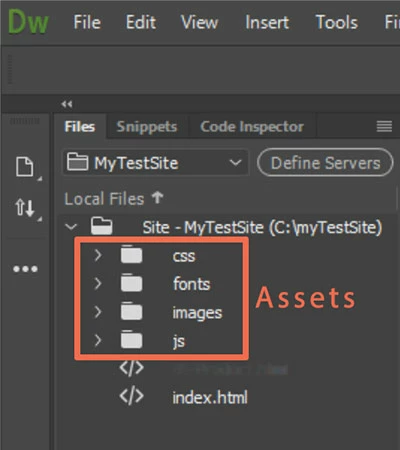
    I'm not using a site? Under the files panel, it just says Desktop and shows the files on my computers desktop.


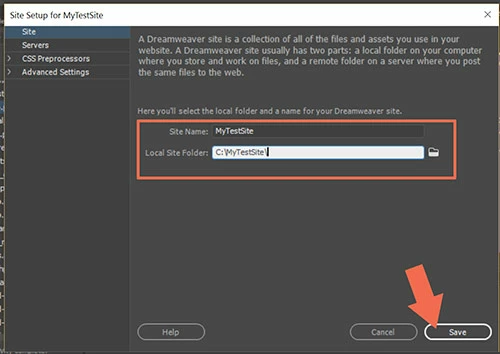
    Go to Site > New Site and tell DW where your local site folder resides on your primary hard drive.  For example, C:\MyTestSite\

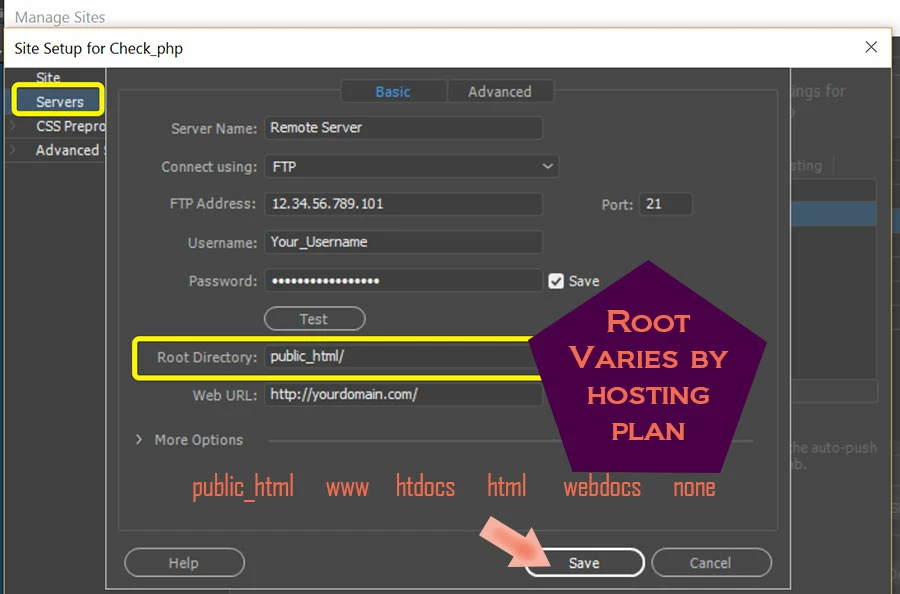
    (see screenshots).


    Click on Servers tab.  Enter your remote server's log-in credentials.  If unsure what to enter here, ask your hosting provider for details.


    After your local site folder is defined, open your Files Panel and select it from the drop-down list.


    1 reply

    Nancy OShea
    Community Expert
    Community Expert
    April 1, 2021

    Hi @7944201,

    1. Please ensure your computer meets or exceeds the minimum system requirements to run Creative Cloud + OS + all other apps you use. Check each one.  Requirements vary by product.
    - https://helpx.adobe.com/creative-cloud/system-requirements.html

    2. Are you working in a defined local site folder that resides on your primary hard drive and NOT a networked or cloud drive?  Site > New Site...


    Nancy O'Shea— Product User & Community Expert
    April 1, 2021

    1. Confirmed, I meet all requirements

    2. See screenshot to confirm this


    Additionally I noticed, every time I open Dreamweaver I have to choose what to do to sync settings

    Nancy OShea
    Community Expert
    Community Expert
    April 1, 2021

    Do not confuse Sync Settings with syncing files. They are two completely different things. 


    Custom settings, workspaces, snippets, etc... that you previously synced to the cloud can be imported if you want them via your Preferences panel.   After importing synced settings you will need to APPLY and restart Dreamweaver.  But that should NOT crash your system.


    Nancy O'Shea— Product User & Community Expert