



Participant
January 4, 2023
Answered

Dreamweaver 21.3 interface preference colors not working on Windows 11

  • January 4, 2023
  • 3 replies
  • 465 views

No matter what interface preference I choose the files window background and top and left command bars stay black

This topic has been closed for replies.
Correct answer BenPleysier

No problem here


You may need to reset the prefernces as in https://helpx.adobe.com/dreamweaver/kb/restore-preferences-dreamweaver.html


3 replies

Nancy OShea
Community Expert
Community Expert
January 4, 2023

Are you using 'Dark Mode' on Windows 11?

Windows > Settings > Personalization > Colors


Does the same happen in 'Light Mode'?


Nancy O'Shea— Product User & Community Expert
cacmmcisAuthor
Participant
January 4, 2023

It happens in Light, Dark, and Custom modes.

I have tried various combinations of light and dark for windows vs apps under custom.

No change in the black background in Dreamweaver.

Thanks for looking at this.

Nancy OShea
Community Expert
Community Expert
January 4, 2023

Follow the link posted by @BenPleysier above to Restore Preferences.


Nancy O'Shea— Product User & Community Expert
BenPleysier
Community Expert
BenPleysierCommunity ExpertCorrect answer
Community Expert
January 4, 2023

No problem here
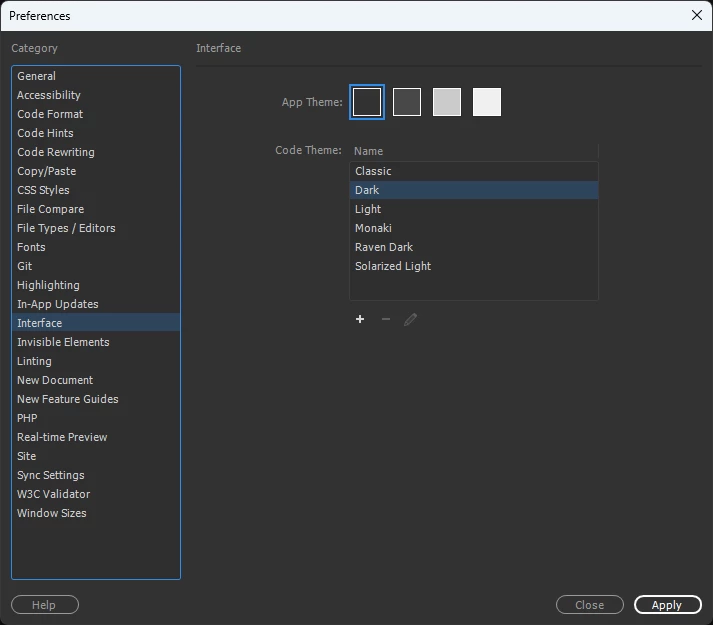


You may need to reset the prefernces as in https://helpx.adobe.com/dreamweaver/kb/restore-preferences-dreamweaver.html


Wappler is the DMXzone-made Dreamweaver replacement and includes the best of their powerful extensions, as well as much more!
John T Smith
Community Expert
Community Expert
January 4, 2023

You need to ask program questions in the forum for the program you are using
To ask in the forum for your program please start at https://community.adobe.com/
Moving from Using the Community (which is about the forums) to the correct forum