Participant
April 30, 2020
Question

Dreamweaver 8 FTP error message

  • April 30, 2020
  • 2 replies
  • 457 views

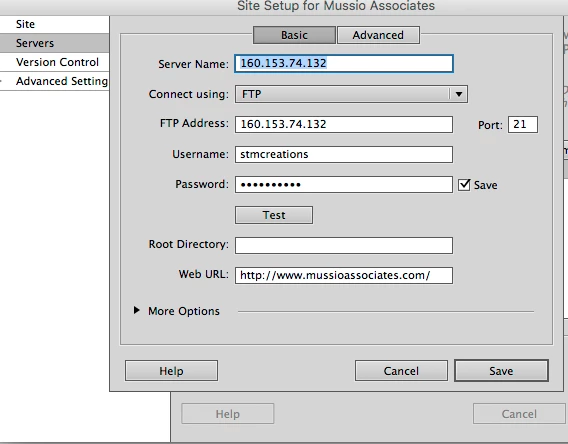
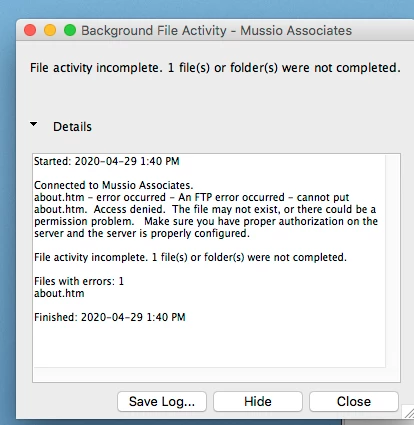
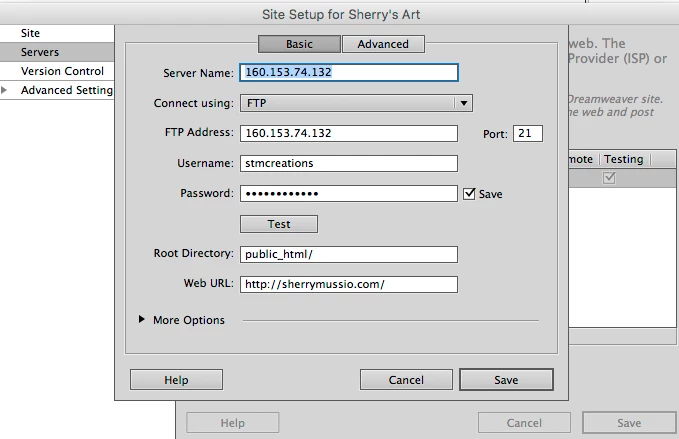
I've used this program for over fifteen years with no problem. All of a sudden my password didn't work so I changed it.   I have two sites on Go Daddy and one is listed as a sub-site of the other.  Finally, after hours on the phone with Go Daddy we changed the FTP address and determined the FTP connection was correct.  I have changed to the new server address on both sites and added a root directory to my primary site, and it is now working. However, the second site will not publish.  Not sure if a root directory should be filled in as I have tried many combinations and keep getting error messages.  The second site test is also not successful. See below. Can anyone help?


    This topic has been closed for replies.

    2 replies

    Community Expert
    May 1, 2020

    In addition to what Nancy has said, I'm noticing a few things.  First, your error is not password related but permission related on the server.  If Nancy's suggestion does not work, let's try to look at the log during your transfer. To do that click on Site-->Advanced-->FTP Log during your next session and see what error is returned.


    In addition, click on More Options on your FTP settings and make sure Passive FTP is enabled.  Per Godaddy's support Passive FTP is required for all sessions ( https://www.godaddy.com/help/what-is-ftp-19304 ).

    Nancy OShea
    Community Expert
    Community Expert
    April 30, 2020

    Add the root directory, public_html/ to your 2nd site definition. 


    Also give some thought to getting modern software.  DW 8 is sorely out of date.  I'm surprised you can still run it because the CS2 activation servers were taken offline years ago. 


    Nancy O'Shea— Product User & Community Expert
    sherry10Author
    Participant
    May 10, 2020


    Yes, for unknown reason all my settings were disrupted on my computer including the ipo address for Go Daddy and the directory on my computer to the website links.  I re-organized and re-directed all of theses links and filled in the new link directions and the program ran, so I was able to make changes to the websites.  Thank you.  What new program would you recommend I look at to replace Dreamweaver?  One site is extensive with photos and the other site has about 3 pages and links to pdf papers.