Known Participant
February 11, 2019
Answered

Dreamweaver: Abstände im Text

  • February 11, 2019
  • 2 replies
  • 579 views

Hallo miteinander

Wenn ich im Word einen Text schreibe und Zeilenumshaltung tätige, gibt es einen normalen Abstand.

Im Dreamweaver ist alles ganz anders - und ich möchte wissen, wie ich es hinkriege, dass ich bei einem Text für eine neue Zeile einen ganz normalen Textabstand erzielen kann ohne Abstände?

Danke für einen Tipp.

Gruss Regula

This topic has been closed for replies.
Correct answer Nancy OShea

Shift + Enter = <br>

Enter = <p>

regulah71676400  wrote

Nein - das ist nicht die Antwort.

:-(

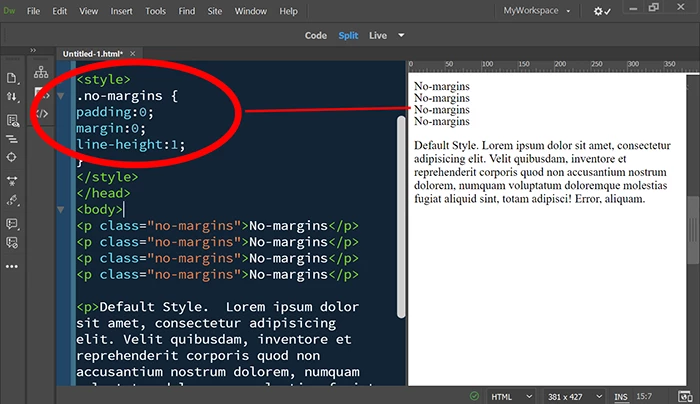
It works correctly for me.  See screenshot.

2 replies

Known Participant
March 22, 2019

Nein - das ist nicht die Antwort.

:-(

Ich habe im Internet gefunden:

<p>TEXT</p>

gibt immer einen Abstand zum nächsten <p>TEXT</p>

Es sieht so aus:

Text

Text

Text

Das will ich nicht so. Ich möchte so:

Text

Text

Text

Wie wird das gelöst? Im Internet habe ich herausgefunden:

<p>Text

<br)Text

<br>Text</p>

Meine FRAGE ist jetzt WIE kann ich mit einer Tastenkombination auf dem MAC das <br> erzwingen? Danke.

Nancy OShea
Community Expert
Nancy OSheaCommunity ExpertCorrect answer
Community Expert
March 22, 2019

Shift + Enter = <br>

Enter = <p>

regulah71676400  wrote

Nein - das ist nicht die Antwort.

:-(

It works correctly for me.  See screenshot.

Nancy O'Shea— Product User & Community Expert
Known Participant
March 22, 2019

THANK you now it's CLEAR to me

Nancy OShea
Community Expert
Community Expert
February 11, 2019

I'm not sure I understand the question. 

Can you please provide screenshots of your text in Word?

And then please post a URL to your online page?

Nancy O'Shea— Product User & Community Expert
Known Participant
February 11, 2019

Nochmals:

Text schreiben im Dreamweaver:

Wenn ich im Dreamweaver einen Text schreibe und ENTER drücke, gibt es einen Abstand.

<p>

Wenn ich einen Umbruch erzwingen möchte (ohne Abstand) geht  das mit

<br>

wie kann ich das auf einem Mac machen ohne dass ich im Code schreiben muss. Beim PC ist es SHIFT + ENTER. Beim Mac = wie??

Nancy OShea
Community Expert
Community Expert
February 11, 2019

Use CSS to style your paragraph text. 

.no-margins {

     margin: 0;

     line-height: 1;

     padding: 0;

}

<p class="no-margins">This paragraph contains no margins or padding.</p>

Nancy O'Shea— Product User & Community Expert