Inspiring
February 2, 2025
Answered

Dreamweaver always uploads dependent files, but I don't want it to

  • February 2, 2025
  • 2 replies
  • 587 views

I have Dreamweaver 2021. When I got a new computer, I installed DW, and I cannot fix one problem I never had on the old one. Whenever I upload a changed page to the web, it always includes all dependent files (both from the current page, and from the unchanged stylesheet). In site/preferences, I have un-checked “prompt on put/check-in” and “prompt on get/check-out” but that makes no difference (and I’m not really interested on whether it prompts me, I just don’t want it to do this at all). Also, in the "advanced" tab of the server window, "automatically upload file to server on save" is un-checked.

How do I get it to NOT upload all dependent files on every.single.upload?

Correct answer Nancy OShea

All those checking/uncheckings stay as I put them; even in one session, changing a check box from one state to another makes no difference in upload behavior. I didn't use any migration tools, just started new and installed all apps from scratch. 

I had to do a big upload so went to a different computer, with a newly installed copy of DW. When I did the "put", a dialog box came up and asked if it should include dependent files; I checked "no". This dialog box never reappeared. I fear it got checked "yes"  the first time on the other computer, so I guess I am looking for a way to find that dialog and change it back.


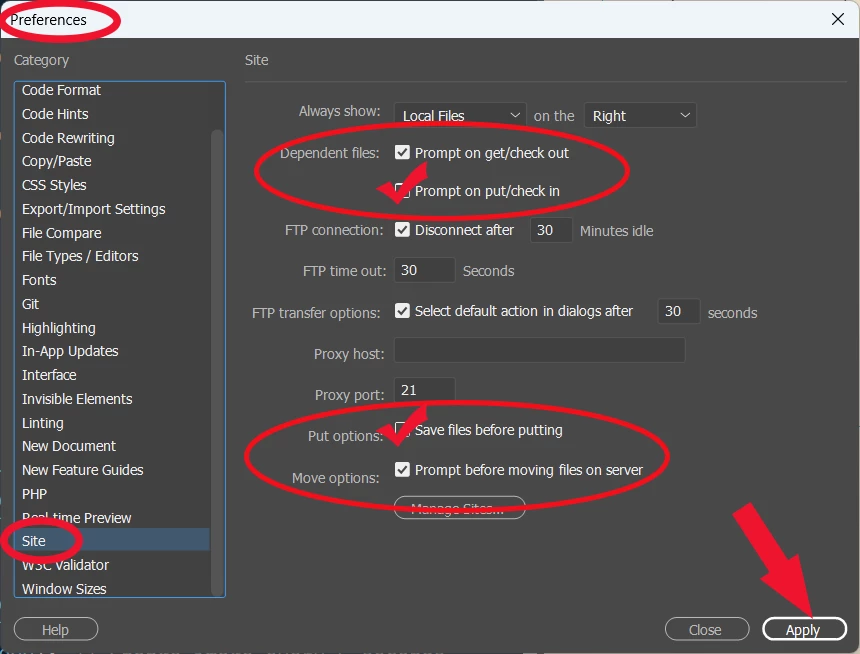
See screenshot.

Apply settings.

Close DW.

Preference settings should stick when you re-launch Dreamweaver.


Hope that helps.


2 replies

Nancy OShea
Community Expert
Community Expert
February 2, 2025

Use the Cloaking feature.  You can cloak individual files or folders to keep them from uploading.

https://helpx.adobe.com/dreamweaver/using/cloaking-files-folders-dreamweaver-site.html


Nancy O'Shea— Product User & Community Expert
BenPleysier
Community Expert
Community Expert
February 2, 2025
Inspiring
February 2, 2025

Yes, that link mainly suggests that I check/uncheck all boxes that I have said are checked/unchecked. I have read it several times. I'm just grasping at the idea that there might be something new...

Community Expert
February 2, 2025

When you change those settings are they saving, or do you find they are reverting? I ask because you say you have a new computer and there have been noted instances of erratic behavior when using migration tools from an old computer to a new one such as with the Apple migration tool. If the settings are potentially not saving, this could be an OS issue with the migration where you may need to reinstall.