
Inspiring
June 20, 2019
Answered

Dreamweaver and Github branches

  • June 20, 2019
  • 1 reply
  • 1693 views

Hello,

New to Github and trying to use dreamweaver to connect with

I have already cloned a repository, i can push and pull, not really a big deal.

However, when i created a branch just now on the Github website (named "Style-optimizations") things got a bit more complicated for me.

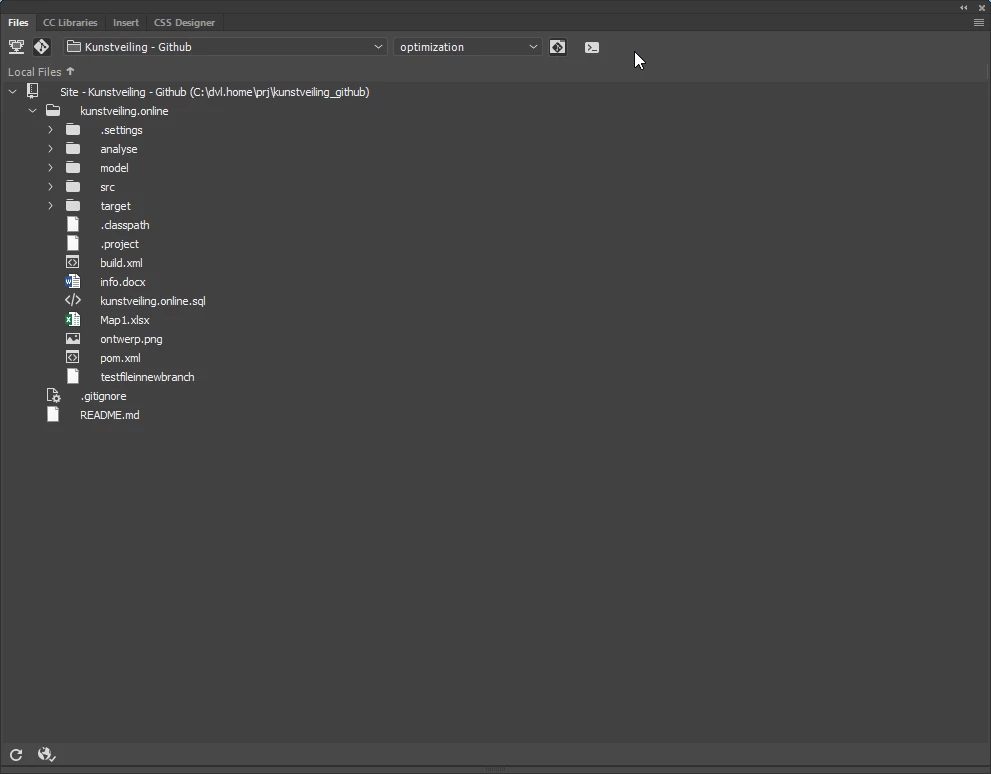
I manage to pull the files from this branch, but i am starting to wonder what exactly the "branch" dropdown on the git-panel does?? (please find dropdown with "optimization" in image below)

The newly created branch did not appear there, i manually created one in dreamweaver named "optimization" with "manage branches" dialog.

Now in my Git-panel i have "Master" and "optimization" but selecting these does nothing to my local folders in my case.

Is this normal behavior or am i missing something?
Thanks for your feedback and thoughts.
This topic has been closed for replies.
Correct answer KazuH

Hi,

Git clone only creates the master branch locally, but you can access any of the branches with "git checkout" command from terminal .

Attached is my example (run on macOS and bash terminal) . I created a branch called "develop" in my test project on GitHub Website, then created a DW site with cloning the repository on my PC.

Fig.1 Left shows only master branch is visible on DW (initial state). But you can see other branches hiding in the local repository by using "git branch -a" (Fig.1 Right).

If you want to work on "develop" branch, you need to run "git checkout" for that branch. (Fig.2 Right). When this is done, "develop" branch name shows up on the dropdown menu in DW.

1 reply

HARSHIKA_VERMA
Community Manager
Community Manager
June 20, 2019

Hi there,

Thank you for reaching out. From my reading of your post. it looks you are trying to understand the use of branches in GIT for collaboration.

In Dreamweaver, when developers and designers work together for a site, each user can create a branch off the master and make changes independently. Whenever required, they can easily merge their changes with another branch and continue to work with both the branches. For more info please check out this article Learn how to download and use Git with Dreamweaver.

Please let us know if that helps. We'd be happy to help.

Thanks,

Harshika

Inspiring
June 21, 2019

Hello Tarshika,

Thank you for your reply. I understand the basic concept of branching from reading that page earlier. What I don't understand is there does not seem to be a coupling between the branches made in Github website and those made in GIT-panel for Dreamweaver? Is this assumption correct? I expected it to be coupled.

I can't seem to find a way to load my Github-website created branch into Dreamweaver. Am I supposed to pull the entire project anew? Am I supposed to ONLY work from Dreamweaver to not have this issue?

Edit: I just cloned the entire repository anew. It only loaded the master branch. The created branch does not appear in the branches dropdown in Dreamweaver nor did I find a way to include it. Either i'm missing something, or the support page doesn't really cover this extensively.

KazuHCorrect answer
Participant
June 23, 2019

Hi,

Git clone only creates the master branch locally, but you can access any of the branches with "git checkout" command from terminal .

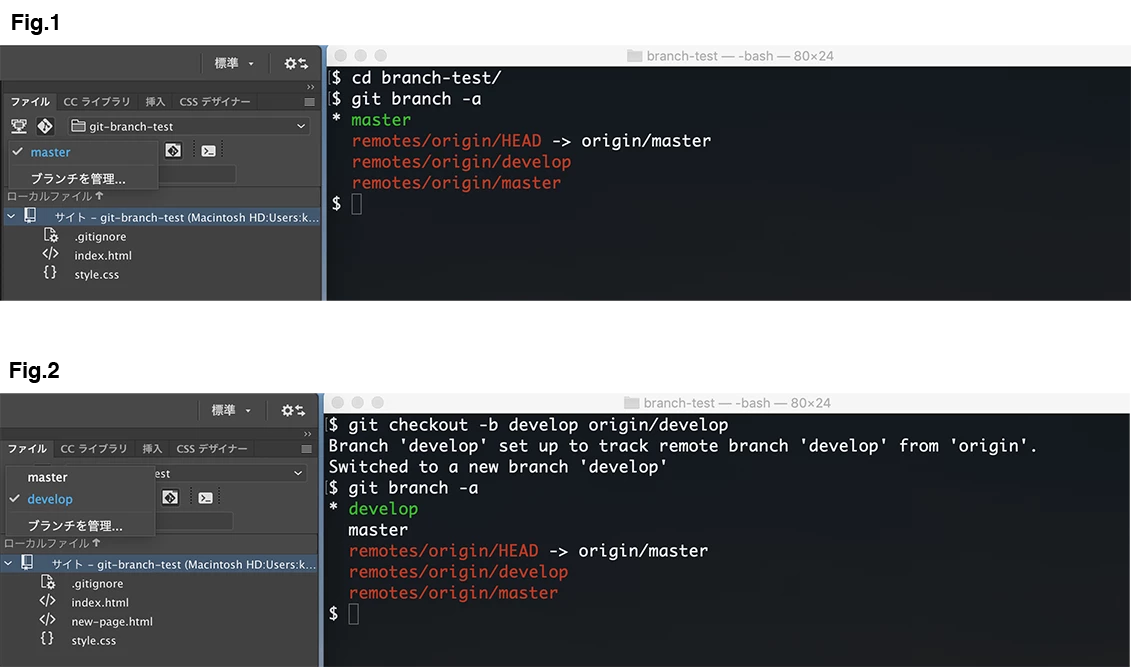
Attached is my example (run on macOS and bash terminal) . I created a branch called "develop" in my test project on GitHub Website, then created a DW site with cloning the repository on my PC.

Fig.1 Left shows only master branch is visible on DW (initial state). But you can see other branches hiding in the local repository by using "git branch -a" (Fig.1 Right).

If you want to work on "develop" branch, you need to run "git checkout" for that branch. (Fig.2 Right). When this is done, "develop" branch name shows up on the dropdown menu in DW.