Inspiring
February 3, 2025
Answered

Dreamweaver + Bootstrap inability to create basic links

  • February 3, 2025
  • 2 replies
  • 1458 views

Hi folks, 

 
I’ve just returned to my Dreamweaver website project after circa 12 months and and am having trouble with some basics.
 
Best to point out early that I'm not very knowledgable regarding coding.
 
I’m also aware that Dreamweaver is very old school and outdated now but it is what it is and I’m not of an age to begin again.
 
;o)
 
I’m now using Bootstrap in conjunction with Dreamweaver.
 
1.  Am I correct in thinking I used to be able to edit text directly in the “live view” window before saving ? If this is the case then sadly it’s not happening anymore.  The only way I can now change/update the text is to type it in the relevant space in the code then when I go to Real Time Preview I have to save it before I can view it.  I seem to remember I could simply type it in live view before previewing and saving ?
 
2. The most frustrating thing I’m encountering is that I cannot create any “links”.  For example if I highlight some text and go to “EDIT” and “LINK”  then I find the  “Make Link” “Remove Link” and “Open Linked Page” options are greyed out and unusable.
 
If I go to the "Page Properties” and “Links" option it only allows me to change things such as font and the colour of links, rollovers etc., but no option to input any actual link details.
 
I initially thought it may have been due to some of my earlier coding however I’ve recently tested on brand new start up sites and the same problems remain.
 
Any ideas and/or advice would be greatly appreciated.
 
Kind regards, Garry

    Correct answer Jon Fritz

    P.S. I guess what is confusing me most - given that it is an entirely new site start up and also a new document being created - is that this appears to be a Dreamweaver CC issue rather than something I may have done incorrectly ?


    Your DW isntallation is, at least slightly, corrupt.

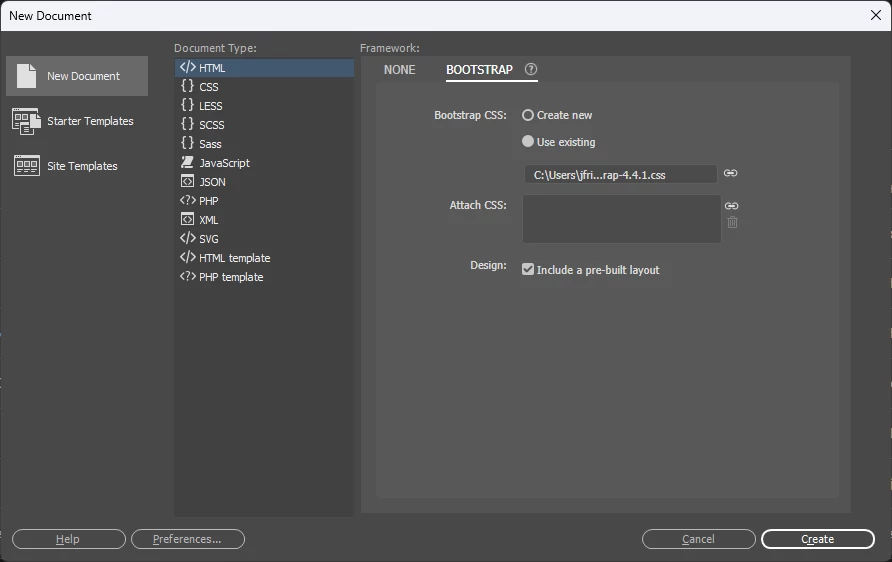
    Those broken link images in DW's interface are just that, broken links within DW's interface. The window should look like below (it's not part of your site).


    You may want to try restoring DWCC's Preferences or reinstalling.

    Who knows what else might be broken in the current installation. 

    2 replies

    Nancy OShea
    Community Expert
    Community Expert
    February 4, 2025

    Until we know more details about your system, try this:

    • Toggle from LIVE to DESIGN view -- Ctrl+Shift+F11 on Win (Cmd+Opt+F11 on Mac).
    • Refer to the Link field on your Properties Panel (Ctrl + F3).


    • Ensure there's a Green Checkmark showing below your document panel. This denotes error-free code. 
    • A Red X indicates code errors that can cause performance problems in DW.


    Nancy O'Shea— Product User & Community Expert
    Inspiring
    February 5, 2025

    Hi there,


    Apologies for not supplying necessary information in my earlier message.


    macOS Ventura

    Dreamweaver CC

    bootstrap 4.4.1

    Not using templates.


    Firstly, many thanks for your reply Nancy which has rectified the earlier problems listed above !

    Toggling from LIVE view to DESIGN view seems to have reset something ?  .  .  .  anyhowz that aspect is now functioning as it should which is great.


    Next question :o(


    My original very old and outdated website was created WITHOUT Bootstrap and I had been trying to incorporate my old files into a revamped website now USING Bootstrap.


    To say this was/is proving problematic is an understatement.


    Having faffed about for a few days now I'm fast reaching the conclusion that I would be better off starting afresh with all new Dreamweaver/Bootstrap files.


    To this end I'm starting afresh, or more accurately trying to, as I have immediately hit a possible snag which causes concern.


    I've created my New Site and when I go to create a new document I come to the window below.


    Everything seems to function as it should and I can proceed to choose Bootstrap etc., etc., however I'm concerned that the three options on the left show what looks like broken link graphics ?


    Is it okay to simply ignore those seemingly broken link graphics or is perhaps something else amiss from the start here ?


    Any assistance greatly appreciated as always.


    Kind regards, Garry.


    Nancy OShea
    Community Expert
    Community Expert
    February 5, 2025

    Bootstrap 4 reached end of life in early 2023.  I'm not using it anymore.


    If you want to work with current Bootstrap 5.3, you'll need to code manually.  The components in DW were never updated beyond version 4.  Or you can use other tools alongside DW. 


    Some people really like the drag & drop ease of BootstrapStudio.io.  Once your page layout is how you want it, you can drop the code into your favorite editor and add your content.


    This is a basic example of Bootstrap 5.3.

    <!doctype html>
    <html lang="en">
    <head>
    <title>Bootstrap 5.3.2 Example</title>
    <meta charset="utf-8">
    <meta name="viewport" content="width=device-width, initial-scale=1">
    
    <!--Minified Bootstrap 5 CSS from CDN-->
    <link href="https://cdn.jsdelivr.net/npm/bootstrap@5.3.2/dist/css/bootstrap.min.css" rel="stylesheet">
    
    <!--Bootstrap Icons-->
    <link rel="stylesheet" href="https://cdn.jsdelivr.net/npm/bootstrap-icons@1.10.2/font/bootstrap-icons.css">
    
    <!--Bootstrap JS bundle-->
    <script src="https://cdn.jsdelivr.net/npm/bootstrap@5.3.2/dist/js/bootstrap.bundle.min.js"></script>
    </head>
    <body>
    <div class="container">
    <div class="row">
    <!--3 columns-->
    <div class="col">
    <h3>Heading 3</h3>
    <p>Lorem ipsum dolor sit amet, consectetur adipisicing elit. Laudantium deserunt eaque ratione laborum, qui libero vero ab deleniti saepe numquam. Nostrum eveniet dolore recusandae excepturi aspernatur, eius voluptatibus quo incidunt!</p>
    </div>
    
    <div class="col">
    <h3>Heading 3</h3>
    <p>Lorem ipsum dolor sit amet, consectetur adipisicing elit. Laudantium deserunt eaque ratione laborum, qui libero vero ab deleniti saepe numquam. Nostrum eveniet dolore recusandae excepturi aspernatur, eius voluptatibus quo incidunt!</p>
    </div>
    
    <div class="col">
    <h3>Heading 3</h3>
    <p>Lorem ipsum dolor sit amet, consectetur adipisicing elit. Laudantium deserunt eaque ratione laborum, qui libero vero ab deleniti saepe numquam. Nostrum eveniet dolore recusandae excepturi aspernatur, eius voluptatibus quo incidunt!</p>
    </div>
    </div>
    </div>
    <!--Begin Footer-->
    <div class="container-fluid mt-auto">
    <footer class="row bg-dark text-light">
    <div class="mt-4 p-4">
    <small>Footer<br>
    XYZ Company  |  1400 5th Ave, New York, NY | Tel: 123-456-7890<br>
    ©2025 all rights reserved.</small>
    </div>
    </footer>
    </div>
    </body>
    </html>


    Nancy O'Shea— Product User & Community Expert
    Nancy OShea
    Community Expert
    Community Expert
    February 3, 2025

    We need more information to help you:

    • Which operating system?
    • Which version of Dreamweaver?
    • Which version of Bootstrap?
    • Are you working with a Dreamweaver Template.dwt?


    Nancy O'Shea— Product User & Community Expert
    BenPleysier
    Community Expert
    Community Expert
    February 4, 2025
    quote

    We need more information to help you:

    • Which operating system?
    • Which version of Dreamweaver?
    • Which version of Bootstrap?
    • Are you working with a Dreamweaver Template.dwt?


    By @Nancy OShea


    In other words, what is the URL for the site???

    Wappler is the DMXzone-made Dreamweaver replacement and includes the best of their powerful extensions, as well as much more!