


Inspiring
October 26, 2017
Answered

Dreamweaver CC 18.0 - PHP code hinting for methods

  • October 26, 2017
  • 2 replies
  • 2220 views

Is there PHP code hinting for methods. For example in PHP Storm we can do this:

https://xenforo.com/community/attachments/forumparent-png.160701/

Notice when I typed $parent-> this popup displays the available methods. Is this feature at all possible with Dreamweaver CC 18.0.

    This topic has been closed for replies.
    Correct answer BenPleysier

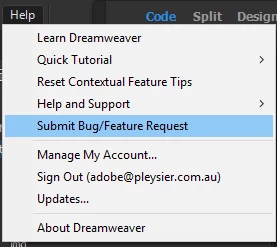
    All I can say is: Download a 7 day trial version of Dreamweaver and if you find that it does not work, submit a bug report as in

    2 replies

    Niharika Jha
    Adobe Employee
    Adobe Employee
    October 27, 2017

    Hi,

    I am not sure why the hints of variable are displayed for you and not for methods, also the link shared for snapshot is not accessible to me so I can't validate what is being displayed in other php editors.

    As a sample, please see what I tried to see the hints. Let me know if this is what you are trying or there is something else- a sample code snippet will be helpful in that case.

    Regards,

    Niharika Gupta

    Adobe Dreamweaver

    Inspiring
    October 27, 2017

    Hi Niharika,

    Thank you for your reply.

    I have done more research on this issue and if I understand correctly in order for me to see PHP methods code hints I need to do this:

    1) Enable Site-Specific Code Hints

    2) However in order create Site-Specific Code Hints I need to set up a Test Server.

    After doing a little research regarding setting up a test server I have given up. I don't want to set up a test server as I like to keep things simple. I don't want to have a third place where my site files are located, that's just too confusing. This would require all my files to be located at these three locations:

    Local

    Server

    Test server

    I hope that in future versions the ability to have PHP methods code hints will not be so complicated. It needs to be made really easy without the need for a test server.

    Thank you.

    Nancy OShea
    Community Expert
    Community Expert
    October 27, 2017

    If you work with PHP code on a regular basis, you need a local testing server.  To simplify things, my local site is in my testing server's default web folder.   No duplicate files required.  See screenshots.

    Basic tab:

    Advanced tab:

    Nancy O'Shea— Product User & Community Expert
    BenPleysier
    Community Expert
    Community Expert
    October 27, 2017
    Wappler is the DMXzone-made Dreamweaver replacement and includes the best of their powerful extensions, as well as much more!
    Inspiring
    October 27, 2017

    Hello,

    Thank you for the link. However I have already carefully read that entire page and the only reference to methods is shown here:

    I think this might be in error because as I understand it, we should get a window showing the available methods after the -> portion of the object is typed. Please see the first post of this thread, I show $parent-> and a window which pops up in PHP Storm, I don't think Dreamweaver has this option, please confirm.

    BenPleysier
    Community Expert
    BenPleysierCommunity ExpertCorrect answer
    Community Expert
    October 27, 2017

    All I can say is: Download a 7 day trial version of Dreamweaver and if you find that it does not work, submit a bug report as in

    Wappler is the DMXzone-made Dreamweaver replacement and includes the best of their powerful extensions, as well as much more!