

digitalcoffee7526170
Inspiring
January 15, 2019
Answered

Dreamweaver CC 18.2 says Settings Sync Failed

  • January 15, 2019
  • 2 replies
  • 837 views

My setting haven't synced in a week.

I have deleted what was stored at adobe.

The "Sync Settings Now" button continues to be greyed out.... see screenshot below.
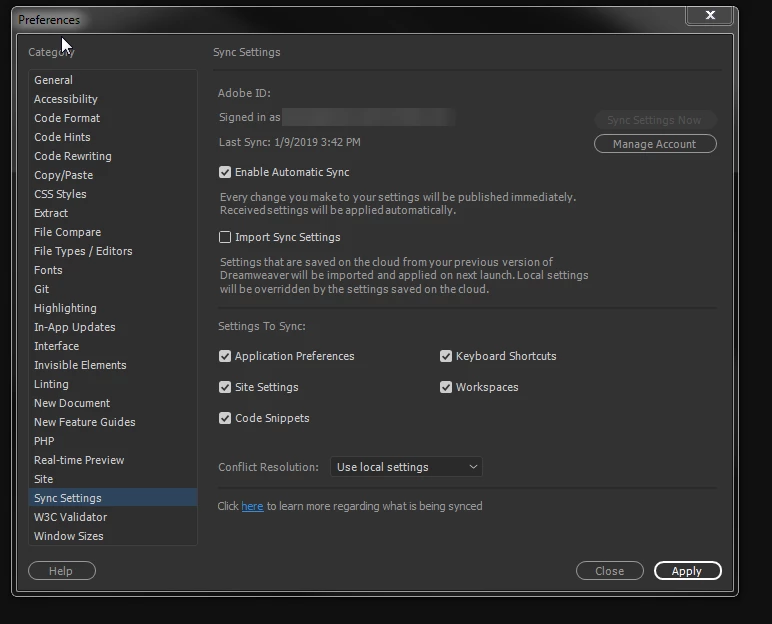
It doesn't look like Photoshop CC 19.1.7 and Illustrator CC 22.1 sync settings to adobe any more.

So did Adobe turn this off or what?

Help Please!

Thanks!

This topic has been closed for replies.
Correct answer Paul-M

Doesn't look like you're signed in .....

As far as I'm aware under normal circumstance you'd be prompted to login on launching Dreamweaver in that case.

In Dreamweaver from the help menu there should be a sign in/sign out option, try that let us know if that helps any?

2 replies

Legend
January 15, 2019

Also what happens when you launch the Creative Cloud app - are you logged in ?

Paul-M - Community Expert
digitalcoffee7526170
Inspiring
January 15, 2019

I am signed in every where... Dreamweaver (its blurred out in the screenshot), Photoshop, Illustrator and Creative Cloud.

I will sign out and sign in and let you know if anything changes.

Paul-MCorrect answer
Legend
January 15, 2019

Doesn't look like you're signed in .....

As far as I'm aware under normal circumstance you'd be prompted to login on launching Dreamweaver in that case.

In Dreamweaver from the help menu there should be a sign in/sign out option, try that let us know if that helps any?

Paul-M - Community Expert