tahirah27994
Participant
February 14, 2017
Answered

Dreamweaver cc 2015 not working with xampp version 3.2.1??

  • February 14, 2017
  • 3 replies
  • 2090 views

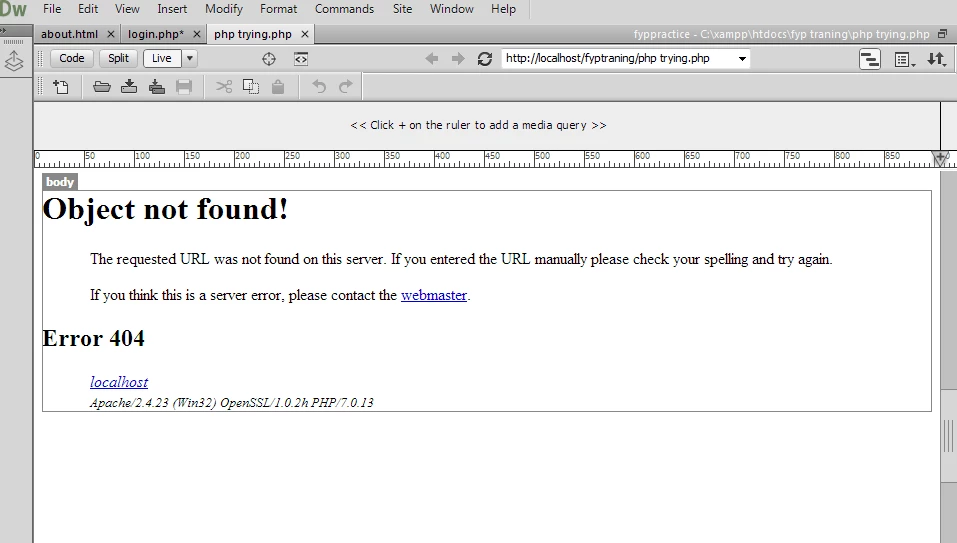
i'm trying to use dreamweaver with xampp v3.2.2 but the testing server is not working in dreamweaver live view....it shows the error of object not found ,,error 404?? i have connect dreamweaver with xampp many times but live view is not working with my php files ?

where is the problem??
This topic has been closed for replies.
Correct answer Jon Fritz

It looks to me like your local server is not seeing a space in your folder name at...

Site > Manage Sites > click your site > Edit > Servers > Testing > Edit > Web URL

Make sure the folder name is the same in your Files window as it is in the server settings.

3 replies

Jon Fritz
Community Expert
Jon FritzCommunity ExpertCorrect answer
Community Expert
February 14, 2017

It looks to me like your local server is not seeing a space in your folder name at...

Site > Manage Sites > click your site > Edit > Servers > Testing > Edit > Web URL

Make sure the folder name is the same in your Files window as it is in the server settings.

tahirah27994
Participant
February 15, 2017

Thanks that problem is solved

Jon Fritz
Community Expert
Community Expert
February 15, 2017

Good deal, was it the folder name mismatch causing the issue or something else?

pziecina
Legend
February 14, 2017

Just as a note.

Even if you get the testing server running, it will not work with the deprecated server behaviours. This is because the version of PHP your testing server is running is PHP 7, and the SB's do not work with this version.

Nancy OShea
Community Expert
Community Expert
February 14, 2017

Right.  

An older version of Xampp will have older PHP.  But your remote server might not be compatible.  Ideally, you r testing & remote servers should have the same version of PHP & MySQL.   You'll have fewer surprises that way.

Create a new PHP file with code below.

<!doctype html>

<html>

<head>

<meta charset="utf-8">

<title>PHP info</title>

</head>

<body>

<?php phpinfo() ?>

</body>

</html>

SaveAs phpinfo.php  & upload to server.

Open page in browser.  This will tell you which versions of PHP & MySQL you have.

Nancy

Nancy O'Shea— Product User & Community Expert
Nancy OShea
Community Expert
Community Expert
February 14, 2017

You need to launch Xampp to use it.  Is Xampp running?

Nancy

Nancy O'Shea— Product User & Community Expert