


Inspiring
June 19, 2017
Answered

Dreamweaver CC 2017.5 - classic theme problem

  • June 19, 2017
  • 1 reply
  • 1157 views

I very disappointed with Adobe Dreamweaver CC 2017.5. I was hoping the new Classic Theme option would have the option to see my PHP code in the colors as it has been for the last 10 years.

The issue is "Document type" is not available in Dreamweaver CC 2017.5 as it was in Dreamweaver CC 2015 (screen print below to illustrate).
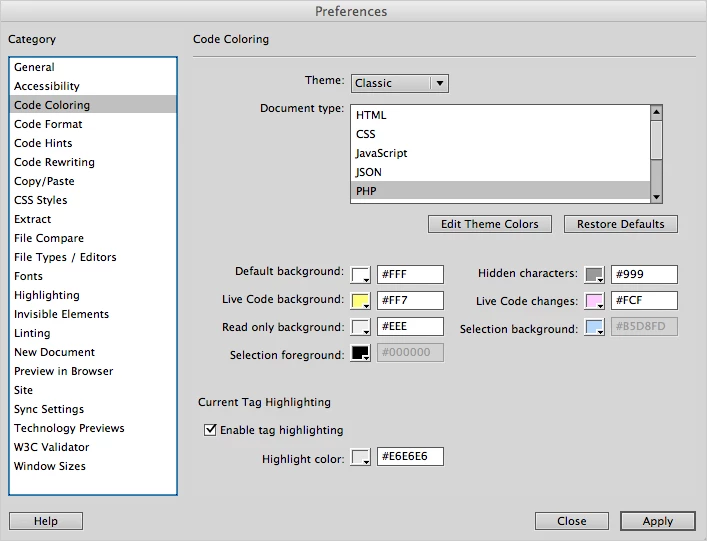
Tech support has sent me the following link: Learn how you can customize the colors of your code elements in Dreamweaver.

However we should not have to spend hours trying to make the code colors look like it did in the previous version.

This topic has been closed for replies.
Correct answer Andrew Bajka

I managed to make the PHP code colors look like they were in Dreamweaver CC 2015.

Here are the changes I made to main.less

Change the background to white:

====

/* Define some variables used in multiple places */

/* 1. Background color for the code view */

@background: #FFFFFF;

/* 2. Foreground color for the code view (Regular strings or text) */

@foreground: #3A3A3A;

====

also in the PHP section I added the following:

====

.cm-comment {

    color: #ffa86c !important;

}

.cm-keyword {

    color: #00750f !important;

}

.cm-def {

    color: #000000 !important;

}   

.cm-variable-2 {

    color: #0e83fc !important;

}

.cm-variable-3 {

    color: #db2114 !important;

}   

.cm-string {

    color: #db2114 !important;

}

====

1 reply

Andrew BajkaAuthorCorrect answer
Inspiring
June 20, 2017

I managed to make the PHP code colors look like they were in Dreamweaver CC 2015.

Here are the changes I made to main.less

Change the background to white:

====

/* Define some variables used in multiple places */

/* 1. Background color for the code view */

@background: #FFFFFF;

/* 2. Foreground color for the code view (Regular strings or text) */

@foreground: #3A3A3A;

====

also in the PHP section I added the following:

====

.cm-comment {

    color: #ffa86c !important;

}

.cm-keyword {

    color: #00750f !important;

}

.cm-def {

    color: #000000 !important;

}   

.cm-variable-2 {

    color: #0e83fc !important;

}

.cm-variable-3 {

    color: #db2114 !important;

}   

.cm-string {

    color: #db2114 !important;

}

====

Inspiring
June 20, 2017

Also this link is very helpful in determining the CSS names.

CodeMirror: Token inspector Demo

Inspiring
June 20, 2017

In addition to the CSS I show above, I also needed to add the following to the main.less in two areas, the HTML and the PHP. This will allow the cursor to be seen when tags or brackets are highlighted.

====

.CodeMirror-matchingtag {

    background-color: #CCCCCC !important;

}

.CodeMirror-matchingbracket {

    background-color: #dedede;

}

====