Answered
Dreamweaver CC 2017 "Apply Source Formatting" works wrong
The "Edit > Code > Apply Source Formatting" doesn't work correct for PHP-Code.
I'm using Dreamweaver CC 2017.0.1 Build 9346
Code-Before:
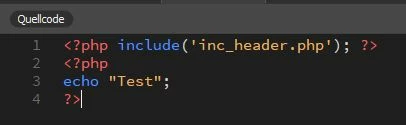
Code-After:
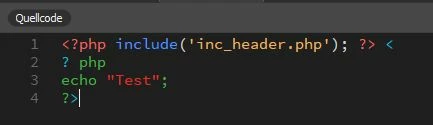
This code doesn't work anymore!

The "Edit > Code > Apply Source Formatting" doesn't work correct for PHP-Code.
I'm using Dreamweaver CC 2017.0.1 Build 9346
Code-Before:
Code-After:
This code doesn't work anymore!
Is there a solution for the space problem?
Hi - Are you talking about spaces in PHP code when apply source formatting? Follow these instructions to reduce the spacing
:
On windows you can locate this file and make a backup, as you are going to edit it:
C:\Program Files\Adobe\Adobe Dreamweaver 2021\www\extensions\default\BracketsDWBeautify\default.jsbeautifyrc
Look at the PHP section at the bottom and some rules you can change to reduce the amount of spacing inserted in PHP code
change:
"space_after_anon_function": true,
to
"space_after_anon_function": false,
change:
"space_before_conditional": true,
to
"space_before_conditional": false,
change
"space_in_paren":true
to
"space_in_paren":false
Already have an account? Login
No account yet? Create an account
Enter your E-mail address. We'll send you an e-mail with instructions to reset your password.


 AdChoices