


TomDoc
Participant
August 4, 2017
Answered

Dreamweaver CC 2017 code style

  • August 4, 2017
  • 3 replies
  • 624 views

I just downloaded Dreamweaver CC 2017 and I can't write code anymore. The colors and design of code is fully changed. This is something terrible and I'll no longer use Dreamweaver. Please let me know how to downgrade my installation to previous versions.

    This topic has been closed for replies.
    Correct answer italosan

    Hello TomDoc,

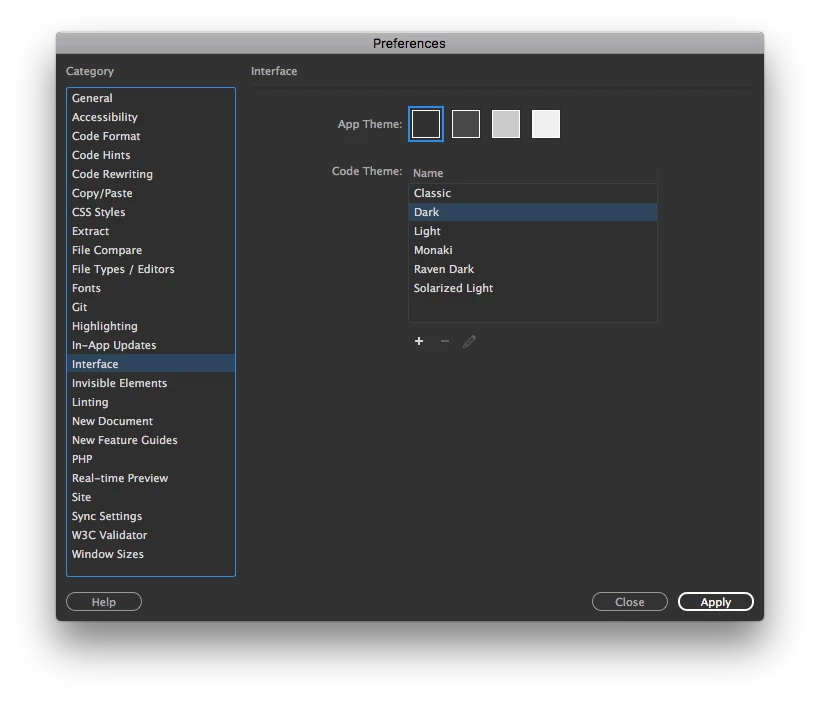
    there is no need to downgrade since with Adobe Dreamweaver CC 2017 you can change the colors of the code choosing a theme.

    If you want you can even customize code behaviours such as hints, highlights and so on. Furthermore you can even create your own theme.

    Hope these helps in anyway otherwise its up to you if downgrade or not.

    3 replies

    TomDoc
    TomDocAuthor
    Participant
    August 4, 2017

    Thank you for quick help, both options are good for me!

    italosan
    Community Expert
    italosanCommunity ExpertCorrect answer
    Community Expert
    August 4, 2017

    Hello TomDoc,

    there is no need to downgrade since with Adobe Dreamweaver CC 2017 you can change the colors of the code choosing a theme.

    If you want you can even customize code behaviours such as hints, highlights and so on. Furthermore you can even create your own theme.

    Hope these helps in anyway otherwise its up to you if downgrade or not.

    BenPleysier
    Community Expert
    Community Expert
    August 4, 2017
    Wappler is the DMXzone-made Dreamweaver replacement and includes the best of their powerful extensions, as well as much more!