Participating Frequently
February 22, 2017
Answered

Dreamweaver CC 2017 crashes when selecting layout...

  • February 22, 2017
  • 1 reply
  • 657 views

Hi All,

I've googled and tried all the suggested solutions, deleting preferences, searching for lavasoft dlls (which I don't have) and disabling malwarebytes, but I still get:

Faulting application name: Dreamweaver.exe, version: 17.0.1.9346, time stamp: 0x585230b7

Faulting module name: dvaui.dll, version: 11.0.0.0, time stamp: 0x58522ce6

Exception code: 0xc000041d

Fault offset: 0x00000000002e1410

Faulting process id: 0x17fc

Faulting application start time: 0x01d28d4d1a754c5f

Faulting application path: C:\Program Files\Adobe\Adobe Dreamweaver CC 2017\Dreamweaver.exe

Faulting module path: C:\Program Files\Adobe\Adobe Dreamweaver CC 2017\dvaui.dll

Report Id: 48aca22d-3ed1-4e4c-9c87-d798bf8b0293

Faulting package full name:

Faulting package-relative application ID:

after selecting a layout when starting DW for the first time (and yes I've tried uninstalling and reinstalling).

Anyone know what's going on?

Thanks!

John Francis

    This topic has been closed for replies.
    Correct answer Nancy OShea

    Thanks very much, Ben, but replacing the DLL did not fix the error.

    Regards,

    John Francis


    Are you having trouble with any other applications on your system?

    If yes, reinstall Windows.

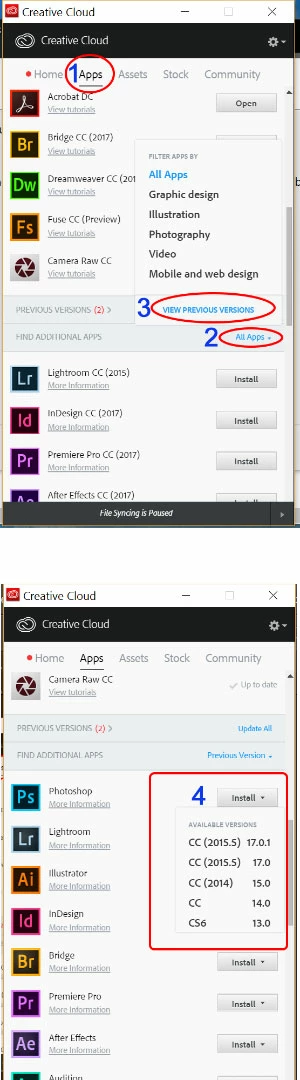
    If not, drop back to an earlier version of Dreamweaver from your Creative Cloud Desktop App.

    Nancy

    1 reply

    Jon Fritz
    Community Expert
    Community Expert
    February 22, 2017

    When you uninstalled/reinstalled did you use the Adobe Cleaner Tool?

    https://helpx.adobe.com/creative-cloud/kb/cc-cleaner-tool-installation-problems.html

    Participating Frequently
    February 22, 2017

    Hi Jon,

    I just tried that, following the instructions on the page you sent, uninstalling, reboot, cccleaner, reboot and I still have the same behavior.

    Thanks!

    John

    Jon Fritz
    Community Expert
    Community Expert
    February 22, 2017

    Has this version of DW ever previously worked on this machine, or is this some new behavior?

    It could be a corrupt user account, though in the forums, we usually see that on Macs, not PCs. It might be worth testing it under a new Admin level user account.