


Participant
May 31, 2017
Question

Dreamweaver CC 2017 for mac无法启动是怎么回事?

  • May 31, 2017
  • 2 replies
  • 1413 views

Dreamweaver CC 2017 for mac无法启动是怎么回事?提示以下内容“your subscription entitles you to chinese simplified product versions.please verfy the language settings in your os,browser,and oftware download are sat to chinese simplified.if you continue to have installation issues, please contact support.>www.adobe.com/go/support"
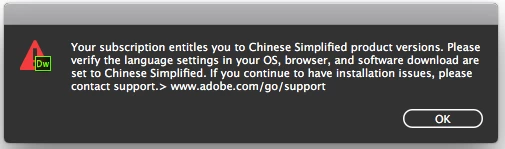
有谁知道是怎么回事?

This topic has been closed for replies.

2 replies

Niharika Jha
Adobe Employee
Adobe Employee
June 2, 2017

Hi,

Because of some piracy issues, we have restricted the use of Dreamweaver only in Chinese on Windows and English on Mac (as we do not support Chinese Simplified on Mac). We have a check in place to ensure that the user cannot tamper the resources and use the product in any other language. By downloading the zh_CN folder from somewhere on Mac, you have  unknowingly tampered the resources and that is why you are seeing this message.

If you would uninstall the product, clear the install folder, and install the product again, this problem should go away. However, you will only be able to use the product in English on Mac. I repeat, we do not support Chinese Simplified on Mac.

Regards,

Niharika Gupta

Adobe Dreamweaver

Preran
Legend
May 31, 2017

Can you try changing the language settings for your CC apps using the info in this doc Change the language setting of your Creative Cloud apps and let us know if it helped?

Thanks,

Preran

Participant
June 2, 2017

get it, I was download of another language pack to replace the old .