LutherMax
Participant
May 13, 2017
Answered

Dreamweaver CC 2017 Mac crashes when performing site sync

  • May 13, 2017
  • 3 replies
  • 1356 views

Dreamweaver CC 2017 (latest version, updated via the CC panel) crashes every time I try to do a site sync.

I click the sync button, select 'entire site / get new files from remote'. It connects to the server and returns the list of files (there are about 200), but when I click OK to confirm it just hangs.

I have a site which I need to move ASAP, so need to get the files from the server. This is a very urgent issue for me.

Mac OS Sierra 10.12.4 (16E195)

This topic has been closed for replies.
Correct answer Nancy OShea

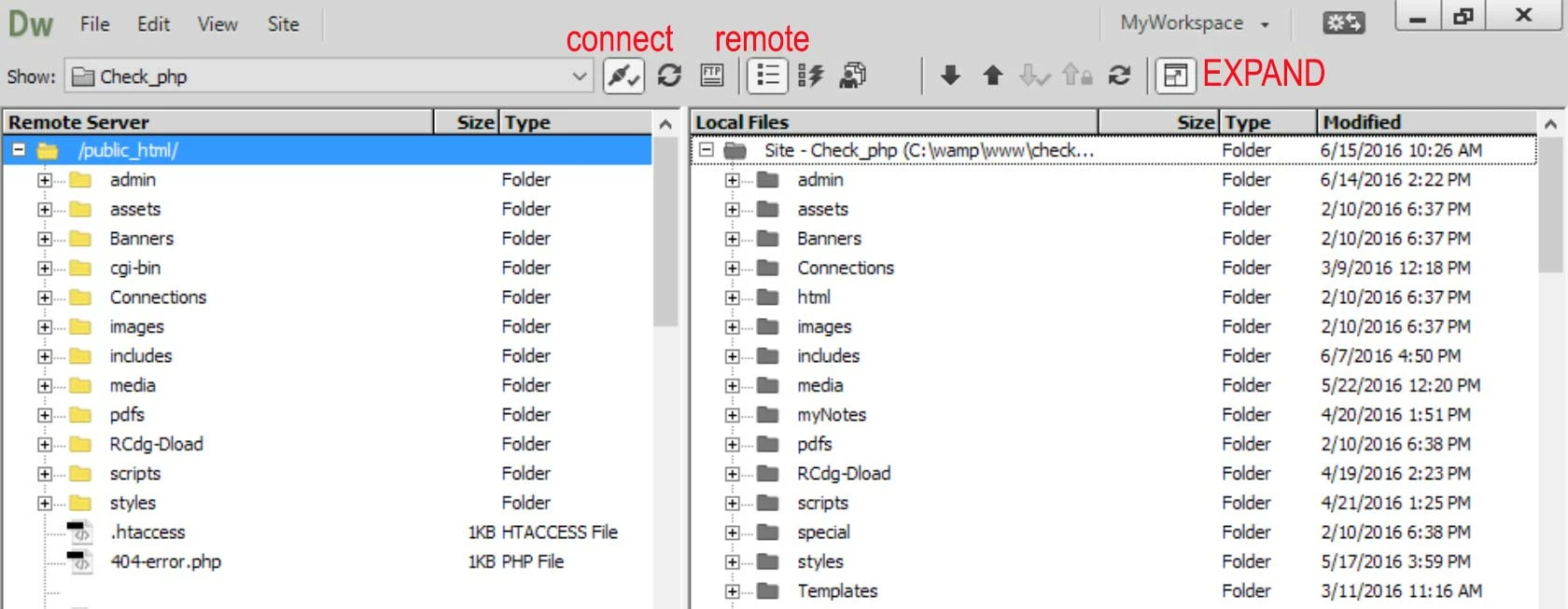
Forget about file Sync.  Use GET (Down arrow) to retrieve files from remote server.   See expanded Files Panel screenshot below.

Remote server is shown on the left side.  Local files are shown on the right side.

Select all the files in your server's Root folder (inside public_html or whatever your hosting plan uses).  Click the Down Arrow,  DW will ask if you want dependent files.  Hit YES. 

3 replies

Participant
January 28, 2018

I had the same, very specific problem of Dreamweaver (CS5) on a Mac running highSierra 10.13.1. (Wouldn't open the "Files" panel at all and crashed if I clicked on "Site")  and I tried a few things. However I removed the following FOLDERS from my —Library/Application support/Adobe and that worked like a charm.

Common

CS5

DWHTML5Pack.mxi_Resources

BUT I DID NOT THROW THEM OUT. I assume the actual problem was the DWHTML5Pack.mxi_Resources and am waiting till the next time I load up an Adobe program to be told I need the other two.

Hope this helps

Participating Frequently
June 20, 2017

Hi Luther,

We are sorry that Dreamweaver is crashing for you.

We are unable to recreate the issue at our end. So,can you please share the crash logs with us? Also, a video of the issue would help us recreate and the investigate the issue.

Thanks,

dbc

Nancy OShea
Community Expert
Nancy OSheaCommunity ExpertCorrect answer
Community Expert
May 13, 2017

Forget about file Sync.  Use GET (Down arrow) to retrieve files from remote server.   See expanded Files Panel screenshot below.

Remote server is shown on the left side.  Local files are shown on the right side.

Select all the files in your server's Root folder (inside public_html or whatever your hosting plan uses).  Click the Down Arrow,  DW will ask if you want dependent files.  Hit YES. 

Nancy O'Shea— Product User & Community Expert